I'm working at my computer while listening to the premiere of "Severance — Music to Refine To." It's Lo-fi music with a Severance twist. 👨💻

Tony Vincent
Dad ⭐️ Educator ⭐️ Substitute Teacher ⭐️ Former 5th grade teacher ⭐️ Shapegrams ⭐️ Iowa
#teaching #education #edtech #googleedu #appleedu #shapegrams #blendedlearning
Learning in Hand
Shapegrams
Instagram
End the year by listening to Chris Nesi's House of #EdTech 2024 Smackdown. Educators tell about their best tips, tools, and insights. Includes:
📓 NotebookLM
🎙️ Adobe Podcast
🌈 Microsoft Copilot
😁 Flippity
🔺 Adobe Express
🔦 Speaker spotlight in Google Slides
👁️🗨️ Poe AI
https://www.chrisnesi.com/2024-house-of-edtech-smackdown-hoet257/
This article lists transition words, adjectives, nouns, verbs, and phrases that ChatGPT overuses.
For some reason, there's no Share setting so that anyone with a link to a Google Form can only view. If you want others to be able to make a copy of your form, but you don't want to give them edit access, try this little workaround.

Google's "Prompting Guide 101" suggests four main areas to consider when writing an effective prompt for an AI chatbot:
👤 persona
🎯 task
🧩 context
📄 format
Download the 44 page PDF:
https://services.google.com/fh/files/misc/gemini-for-google-workspace-prompting-guide-101.pdf

Huge collection of "rooms" in Google Slides with hyperlinks to learning resources! Rooms for every month, most holidays, and other occasions. Make a copy of a room and you can customize it. Thanks Sarah Wood! (via Eric Curts)
https://docs.google.com/document/d/1sZ1WBDnpW-YW0BO-8EhX0116mB-hrksq-QqGUe7Oj5M/edit
Fun Friday! Make your own Wordle game with Word.Rodeo. Puzzles can be be as short as 3 letters and as long as 10 letters. More options include adding a hint and allowing up to 12 guesses. Languages include English, German, French, and Polish.
Describe the Google Sheets or Excel formula you need to GPTExcel, and it will generate and explain the formula for you.
You get 4 free request per day.
Designing a poster, graphic, form, or worksheet? Hierarchy guides the viewer’s attention and conveys the relative importance of each element.
https://blog.thenounproject.com/graphic-design-principles-hierarchy/
Canva has templates for ready-to-teach lessons. Browse by grade, subject or resource type. They are all free and customizable!
Enter a hex code or use sliders to input a color. UI Colors creates a monochromic color scale and shows you what those colors look like when applied to gradients, buttons, graphics, and more.
Upload an image, screenshot, or PDF to OCR Space. It detects any text and makes it easy for you to copy. Supports multiple columns of text. (This online service stores no data. Check out the privacy policy.)
Get hex codes for the colors in these appealing color palettes.
https://digitalsynopsis.com/design/beautiful-color-gradient-palettes/
Tip Tuesday! Prevent yourself from making edits in a Google document.
Find the file in Google Drive and click More actions (the three dots) on its thumbnail. Hover over "File information" and click Lock.
This is handy for templates that you don't want to accidentally edit.
Magic Padlet is a new feature that uses AI to easily create a padlet based on your prompt. I used this recently and was impressed. It generated the structure, instructions, visual look, and example posts.
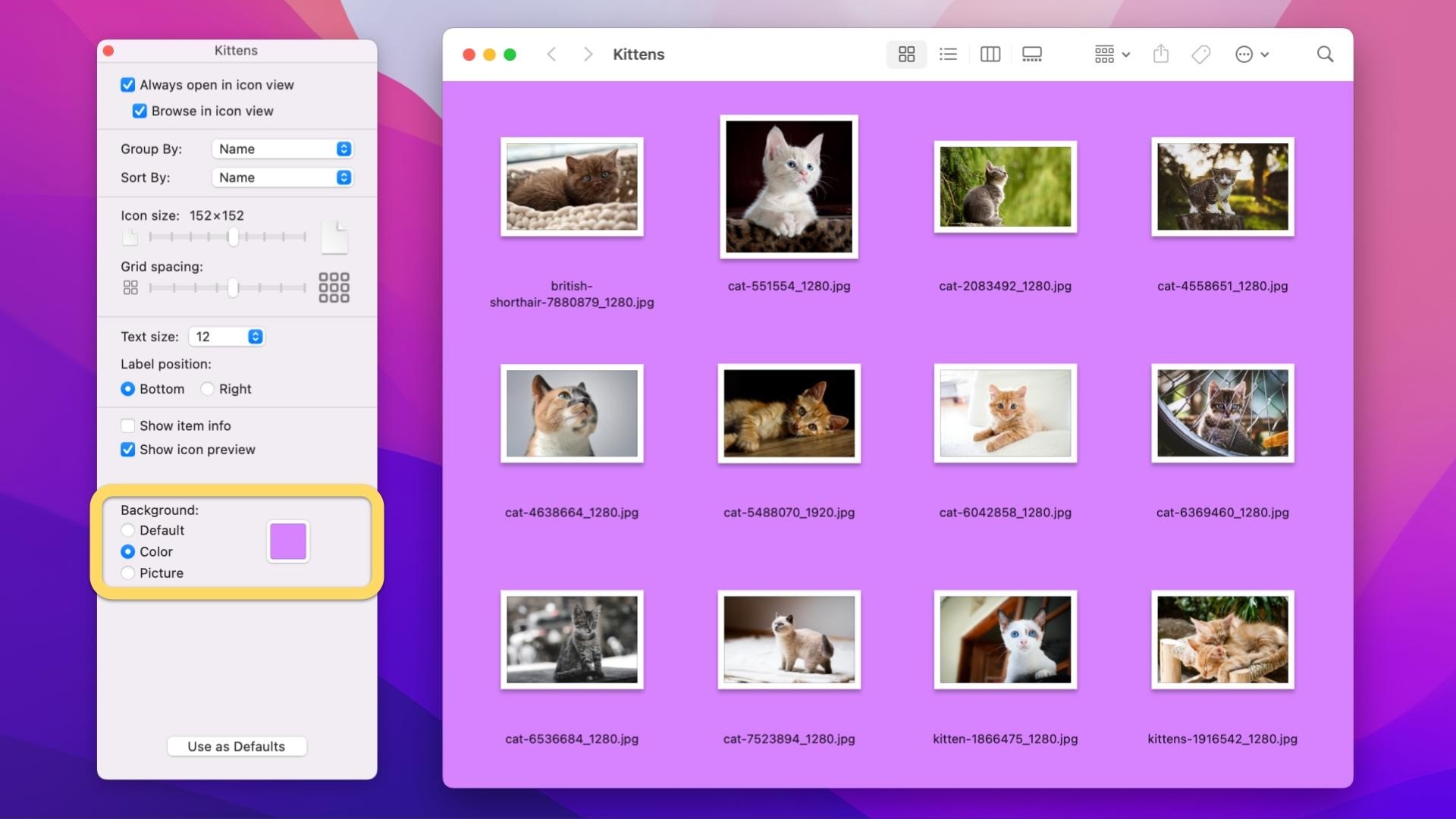
Tip Tuesday! Customize the look of a Finder window on your Mac. With a window open, click View → as Icons. Then go to View → Show View Options. Under Background, choose Color or Picture. #EdTech
Short Answer gamifies peer feedback. Students compose answers to the teacher's questions, compare peer answers, provide actionable feedback, and converse about the results.
Sign up for free and watch the helpful Getting Started video.
Fun Friday! "Say What You See" is a game that helps you describe artwork. Given an AI generated image, you try to generate a close match. Get tips for AI prompting as you play.
https://artsandculture.google.com/experiment/say-what-you-see/jwG3m7wQShZngw
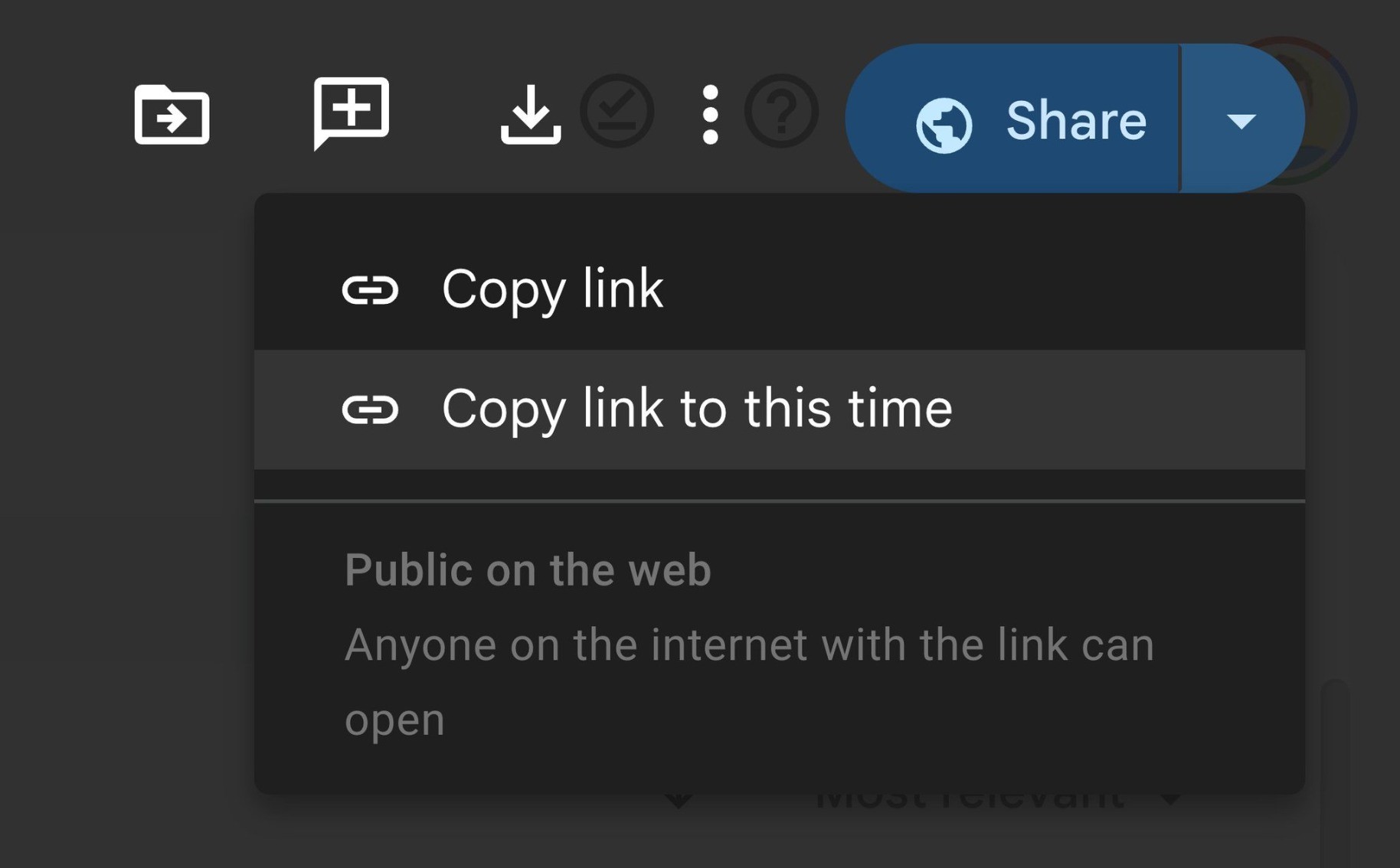
Tip Tuesday! Create a link that takes viewers directly to a specific spot in a Google Drive video. Do this by pausing the video at the desired time, clicking the arrow next to the Share button , and selecting “Copy link to this time.”
Aftel.net is an online timer made for teachers.
📺 Full screen
💬 Show description
⏯️ Pause/start with spacebar
🔗 Share a link to a specific timer duration
🚫 Prevent screen sleep
🚦 Show progression with colors
🎁 Free, no login, no ads

Client Info
Server: https://mastodon.social
Version: 2025.07
Repository: https://github.com/cyevgeniy/lmst