#DraftsApp

Stephen Millardsylumer
2025-12-06

My November round up post is now live. This month there's a bit on Alfred (the Mac launcher app), some interesting Drafts forum stuff, a little note on some 3D printing, some newbie ham radio stuff, and some tech links I've found useful this past month that you might too.

If you haven’t already, also consider following me on Buy Me a Coffee. It's 100% free and you get the same monthly post sent to your mailbox when it is published.

buymeacoffee.com/sylumer/novem

Thanks to everyone who has bought me a coffee. I really appreciate it.
2025-11-08

One of the uses of this particular #Draftsapp action: I’ve attached it to my iPhone action button. Whenever I have a moment when I feel aimless or unmoored during the day— whether as a result from emerging from a rabbit hole of thought or just generally losing focus on what I’m supposed to do, I press the button and get grounded in what I’ve planned to do next, or pick something from a list of high value candidates. toolsforthought.social/@jslr/1

2025-11-08

Also, I need to wrap my head around how to manage #DraftsApp actions I share vs actions I use. The action group that might make sense to share is not the way I organise them in my own set-up. So... duplicate actions? Hide the shared actions and remove them from search so they don't cruft up my own system?

2025-11-08

Been (over-)thinking about sharing some of these #Draftsapp actions I've been working on. A few things get in the way. Largely, some of them are really dependent on other elements of my personal workflow. This daily dashboard, for example, has a graph panel that surfaces "time elapsed" bars from one of my other tracker actions. For it all to make sense, I'd have to share a whole bunch of actions. With supporting notes.

I guess that's what an action group is for...

I feel like i need to explore the scripting abilities of #OmniOutliner . I think the the document interface feels dated, but I could use it as a framework for tracking my charges.

I wish it had an interface more like #DraftsApp or #AppleNotes where I could access documents much more quickly.

If I could use it to access an API, lots of my issues could be overlooked.

@OmniGroup @OmniOutliner

Thomas Vander Walvanderwal
2025-10-29

I can't sort out if the issue is on the side of things or OS 26.

2025-10-10

I really do half-ass documenting the various #DraftsApp actions I dream up. A number of them end up unused, having seemed like good ideas in the moment. Takes time to figure out what actually sticks.

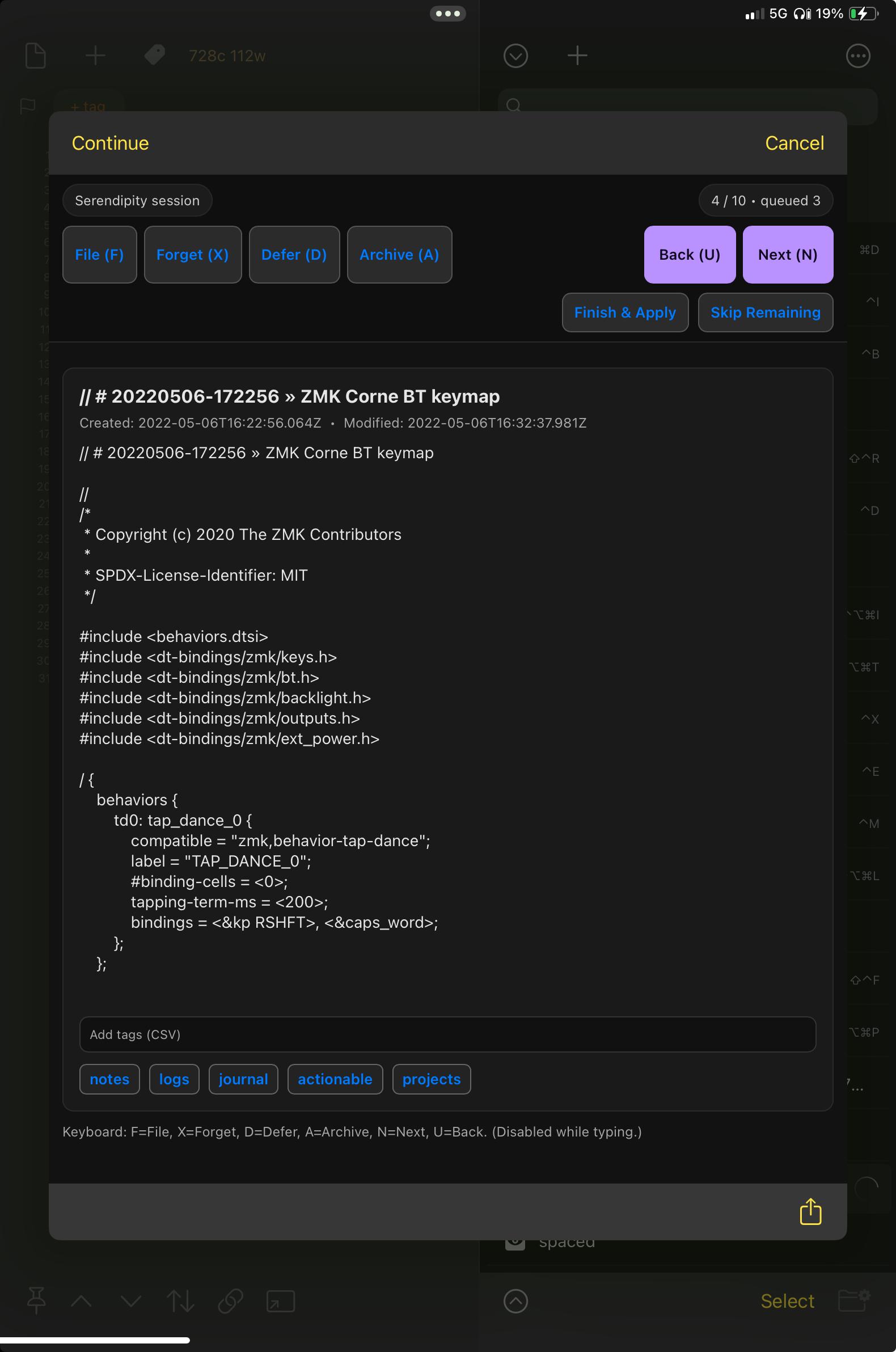
This week I discovered MyMind's Serendipity feature (youtube.com/watch?v=7kt1Ix86mrw), and thought it could be useful in Drafts (pictured). Then figured I could use the same way of working for a spaced repetition workflow. Processing old drafts and surfacing old ideas that would otherwise remain buried...

A pop-up window titled “Serendipity: Build a Review Queue” within a dark-themed app interface. The panel includes various options and toggles for filtering drafts e.g. “Restrict to Current Workspace,” “Untagged only,” “Inbox only,” fields for tag inclusion/exclusion, and a “Batch size” input (defaults to 10 drafts— a nice manageable number for a quick review) along with “Cancel” and “Build Queue” buttons at the bottom.A “Serendipity session” review interface with options to “File,” “Forget,” “Defer,” or “Archive” a draft, pictured on the 4th draft of a 10 draft review. The draft panel shows a draft titled “ZMK Corne BT keymap” containing source code in C for a keyboard firmware configuration. Navigation buttons like "File (F)", "Forget (X)", Defer (D)", "Archive (A)", “Back (U),” “Next (N),” “Finish & Apply,” and “Skip Remaining” appear at the top of the interface, with keyboard shortcut keys in brackets. Tag suggestions such as “notes,” “logs,” “journal,” “actionable,” and “projects” below the draft window.
2025-09-21

Geek brain is dominant today. Reviewing the toolset. Messing with a #DraftsApp version control action. Drafts already has a "versions" interface, but it's a bit tucked away, and I still find myself wanting to create separate drafts for iterations of things I’m writing that I could probably use a versioning system to manage...

Blog post: jslr.pika.page/posts/notes-on-

2025-09-13

In other news: spent the day working on a commissioned sequence.

I sometimes wonder whether my workflow noodling is more procrastination than productivity; today’s session was proof of value.

From authoring and editing new pieces, through managing work in progress, #DraftsApp continues to shine. I’ve recently tweaked a couple of output actions so I can export to Pages via rich text or export a formatted PDF— the last mile of my process. Those and a drag/drop sentence-part restructurer.

2025-08-30

Nope.

This is not me considering implementing an alternative check mark toggle in #Draftsapp after being reminded of "A Drafts custom syntax for book lists" (leancrew.com/all-this/2021/04/).

We'll save that for a later bout of procrastination...

2025-08-29

Friday afternoon. Plenty to do, but I'm blocking. Thus geeking around in #Draftsapp to build a bit of momentum.

For the non-Drafts crowd: syntax definitions allow you to choose the markup for the current draft, e.g. JavaScript, Markdown, Taskpaper, etc (docs.getdrafts.com/docs/extend). The syntax switcher I've been using up until now is based on MGChecklistPrompt (mattgemmell.com/mgchecklistpro). Swapped it out for something based on my own menu system instead: directory.getdrafts.com/a/21B

2025-08-11

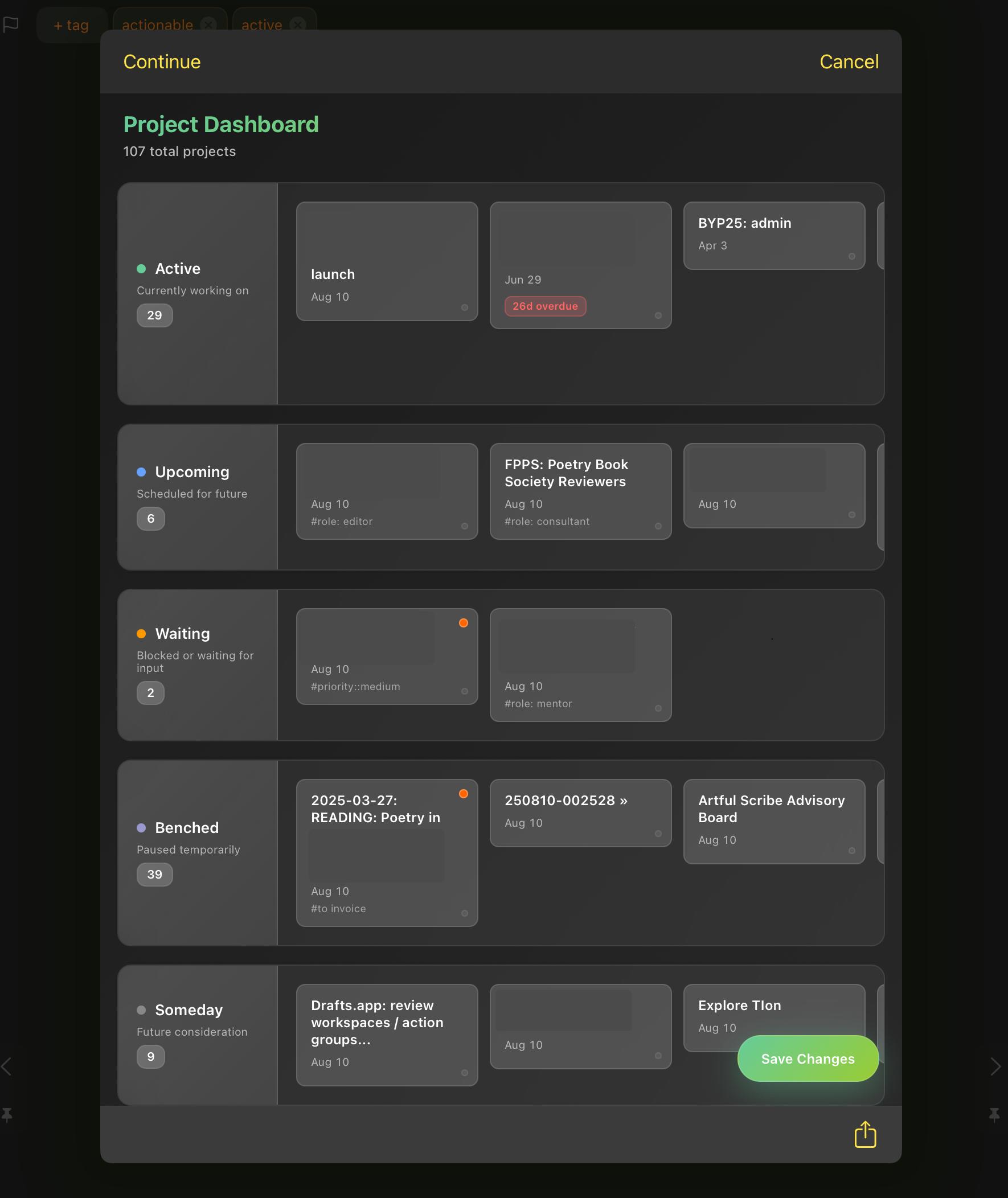
See the little red tag on the second card in the "Active" lane? That's based on a "next due" tag. Dates due at some point in the future are blue, due in the next week are green, and overdue are red (like this one).

It kinda blows my mind what's possible with HTML views in Drafts. Yes, there are limitations, but the ability to build interfaces that make sense for the way my brain works is just... wow. One of many reasons to love #DraftsApp.

2025-08-11

More @drafts HTML view shenanigans...

I had a project index workflow, with an action that refreshed a draft that listed all my active projects. Cool, but didn't quite nail it for me. A full review of all projects meant moving down the list and updating each project individually. Yeah. That didn't happen.

So I built my own take on a kanban board. In #DraftsApp. Complete with drag and drop to set project status tags.

Dark-themed Project Dashboard interface showing 107 total projects grouped by status: Active (29), Upcoming (6), Waiting (2), Benched (39), and Someday (9). Each status column contains project cards with titles, dates, and occasional tags or overdue markers. A ‘Save Changes’ button is at the bottom right, and a Cancel button is at the top right.
2025-07-27

directory.getdrafts.com/a/2Z4

Posted another #DraftsApp action. This one for inserting special characters. Easy enough to customise the list.

Screenshot of Drafts app showing a special character selection menu in dark mode. The menu is presented as a vertical list of characters, each accompanied by its name, identifier, and a small colour bar on the left edge. At the top of the menu, there’s a search input field labelled “Search special characters…”. Characters listed include arrows (long and short), typographic apostrophe, back tick, tilde, ellipsis, bullet point, degree symbol, copyright symbol, registered trademark, and trademark.
2025-07-23

Starting to share a few of the #DraftsApp actions I’ve been working on in recent weeks. This first one is a menu that takes its items from a source draft, with a live filter to aid speedy selection. Selected item is inserted into the current draft.

I use this one for a list of daily actions that can be inserted into my daily log on the fly. I used to use recurring reminders for something like this, but that was much more cognitive overhead…

actions.getdrafts.com/a/2ZZ

2025-07-13

Something that occurred to me: when invoked via a keyboard shortcut, the #Draftsapp command palette works like a leader key...

...except not quite, because of the way you typically name actions (verbose-ish, human readable). Maybe there's space for a Drafts action that allows you to use shortcodes to invoke other actions?

(...thinking out loud but tentatively because I've read about leader keys but don't use VIM and haven't implemented a leader key on any of my keyboards via #ZMK...)

One thing I have noticed in the past 100 years is that most notes and text I create are totally ephemeral. Only in rare occasions do I need to refer to them again. BUT! There is always some information I need to pull at random.

I finally settled on a workflow.

I use #DraftsApp to create pretty much all text.
I created an action to send the draft to #DevonThink and then archive it. Most everything goes here.

Then, everything else gets handled through other actions.

So, I figured out how to send notes from #DraftsApp to #AppleNotes when needed. I tried automating this, but the #markdown to #RichTextFormat does not speak #Bocce.

The trick is to "Preview" the draft as HTML, then select all, copy paste.

More steps than I'd like, but it works well enough.

Works for Teams and Outlook too.

So, I started using #DraftsApp to post to #Mastodon. It seems like a good idea, but I am not sure how to select which Mastodon account my post will go to.

Has anyone tried this?

Trying out the #DraftsApp. It’s pretty slick and a good substitute for my Apple Notes. I used their Drafts Quick Capture via Apple’s Sharesheet which was quicker than export/import of individual notes but,sadly, it was only able to bring over text which I didn’t notice until I was a hundred or so notes in. Bummer. Also, the cloud drive selection for Drafts doesn’t include the drives I’ve been trying out (Mega and Proton). I really want a safe alternative to iCloud Drive!

Client Info

Server: https://mastodon.social
Version: 2025.07
Repository: https://github.com/cyevgeniy/lmst