Server Security Checklist — Essential Hardening Guide
Securing your servers isn’t optional — it’s your first line of defense against data breaches, ransomware, insider threats, and lateral movement. Use this checklist as a baseline for Linux, Windows, cloud, hybrid, or on-prem servers.
⸻
🔧 1. System & OS Hardening
• Keep OS & packages updated (apply security patches frequently).
• Remove / disable unused services & software.
• Enforce secure boot + BIOS/UEFI passwords.
• Disable auto-login and guest accounts.
• Use minimal OS images only (reduce attack surface).
⸻
🔐 2. Access Control
• Enforce strong passwords & MFA everywhere.
• Use RBAC & least privilege access.
• Disable root/Administrator login over SSH/RDP.
• Rotate credentials & keys regularly.
• Implement just-in-time access for privileged users.
⸻
🌐 3. Network Security
• Restrict inbound/outbound traffic via firewalls.
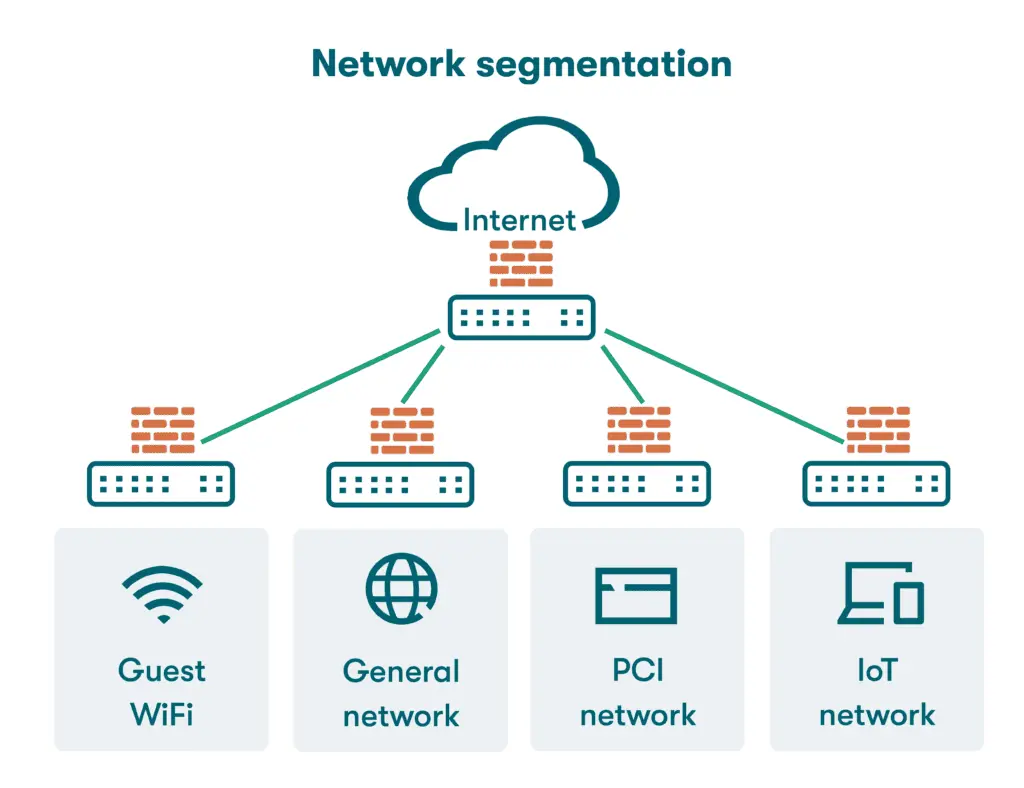
• Segment critical servers from general LANs/VLANs.
• Disable unused ports & protocols.
• Enable DoS/DDoS protection.
• Apply zero-trust network principles.
⸻
🔑 4. Secure Remote Access
• Use SSH key-based authentication (disable password login).
• Enforce VPN for admin access.
• Log & monitor all remote access sessions.
• Disable legacy protocols (Telnet, FTP, SMBv1).
• Require bastion/jump host for critical access.
⸻
📊 5. Logging & Monitoring
• Enable centralized logging (syslog / SIEM).
• Track failed login attempts & anomalies.
• Configure alerts for privilege escalation or config changes.
• Monitor log tampering.
• Retain logs securely for audits & forensics.
⸻
🔒 6. Data Protection
• Encrypt data at rest (LUKS, BitLocker, etc.).
• Encrypt data in transit (TLS 1.2+).
• Strict database access policies.
• Regular, offline, immutable backups.
• Test restore procedures (don’t assume backups work).
⸻
🔁 7. Application & Patch Management
• Keep middleware, frameworks, and apps patched.
• Delete default credentials & sample files.
• Enable code signing for software packages.
• Use secure coding practices (OWASP Top 10).
• Implement dependency scanning (Snyk, Trivy, etc.).
⸻
🛡️ 8. Malware & Intrusion Defense
• Deploy EDR/AV on endpoints.
• Enable IDS/IPS at network edge.
• Automatic vulnerability scans (schedule weekly/monthly).
• Monitor persistence techniques (cron, startup scripts).
• Block known malicious IP ranges & TLDs.
⸻
🏢 9. Physical & Cloud Security
• Restrict physical access to server racks/rooms.
• Enable provider security tools (AWS Security Groups, Azure NSG, IAM).
• Harden cloud images (CIS benchmarks).
• Review cloud logging & audit trails regularly.
• Disable unused cloud API keys / roles.
⸻
📜 10. Policy & Compliance
• Use CIS / NIST / ISO-27001 benchmarks.
• Track & document every access change.
• Force annual access reviews & key rotation.
• Perform regular security training for admins.
• Maintain disaster recovery & incident plans.
⸻
➕ Additional 5 Critical Controls (Advanced Hardening)
🧠 11. Privileged Access Management (PAM)
• Use jump hosts & session recording.
• Just-In-Time access for admins.
• Store keys in secure vaults (HashiCorp Vault, CyberArk).
🚨 12. Real-Time Threat Detection
• Use behavioral analytics → UEBA/XDR.
• AI-based anomaly detection recommended.
• Block suspicious IPs automatically.
🧪 13. Red Team & Pentesting
• Run regular internal pentests.
• Validate configuration weaknesses.
• Simulate phishing + lateral movement scenarios.
🧱 14. Container / VM Isolation
• Use AppArmor, SELinux, Seccomp profiles.
• Limit Docker socket access & root containers.
• Scan images before deployment.
📦 15. Automated Configuration Management
• Use IaC (Terraform, Ansible, Puppet) for repeatable and secure builds.
• Detect drift using compliance scanning.
• Version control all infrastructure.
⸻
🧠 Core Reminder
A server is only as secure as the team who maintains it.
Hardening isn’t one task — it’s an ongoing
#ServerSecurity #SystemHardening #InfoSec #CyberSecurity #BlueTeam
#DevSecOps #SysAdmin #ThreatDetection #AccessControl #NetworkSecurity
#LinuxSecurity #SecureArchitecture #RiskMitigation #SecurityChecklist
#CloudSecurity #InfrastructureSecurity #ZeroTrust #SecurityMonitoring

![Basic Server Iy pes
Origin y Proxy Mail _,
5 ) 5
* Listens for incoming * os EEL * Controls the Sending _SNf—d5
inbernet requests ond cecewing of email («8
gos ht © Tntermediole Servers between cient and ongn | ® Receives mail From fay 7
Clients
Act as oddihonal Securiky, caching senices,
Delivers web content Fo Clients ® by, Caching El
© | pass requests on bo other servers odministrahve control, and more * Delors mal Jo Hoe
1 does nek have he capacity to respond Computers
we Web DNS Got gr
nl ® Transhbes domain names ink
E==g==VeaN ® oa bid pss lic IP addresses v
g espe ses
a ®fcks like an IP address book.
[BN] © Communicates with web browsers For the mlernel
—
I Can Store and prokeck web ® Includes server Sub-Fypes such as Rook servers,
dic = 4 Hea Authoribakive Nome Servers, and Resolver servers](https://files.mastodon.social/cache/media_attachments/files/115/627/867/613/151/631/original/12701c44703d2066.jpeg)