#AssistiveDevice

skuaskua
2025-09-12

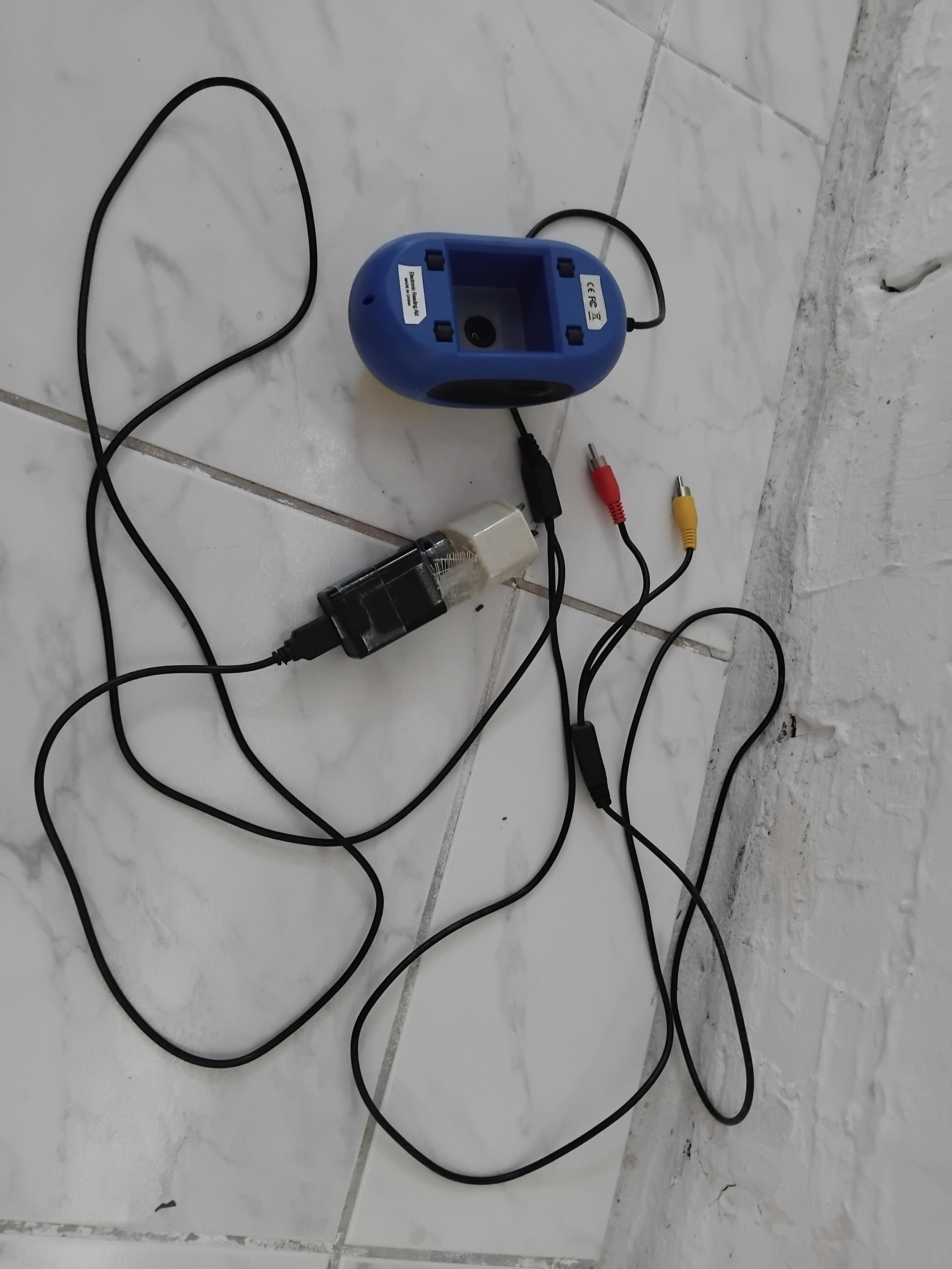
I rigged up an assistive device.

An electronic magnifier that puts an image from a hand-held mouse-style camera on a (46 inch / 116cm on the diagonal) television screen.

Effective magnification is 20 times.

Magnifiers with small screens at high magnifications show only a small section of text.
My large screen allows multiple words & adjacent lines to be on the screen.
Orientation is easier to maintain.

Pics to come.

skuaskua
2025-04-26

I've found the following.

It has combined the On/Off, Start/Stop switch with the Volume rotary dial.

And added a Next-track / Pevious-track rotary dial.

I think this is still simple enough.

dqmusicbox.com/

Walking Stick Mobilitywalkingstickmobility
2025-04-21

Shop Knee Walker for Safe and Smooth Mobility

Knee walker is a perfect solution for those recovering from foot or ankle injuries. At Walking Stick Mobility, we offer a variety of knee walker models to meet your specific mobility needs. Designed for comfort, stability, and independence, a knee walker helps you move freely without crutches.

Order Online: walkingstickmobility.ca/collec

skuaskua
2025-03-01

Have a hand-held, near field, low cost camera. See pic below of it upside down.
USB is power supply only. Image out is the red video cable. Audio out yellow

Calling it a .

How do I go about replacing the lens with one that will focus at ~3 times the current text-lens distance?

Seeking a large field of view on large TV screen.
Which would make whole phrases of text readable. As opposed to several characters from 1 word.

A computer mouse-like camera lies on its back. A concavity in the base of the unit has a lens at the (normally) top of the concave.
Cables protrude from the mouse-camera.
The connectors on the end of the cables are; Power, Video out, Audio out.

(The camera has audio announcement of setting changes for (?) on / off and magnification and sound level.)
Likely Jan Lukaslikelyjanlukas@mstdn.ca
2024-10-27

@meganL

To get to the new stop, one must scale icy, RARELY-cleared sidewalks up a slope. The slope is so minor I suspect drivers are completely unaware of it.

But anyone using an #AssistiveDevice will likely find the slope quite obvious and perhaps a barrier even IF the sidewalks were cleared.

Regardless, that's NOT what makes the whole thing just as easy as catching a bus on Mars.

6/x

#yeg
#yegTransit
#ETS

2024-04-20

These #steampunk-looking 3D printed glasses that let you adjust light levels by rotating polarized lenses are so absolutely simple and awesome looking, I'm not sure why they aren't commonly available, even if you don't need them as an #AssistiveDevice because you are going #blind.

youtube.com/shorts/NNBQ_CmykC8

#BlindSurfer

2023-02-20

@dtauvdiodr do you use #ANC headphones? A good pair can make for an excellent #AssistiveDevice (AD). Plus, as an AD, they are protected by the #ADA (which refers to 28CFR § 36.303: Auxiliary Aids and Services - check the link), so you can feel safe knowing that you can use them wherever/whenever YOU feel like you need to.

Good luck 👍🏼

ecfr.gov/current/title-28/chap
#AuxiliaryAidsAndServices #CivilRights #LivingWithDisabilities

2023-02-19

what are some ways you use your #phone as an #assistivedevice ?

I'm asking because I am trying to organize my life a little better and having practical ways people use their technology to better their lives might give me ideas on how to optimize mine....

#assistivetechnology #android #ios #apple #pixel7 #calender #ideas #help

2023-01-01

Just put a deposit down on a pair of #AI #MoonWalkers by #ShiftRobotics. I have limited mobility and endurance; these seem like they may be a helpful #AssistiveDevice.

Very expensive, but the deposit is refundable if I decide not to purchase them by the time they’re ready for shipment (sometime in 2023), and I’ll keep doing research on them until then.

#DisabilityHacks #Disabled #Disability #Walking #Mobility #MobilityAid #NEISVoid #Fatigue #Shoes

shiftrobotics.io/

2022-02-06

The Coolest Controller Mod, Hands Down

Video games are a great way to relax, and sometimes get your heart rate up at the same time. But unless you're playing something like Dance Dance Revolution , the controls pretty much always require the use of both hands. Even the old Atari controller benefited from using the other hand for support.

But what if you don't have the use of both hands? Or you have a repetitive stress injury? Or you just want to eat cheese curls with chopsticks while you play? [Akaki Kuumeri] has you covered with one of the hands-down greatest uses for 3D printing we've seen -- a PlayStation DualShock 4 controller modified for one-handed use. If this looks familiar, it may be because [Akaki] made a PS5 controller version a while back, but who can get one of those, anyway?

Though [Akaki] does most of the demonstrating in the video below with their left hand, they were cool enough to make a right-handed version as well. In the left-handed version, the symbol buttons and right trigger are actuated with the left hand, and the right joystick is used by moving the whole controller against your leg, the table, the arm of the couch, or whatever you wish.

[Akaki] even designed some optional pieces, including a leg strap. The right-hand version of course does the D-pad instead. But what should the order of the arrow buttons be? After much contemplation, [Akaki] settled on the standard DDR configuration of ←↓↑→.

We love that the symbols are made from raw filament pressed into grooves, and think it's totally awesome that this is made to be attached to the controller and removed with one hand. Check out the video below to see it in action with a handful of games.

Via r/3Dprinting

#games #peripheralshacks #assistivedevice #assistivetechnolgy #assistivetechnology #dualshock4 #onehanded


image

Client Info

Server: https://mastodon.social
Version: 2025.07
Repository: https://github.com/cyevgeniy/lmst