#Keybind

2026-01-18

#howTo
#linux #debian #ubuntu #ubuntu​Studio #KDE #Keybind #shortcuts #keyMapping #Umlaute

To be able to use the option to compose letters for example the german Umlaute "ä, ö, ü" or the spanisch "ñ" you have to activate the compose key option in the system settings menu. Once you have defined and activated a key on the keyboard for that specific purpose, you can compose the letters by combining respective or similar symbols with it while pressing the compose key.

Example:
["]+[composeKey] and than [u] => ü
[~]+[composeKey] and than [n] => ñ
[']+ [composeKey] and than [e] => é
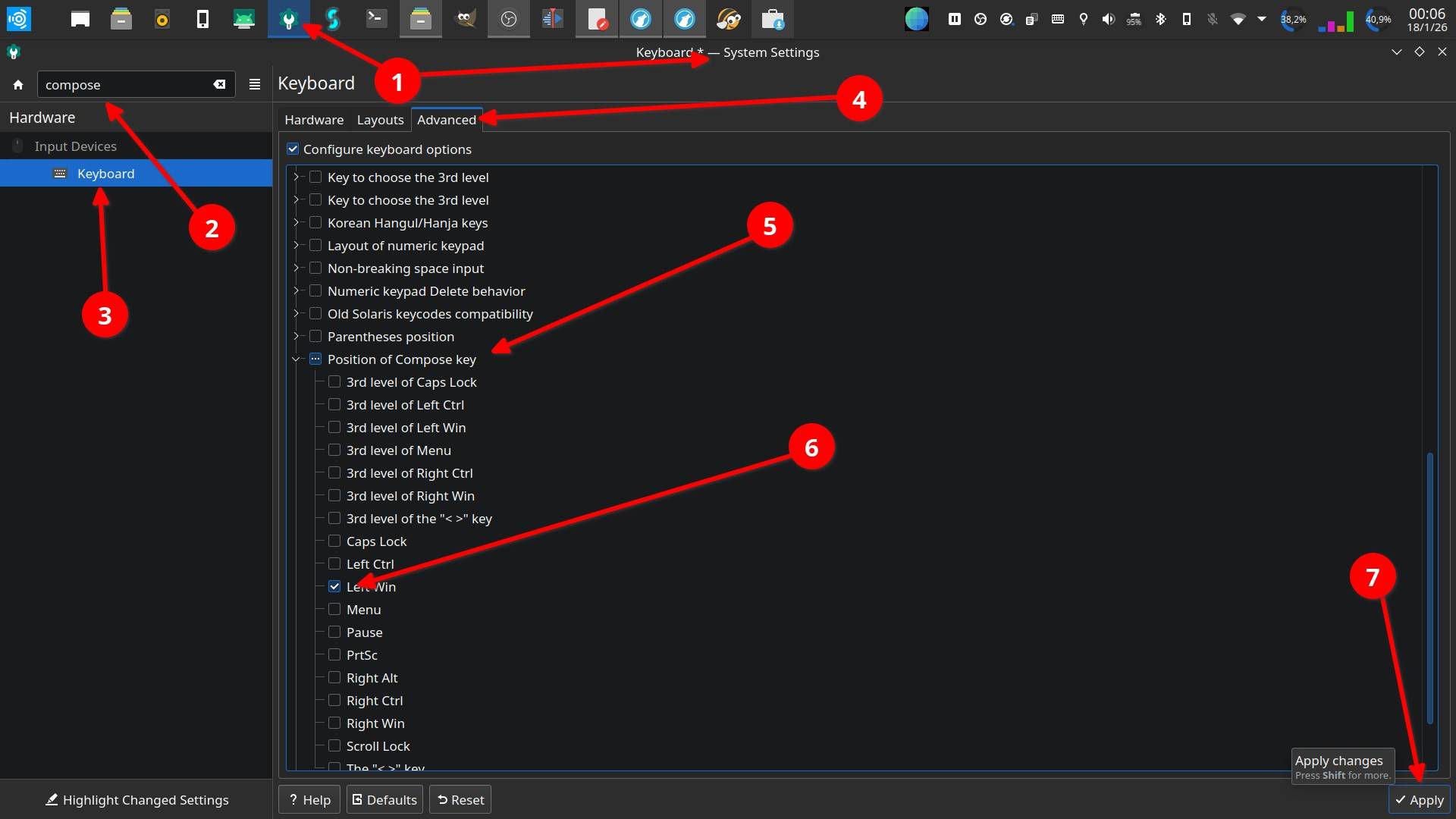
Image that shows the settings manager of KDE in ubuntuStudio 2022.04. The different steps to activate the compose key option and to define a specific key for that purpose is indicated in detail with arrows and numbers. 1 - Settings Manager . 2 - The word "compose" in the search box makes appear the keyboard settings options. 3- The "Keyboard" option is selected. 4 - The "Advanced" tab is selected . 5 - The "Position of compose key" option is open. 6 - In this case the left Win key is selected as compose key. 7 - Selecting the "Apply" tab the changes take effect and the compose key option is available to create specific letters by composing them with the keyboard.
2026-01-18

#howTo
#linux #debian #ubuntu #ubuntu​Studio #KDE #Keybind #shortcuts #keyMapping

How to (re)map keys.
In the case of a #keyboard at hand there are two keys (down arrow and right arrow) that don't work anymore.
Solved this with (re)assigning the arrow up and arrow left keys in combination with the ALT key:
[ArrowUp]+[ALT] = arrow down
[ArrowLeft]+[ALT] = arrow right
The commands in the [Action] box are respectively Down and Right.

superuser.com wrote:

System settings:
  • => "Custom Shortcuts"
  • => "Edit" menu button at the bottom
  • => "New"
  • => "Global Shortcut"
  • => "Send Keyboard Input"

https:// superuser.com/questions/1826459/how-to-remap-key-combination-on-linux-wayland-kde-meta-arrow

Image that shows the settings manager of KDE in ubuntuStudio 2022.04. The different steps to create a shortcut for mapping a key are marked with arrows and numbers. 1 - Settings Manager . 2 - Entering the word "key" in the search box makes appear the keyboard settings options. 3 - The "Custom Shortcuts" options is selected. 4 - The Edit tab is selected, from there over the "New" option the Options "Global Shortcut" and "Send Keyboard Input" are at hand. 5 - A line for to name the new short cut shows up. 6 - In the trigger tab the key or key combination can be defined. 7 - The command "Right" is entered in the Action tab window.
mʕ•ﻌ•ʔm bitPickupbitpickup@troet.cafe
2025-08-21

#Keybind #shortcuts
#linux #debian #ubuntu #KDE

#howTo set a keyboard key to turn the screen off.

Creating a shortcut in settings -> shortcuts -> power management -> turn off screen doesn't work correctly.

To solve this create a customized shortcut:
Settings -> custom shortcuts -> EDIT - new -local shortcut - command

Enter as command line:
sleep 1; xset dpms force off

[sleep 1] delays command. This apparently solves the problem.
tested 2022.04 y 2024.04

@utopiarte @tutorial @studi0

Screenpicture of the settings page with arrows that indicate the respective settings.
2024-07-30

for those of you playing
Once Human
But have been struggling to find the key bind
here is a short vid to share where it is:
#TheMoreYouKnow
#OnceHuman
#keybind
youtube.com/shorts/cKIUhPSpa9M

chocula@mastodon ~$:t_blink:CondeChocula@social.linux.pizza
2023-11-04

If you want to resize at sides on openbox this It is the best way to get it.

paste.debian.net/hidden/244482

Hope It works.

#openbox #keybind

2023-06-06

my #Moonlander #keybind of the day: the mighty semicolon `;`

i hold down the semicolon `;` key, the layer changes on the left half to one that is configured for one-button taps that send:

- `⌘ + [`and `]`
- `⌘ + ⇧ + [` and `]`

to very quickly cycle panes and tabs in iTerm, web browsers, and, any other application that has a tab bar, really.

as shown i also can control the pointer, wheels, and clicks in the same layer.

_;_ is mighty mighty.

#mechanicalKeyboards #config #work

Client Info

Server: https://mastodon.social
Version: 2025.07
Repository: https://github.com/cyevgeniy/lmst