
FIX: set the docker container to bypass my dnsmasq caching resolver, and go directly to an upstream resolver (Quad9 in my case) #evohome #homeAssistant
#evohome
I think I've found the problem, as other ppl are having the same issue:
https://github.com/home-assistant/core/issues/145708
Looking through the HA logs I can see other integrations also getting timeouts, it's much more obvious in the #evohome one
Doing the usual tests (ping, nslookup, dig) from the docker host, and from within the container, interactively always works fine. It seems to be something weird that the evohome-async code, or one of its dependencies, is doing.
The DNS record has a TTL of 300s, so the vendor obviously likes to able to change it relatively quickly, and it’s not getting cached for long, but my local dns is still resolving it without problems 🤔 #homeAssistant #evohome
Trying to get to the bottom of a gnarly problem with the #homeAssistant #evohome integration on my system.
The temperature charts are showing lots of gaps in the data, and my first thought was that it was a problem with the API endpoint at tccna.resideo.com timing out. But looking at the HA logs the Evohome integration is actually logging that DNS resolution timed out, which is weird. My HA is in docker, and it queries the dnsmasq server on my openwrt router. No other clients have problems 🤷♂️

I set up a smokeping to the host and, while it's a little slow, it's barely dropping any packets...
(The big hump is when I do my overnight off-site backups, so to be expected)

Anyone else having trouble with the #homeAssistant #evohome integration recently?
It looks like the API endpoint hosted by the vendor, Resideo, is overloaded and keeps timing out. The attached image shows the temperature plot for one of my rooms, and the white sections under the line are places where there's no data returned by the API. It seems to have good days and bad days, but the last 24 hours have been really bad.
FYI, I'm in the UK, so am using the non-US, international system

And yes, for those who know the product, dynamic scaling is turned off. It’s more trouble than it’s worth.
I regularly sing the praises of our #evohome central heating system, but every now and again it has a real brain fart. Like tonight: it’s freezing outside, the whole house is warm except one room, which is 4degC below the set point, but the controller isn’t calling for heat 🤷♂️
And it’s the lounge, so the room we actually want to spend time in this evening.
#smartHome and #homeAutomation can be frustrating sometimes 🤨
Our #honeywell #evohome went a bit weird overnight. We use the controller as the sensor in our lounge, and when the heating turns off at 23:00 it usually slowly cools down to around 17degC by breakfast time.
But last night it seems to think that it started *heating up* from around 02:00
When I got home from work today it reckoned it was 22degC in there, and it obviously wasn't.
Rebooted the controller and it's back to showing the correct temp now. Very odd 🤷🏻♂️
( Stats from #homeAssistant)
Temporary (maybe) fix for #homeAssistant #evohome integration while #honeywell fix their domain/cert problems
NB. this may break again if Honeywell revert to the previous configuration
https://github.com/home-assistant/core/issues/132366#issuecomment-2539283798
Hmmm, my #homeAssistant integration with #honeywell #evohome appears to be broken as of ~09:00GMT today
I'm getting an SSL error when trying to connect to their API endpoint as 'tccna.honeywell.com', which isn't a SAN in the cert (it's all resideo.com addresses)
Looks like Honeywell updated some of their infrastructure and broke Home Assistant 🤷🏻♂️

Pleased to see the new algorithms on my Honeywell #evohome working well now they’ve bedded in. All the rooms were slightly below the set point this morning as we got up, but the heating hasn’t fired because it knows it’ll soon warm up anyway.
This time of year was always weird in the past, waking up to over-warm rooms as the heating overshot, then solar warming hit the rooms too
What a pleasant surprise: my excellent #Honeywell #evohome smart central heating system has received a firmware update and has a load of new features!
The new features allow increase or decrease of set temp in selected rooms based on outside temperature, and selecting rooms that receive a lot of solar heating.
This system has been on the market for at least 10 years, so it’s great to see the manufacturer still supporting and developing the product 🏆
@matt303 the trick is to find the #smarthome stuff that doesn't rely on cloud services. I'll sing the praises of Honeywell's #Evohome ‘til I’m blue in the face. And there's so much you can do with #HomeAssistant and #zigbee with a little time and effort (stuff you're perfectly capable with your background)
Anyone out there in #homeautomation land finding their #honeywell #evohome app is not connecting this morning? API access seems to be down, too 🤔
Anyone else out there having trouble with the #honeywell #evohome app for heating control? Ours has been playing up for a few days now: seems to be reporting room temps properly, but not set points. Any attempt to change set points or schedules doesn’t seem to get passed to the controller 🤨

Official Honeywell APP displaying current system state has the same behaviour so it may be some problem with data send from main unit to Honeywell. Anyway - because of lack of system data (missing info about boiler on/off for example) it is impossible to figure out when system is asking for heat - difference between temperature and targetHeatTemperature is untrustworthy. 😠
You can see yellow line of current temperature reflecting state which is scheduled at the main unit - 1: stop heating, 2: prepare to be heated to 20° at 3, 3: be at 20°, 4: heat to 21°. But the gray line of targetHeatTemperature stays all the time unaffected at 21° except of while when systems smart fn asked for unscheduled value to prepare room for point 3.
#honeywell #evohome
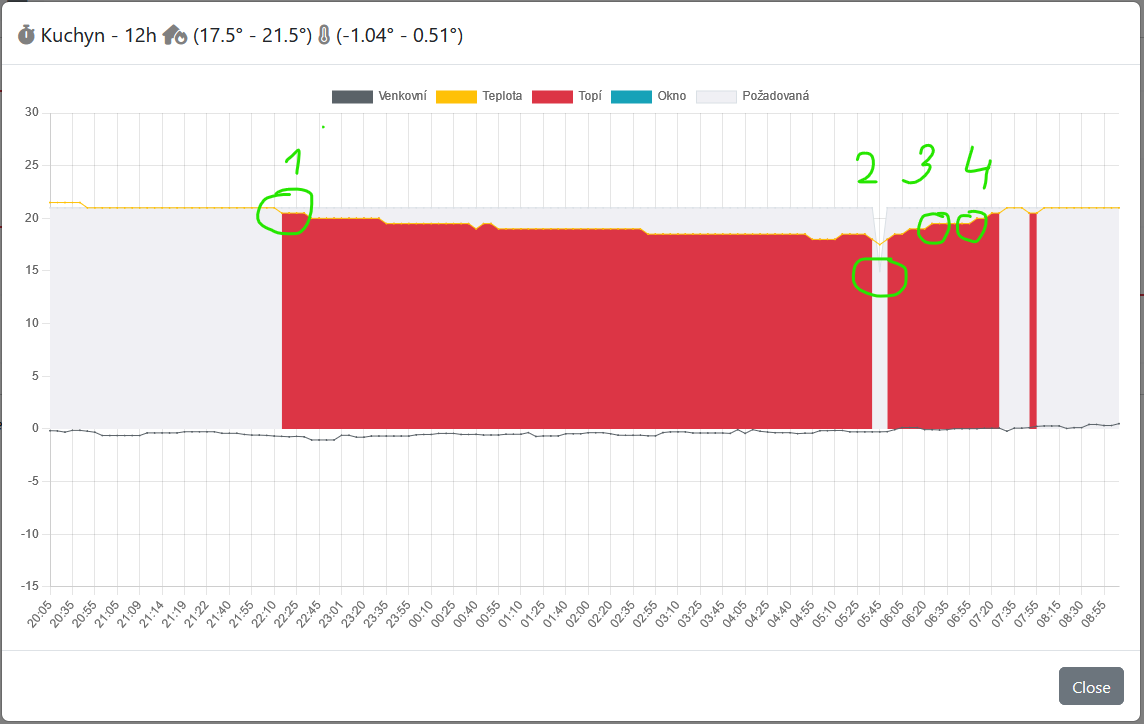
Honeywell API useless for deeper stats?
While prepairing my own simple Evohome heating monitor I found out some annoying problems with data given by HW API. It seems that in some cases API doesn't reflect main unit state and schedule correctly and "keeps" zones targetHeatTemperature unchanged nevermind the current state displayed and realized by main unit. Look at image in next toot to view problematic situation.
Client Info
Server: https://mastodon.social
Version: 2025.07
Repository: https://github.com/cyevgeniy/lmst