I am compressing movies with ffmpeg and I don't understand why libx265 is slower than libav1 with the same settings. I have an amd rx 570 gpu and ryzen 5 3600 cpu if that makes a difference.
#x265 #av1 #av1codec #ffmpeg
#x265
I have a weird behaviour of #ffmpeg on #NetBSD: when transcoding a video (either from an existing video or from still frames, doesn't matter) with #x264, everything is fine. But when I encode with #x265, the ffmpeg process sets itself to niceness 20. I can trace the system calls, and it does indeed call setpriority with x265, and not with x264, but I cannot find it in the source code.
This happens with both ffmpeg5 and ffmpeg7 on NetBSD, but not on Ubuntu. I haven't yet tested anything else.
Normally I wouldn't mind if a CPU-hungry encoder runs "nice", but I would like to decide that for myself, and in my current setup, the CPU clock modulation daemon ignores nice processes and so doesn't raise the frequency, and so my encoding runs slow. And non-superusers cannot lower the niceness.
Another weird NetBSD problem. Please help or boost.

HandBrake 1.10.1 was released. This release fixes a visual corruption issue that could happen when encoding with x265. All users are encouraged to upgrade to the latest version because this issue occurs on all platforms.


Got another box of surplus #DVDs to rip. I hadn't ripped anything lately, especially since getting our new mini PC, so this was my first chance to compare #x265 to #AV1 encode on our Minisforum UM890 Pro with a Ryzen 9 8945HS. This thing absolutely rips. AV1 encodes of DVD quality content run at hundreds of fps, depending on the movie. When using Handbrake's best recommended settings and comparing to x265, AV1 goes faster, makes smaller files and looks just as good.
https://handbrake.fr/docs/en/latest/workflow/adjust-quality.html
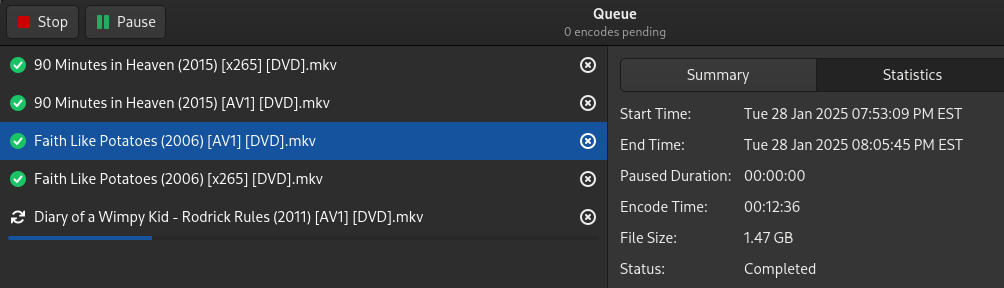
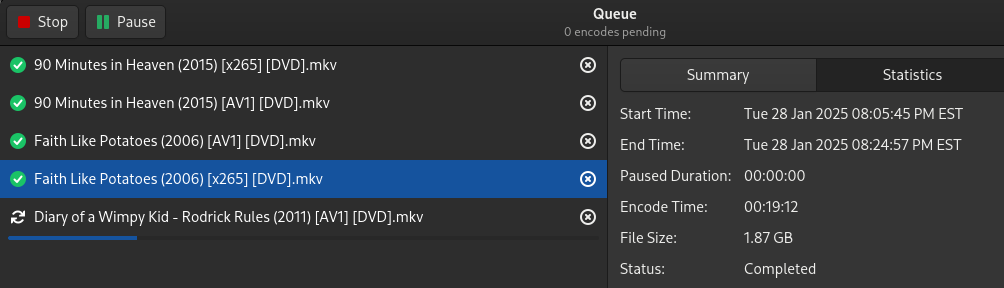

x265 is considerably more efficient than x264. I just re-encoded the entirety of my copy of Farscape, from the same Bluray source discs. Here's a comparison of the final file size for each copy. Settings were as follows:
Both copies were encoded with an RF of 20, 1080p, framerate same as source. The #x264 copy only had a 160 kbps AAC stereo audio track. The #x265 copy included that, but also included an un-touched DTS-HD-MA surround sound track, as well as commentary audio tracks.


A question for any #digital #video experts out there... I'm confused as heck about the results from #libx265 (used via #ffmpeg, not the #x265 tool) regarding quality vs. preset and ratefactor.
I'm far from the first person to be confused by this, but I haven't found any real answers.
First I'll just show some analysis from some test encodes of a file; ssim and ratefactor numbers are coming from the CSV stats output of libx265.
1/x
Oooohhhhh #x265 v3.6 release notes:
"ARM64 NEON optimizations:- Several time-consuming C functions have been optimized for the targeted platform - aarch64. The overall performance increased by around 20%. SVE/SVE2 optimizations"
Thanks, y'all! I love it when codebases start coding to ARM64 NEON! #FFMPEG #FFMPEG7
Is it just me or is #FFMPEG v7 *way* faster (on #ARM64 at least) when doing multiple things at once? (ie: #nlmeans noise reduction, #crop, then #x265)
I mean these used to take hours and hours on several of my Agatha Christie files (which need noise reduction, crop and encoding). These fly through now at about 30% time reduction per file. Not to mention about 15% smaller size (thanks x265 3.6.x update!)

About 6 months ago I got a bee in my bonnet about the quality of current codecs. I ended up doing more than 1000 encodes, comparing various codecs, presets and quality settings. A little over a month ago I wrote something up about it.
https://colinmckellar.com/2024/01/11/video-encoder-comparison/
#AV1 #ffmpeg #x264 #x265

Comparing compression in AV1, x264, and x265
I recently got it into my head to compare the various popular video codecs in an effort to better understand how av1 works and looks compared to x264 and x265. I also had ideas of using a intel video card to compress a home video security setup, and what levels of compression I would need to get good results.... #codec #comparison #quality #encode #av1 #x264 #x265


I re-encoded my test video with #x265 at the same bitrates and presets, to visually compare with #AV1 in my simple browser tool.
It turns out that the "#hevc in browser" story is much more complicated than with #AV1. It just doesn't work on any browser on my #Android phone - Firefox nor Chrome.
https://caniuse.com/hevc references "wontfix" issues. I guess I'll just compare them in VLC "offline" then, and for web do #x264 instead...


I've been messing with AV1 this week. So, let have a look at some files.
The first image: The 1080p AV1 is 7.6 GB and the 4K BD is over 50 GB. I think it looks pretty good, but the grain is far from perfect, notice in the dark and light areas...
Picture 2 is a 1080p 8.99 GB x265 on the left and the 4k BD again on the right. So, the grain is worse here, but the contrast is better.
Why does the smaller AV1 have better grain? Grain is the most important thing when it comes to file size (behind resolution). Grain requires a ton of information. Most algorithms just remove most of the grain... and for modern shows that were not shot on film, this sometimes doesn't matter much. They look fine unless the scene is really dark, bright, or contrasty. But for film and stuff that was shot with grain, it makes a huge difference. You can use a grain setting when rendering x265; it looks amazing, but the files are 3-5x larger. So, AV1 is a little different. They are removing the grain then synthesizing new grain. It's kinda genius, but it's far from perfect. They first do a softening layer, which looks very ugly imo. What good is grain if everything looks like clay. There is something you can do, and I've done this here... on Handbrake, use the options: film-grain-denoise=0:film-grain=20
This tells handbrake to skip the de-noising then apply the grain after. My big problem now is that I want a little more grain, but I think the grain is what is making the image look slightly washed out when compared to the x.265. Also, the AV1 takes like 12+ hours to encode on my 5950x CPU. It's a mess. As it stands, I think the x.265 does look better due to the contrast, but the grain does look good with AV1. Hopefully this process will get better, because as of now, it's not worth the time.
#av1 #handbrake #filmnoise #filmgrain #rendering #encoding #x265 #bluray #bdrip


So, it ENDED UP being that x265’s asm.S and pixel_*.S had mis-labeled the high depth #x265 option when compiling 10 and 12 bit
AND
I had to add arm64 to set(ARM_ALIASES armv6l armv7l aarch64) in CMakeLists file! WTH, #x265 devs? 😡
GEEZ! The things I do for a static binary!
Also? I know FAR FAR more about compiling now than I used to! Just didn’t wanna have to learn THIS WAY!
OOoohh! I just statically compiled AtomicParsley for Synology doing the same instructions except adding "LDFLAGS=-static " to the #make command. It worked!
Okay, so I did #FFMPEG earlier, #x264 / #x265, and now I did #MP4Box and #AtomicParsley!
My workflow is almost complete on #Synology!
I'm also completely thrilled that - after installing Docker Desktop - it was this easy!

Using Automatic Ripping Machine (ARM) to rip some DVDs, the lag of computers with DVD drives make this necessary. Also I need to free some of the shelf space in the living room.
#ARM uses #HandBrakeCLI, which is the #Linux #CLI version of #HandBrake, I derived to use a preset "HQ 576p25 Surround" for the #DVDs, which makes sure the input resolution it kept.
In ARM I can add some options to the HandBrake command that is called in the background, I have this in there:
I wanted to keep chapter markers (--markers), rip all eng,deu,spa,fra audio tracks (--audio-lang-list eng,deu,spa,fra --all-audio), copy audio without transcoding if in format given "--audio-copy-mask aac,ac3,mp3,dts,dtshd", if audio in other format then transcode to lossless aac which is MP4 compliant (--audio-fallback aac). I tried MKV before, which seems nice, but won't play on my TV for some reason, so I thought I will try MP4 container instead.
For the subtitile I have some problem right now, need to figure out how to prevent burned subtitiles, but I think this should do:
--subtitle scan -F --subtitle-lang-list=eng,deu,spa,fra --first-subtitle --subtitle-burned=none
And now most important I wand a decent video quality and not too big files, I came to this:
--quality 23.0 --format av_mp4 --encoder-preset slower
But I would still love to increase the #quality a bit and give the process a bit more time, now 126 min DVD rips and transcodes in less than 50 minutes on the old laptop I use to do this. It is my ripping machine now.
The resuting command is:
Problems/ideas... I would love to use x265, I think it won't take to long to encode compared to x264 and I can save some storage, but there is not preset like the one above for the resolution I need. So I would have to provide all the parameters via the CLI command.
So give me feedback, also really happy to get any tips what options I should add to the command.
#video #ripping #rip #encode #mp4 #x264 #x265 #dvd #bluray #blueray
#ARM uses #HandBrakeCLI, which is the #Linux #CLI version of #HandBrake, I derived to use a preset "HQ 576p25 Surround" for the #DVDs, which makes sure the input resolution it kept.
In ARM I can add some options to the HandBrake command that is called in the background, I have this in there:
--markers --audio-lang-list eng,deu,spa,fra --all-audio --audio-copy-mask aac,ac3,mp3,dts,dtshd --audio-fallback aac --subtitle scan -F --subtitle-lang-list=eng,deu,spa,fra --first-subtitle --subtitle-burned=none --quality 23.0 --format av_mp4 --encoder-preset slowerI wanted to keep chapter markers (--markers), rip all eng,deu,spa,fra audio tracks (--audio-lang-list eng,deu,spa,fra --all-audio), copy audio without transcoding if in format given "--audio-copy-mask aac,ac3,mp3,dts,dtshd", if audio in other format then transcode to lossless aac which is MP4 compliant (--audio-fallback aac). I tried MKV before, which seems nice, but won't play on my TV for some reason, so I thought I will try MP4 container instead.
For the subtitile I have some problem right now, need to figure out how to prevent burned subtitiles, but I think this should do:
--subtitle scan -F --subtitle-lang-list=eng,deu,spa,fra --first-subtitle --subtitle-burned=none
And now most important I wand a decent video quality and not too big files, I came to this:
--quality 23.0 --format av_mp4 --encoder-preset slower
But I would still love to increase the #quality a bit and give the process a bit more time, now 126 min DVD rips and transcodes in less than 50 minutes on the old laptop I use to do this. It is my ripping machine now.
The resuting command is:
nice HandBrakeCLI -i /dev/sr1 -o '/home/arm/media/transcode/movies/NAME/NAME.mp4' --main-feature --preset "HQ 576p25 Surround" --markers --subtitle scan -F --audio-lang-list eng,deu,spa,fra --all-audio --audio-copy-mask aac,ac3,mp3,dts,dtshd --audio-fallback aac --subtitle-lang-list=eng,deu,spa,fra --first-subtitle --quality 23.0 --format av_mp4 --encoder-preset slower >> /home/arm/logs/NAME.log 2>&1Problems/ideas... I would love to use x265, I think it won't take to long to encode compared to x264 and I can save some storage, but there is not preset like the one above for the resolution I need. So I would have to provide all the parameters via the CLI command.
So give me feedback, also really happy to get any tips what options I should add to the command.
#video #ripping #rip #encode #mp4 #x264 #x265 #dvd #bluray #blueray
Client Info
Server: https://mastodon.social
Version: 2025.07
Repository: https://github.com/cyevgeniy/lmst