Current weather for Marienburg SR SA using the power of curl wttr.in {ba{c{k{z{sh}}}}} and lolcat
#weather #bash #csh #ksh #zsh #lolcat #technology #OpenSource #SR #SA #Marienburg #Commewijne
Current weather for Marienburg SR SA using the power of curl wttr.in {ba{c{k{z{sh}}}}} and lolcat
#weather #bash #csh #ksh #zsh #lolcat #technology #OpenSource #SR #SA #Marienburg #Commewijne

The javascript tool yt-dlp uses is deno
Ill play with it later in the day
#sh #shell #bash #csh #ksh #zsh #programming #technology #deno #fedimeteo #weather #w3m #sed #tr #pipe
Current weather for Groningen SR SA compliments of wttr.in curl {ba{c{k{z{sh}}}}} and lolcat
Asking for the weather via a shell uses very little power!
Also when wttr.in is heavily loaded on port 443, like now 11:06 UTC-3 you can still get the data via your favourite shell!
The background image is a photograph I composed of a sublime magenta sunset in SR SA
#weather #bash #csh #ksh #zsh #lolcat #technology #OpenSource #SR #SA #Groningen #Saramacca

Current weather for Leonsberg SR SA compliments of wttr.in curl {ba{c{k{z{sh}}}}} and lolcat
Asking for the weather via a shell uses very little power!
#weather #bash #csh #ksh #zsh #lolcat #technology #OpenSource
![A terminal window displays weather data from wtrt.in/leonsberg_suriname/loclcat. At the top, a table shows “% Total 100”, “% Received 0001”, “% Xferd 0001”, “Average Speed Dload 0”, “Average Speed Upload 0”, “Time Total 0:00:06”, “Time Spent 0:00:06”, “Time Left -:-:-:-”, and “Current Speed 2070”. Below, “Weather report: leonsberg_suriname” reads “Partly cloudy 21 °C 8 km/h 6 km 0.0 mm”. The screen features a grid of weather forecasts for Tue 30 Dec, Wed 31 Dec, and Thu 01 Jan, with sections for Morning, Noon, Evening, Night; each section includes icons, temperature (e.g., “+27(29) °C”), wind speed, distance, precipitation (e.g., “0.0 mm | 80%”), and humidity. Location is “Leonsberg, Blauwgrond, Suriname [5.692506, -55.1026346]”](https://files.mastodon.social/cache/media_attachments/files/115/807/995/577/591/911/original/2f4649eddf4b0184.png)
Current weather in Apetina SR SA
#weather #current #Apetina #SR #SA #lolcat #curl #bash #csh #ksh #zsh #sh #technology #meteorology

I was fortunate enough to learn the Control L shortcut way in the beginning of the alpha versions of Linux, when distributions were not even a figment of the imagination.
It has saved me hundreds of thousands of keystrokes
#sh #csh #ksh #zsh #ash #bash #programming #OpenSource #technology #Linux
Current weather for Marienburg SR SA compliments of wttr.in curl bash, all OpenSource
`curl wttr.in/marienburg_suriname|lolcat`
#weather #current #Marienburg #SR #SA #lolcat #curl #bash #csh #ksh #zsh #sh #technology #meteorology

Current weather for Apetina SR SA
compliments of wttr.in {ba{k{z{c{fi{sh}}}} curl and lolcat
#weather #current #Apetina #SR #SA #lolcat #curl #bash #csh #ksh #zsh #sh #technology #meteorology

Current weather in Leonsberg SR SA compliments of wttr.in curl {ba{c{k{z{fi}}}}}sh and lolcat
#Weather #curl #wttr #bash #csh #ksh #zsh #fish #sh #OpenSource #programming #technology #POSIX

Website for FFMPEG, the Mighty encoding / decoding library suite.
https://ffmpeg.org/download.html
#VLC #libdvdcss #MOC #MPlayer #FFMPEG #command #line #VLC_i #Bash #sh #csh #ksh #zsh #fish #Linux #OpenSource #programming
Website for MOC. You're better off working with the version that comes with your Linux distribution or BSD flavor since that one has all the libraries compiled necessary to run.
https://moc.daper.net/download/
#VLC #libdvdcss #MOC #MPlayer #FFMPEG #command #line #VLC_i #Bash #sh #csh #ksh #zsh #fish #Linux #OpenSource #programming
My motto is; be grateful for all OpenSource software you like to use, give credits to the programmers when you find more useful parameters in your beloved software.
When I play audio files my player of choice has always been MOC; music on console has been stable for decades, is the lightest player I could find and is reminiscent of Midnight Commander / Norton Commander interface.
MOC uses an ncurses interface, has all you need at the fingertips and can play many legacy formats like C64 VIC songs {Last Ninja!} Amiga modules {Das Boot!} with ease.
MOC was released before Video LAN IIRC {I checked}
At a certain point I wanted to play my DVDs in Linux. Logical since my Linux uptime was much, much higher cumulatively, than my win32 uptime, where I gamed. Wine either did not exist yet or could do very little for gaming in general.
Then I learned about libdvdcss thus also about Video LAN.
The fantastic thing about libdvdcss is that you don't have to mess with the region of your player. In that period you had to download libdvdcss yourself from the Video LAN site.
You could only change that region for four times before it becomes permanent at the 5th.
libdvdcss is mighty.
I glanced over VLC, yet didn't brother to download the source code, since I use MPlayer to play my videos in combination with the Mighty FFMPEG library suite. When I finally came around to play with VLC I immediately noticed, how smooth it was coded. I also glanced over the Lua interface, yet left it untouched since I played with MOC, MPlayer / FFMPEG.
VLC X11 UI is handy when you want to move faster than in MPlayer, which made me play more often with VLC when I was in X11.
It was only very recent, that I started to play with VLC in bash.
I was on a notebook which was air gapped so I could not download MOC.
I invoked
`vlc -I
`
What popped up was so beautiful that I was CLI heaven. Every parameter you could think of, where you would normally need to wander with your mouse, you can just type in and get prompted to your shell. You can also do that over the network LAN by the way (wow!)
TIL another powerful feature of VLC cli. If you take the time to add the lyrics of the songs in the album to the directory where the songs reside, VLC will happily show them to you.
I was floored.
This is so efficient.
VLC will not go messing on your internet connection which may be bandwidth metered like mine. VLC cli has so many features you just have to check them out on your own, to see which one you like and then play with them just like I do.
Another impressive feature
One problem we have when we have to downmix 5.1 or 7.1 audio to 2.0 is that the downmix becomes too soft, often 16 decibels too soft. Video LAN fixed that so simple & elegantly.
Video LAN Client is the only one which can push its volume up to 200%!
Thank you Video LAN programmers for this amazing work.
https://www.videolan.org/developers/libdvdcss.html
#VLC #libdvdcss #MOC #MPlayer #FFMPEG #command #line #VLC_i #Bash #sh #csh #ksh #zsh #fish #Linux #OpenSource #programming
Going through writing command completion scripts for several different Shells. No judgment yet, except that Tcsh scripting is painful...and I even started out with C-Shell and used it for many, many years (to the point where I still catch myself trying to type setenv or foreach every once in a while).
I expect a lot of sharp edges, but the Tcsh parser keeps surprising me. Latest example is that line continuation in a string does not concatenate the strings.
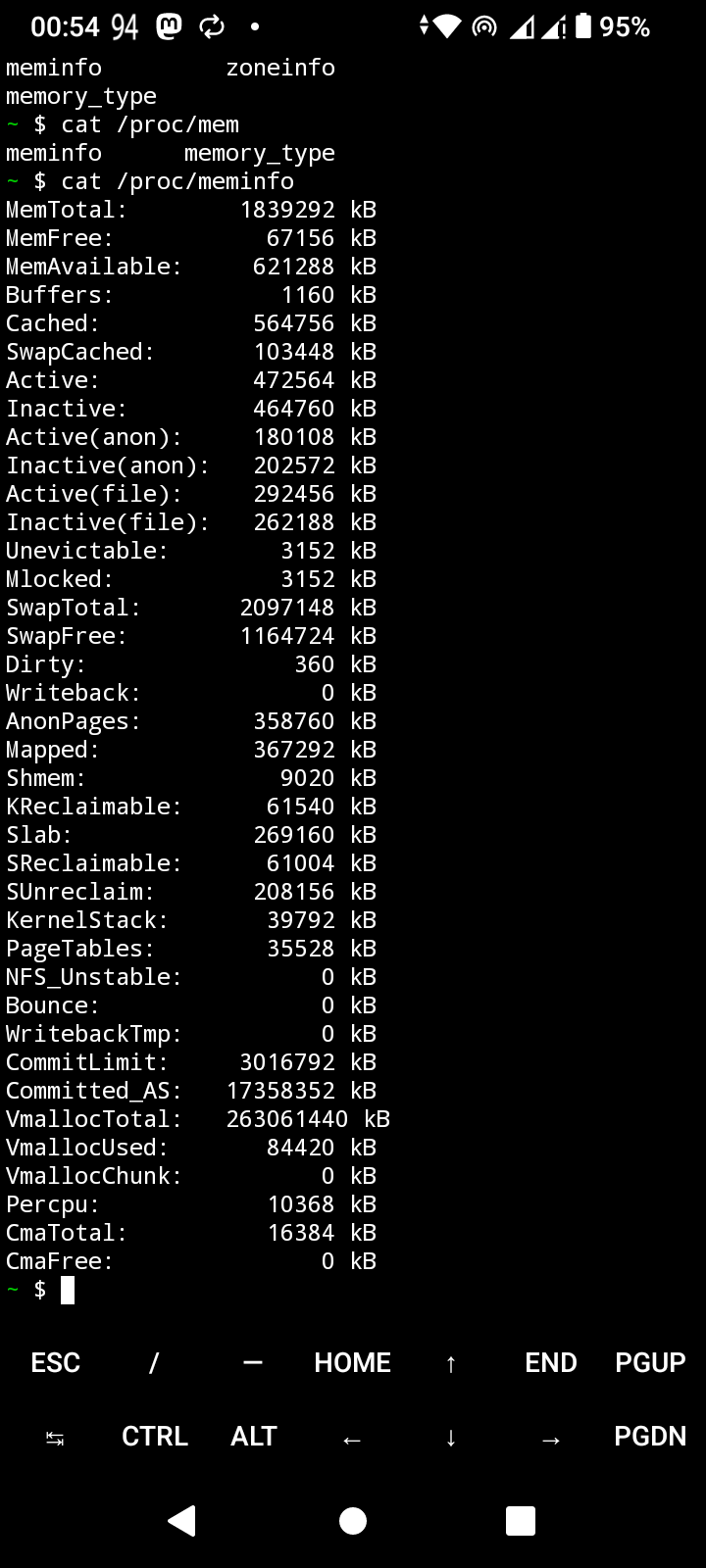
So if you want detailed memory information of your Android just type this in termux
cat /proc/meminfo
Feels like Linux eh?
#programming #bash #csh #zsh #ksh #fish #sh #Linux #command #line #termux #OpenSource #POSIX #technology
One important piece of powerful coding, is that termux is not a virtual machine, not an EMU {emulated environment}
Everything is cross compiled and just patched so that it runs natively in Android
Read more about it in this section
https://wiki.termux.com/wiki/Getting_started
#programming #bash #csh #zsh #ksh #fish #sh #Linux #command #line #termux #OpenSource #POSIX #technology

This is the screen with which Termux welcomes you in the terminal.
Just Gorgeous
#bash #technology #csh #zsh #ksh #fish #sh #Linux #command #line #termux #programming #OpenSource #POSIX

It makes my Android feel great again
#bash #csh #zsh #ksh #fish #sh #Linux #command #line #termux #programming #OpenSource #POSIX #technology