#Watch7

Week 47 of 2025 was big for Galaxy Watch users!

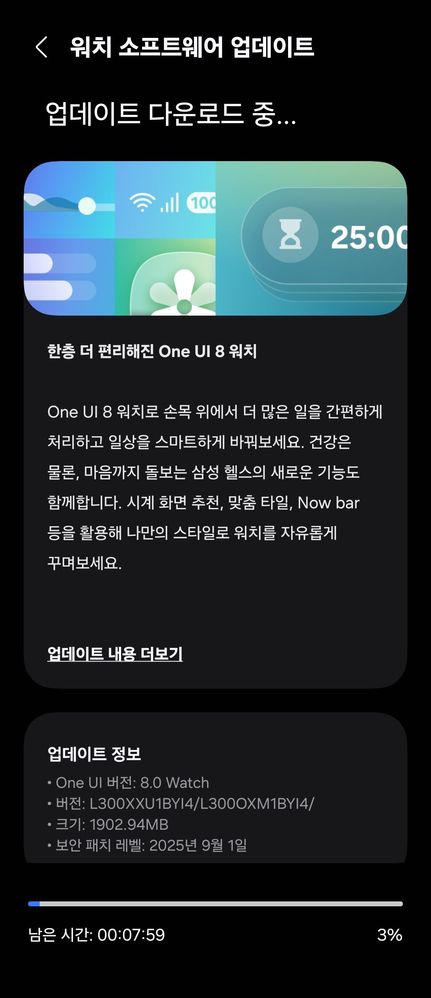
In the forty-seventh week of 2025, it was a massive storm of updates in regards to the Wear OS-based Galaxy Watch series, including the latest Galaxy Watch8 series that was released with One UI 8.0 Watch this July, in addition to the shower of security updates for the flagship phones, including the Galaxy S25 series. We have witnessed this from the start of Week 47 for this year in Korea and in other regions, though the Korean rollout was more apparent.

Included in the updates done this week were updates that were related to the entire Galaxy Watch lineup, starting from the most intriguing ones. However, we’d like to highlight the biggest event that happened in the One UI 8 Watch Beta Program as the first item in this list.

Galaxy Watch6’s One UI 8 Watch Update

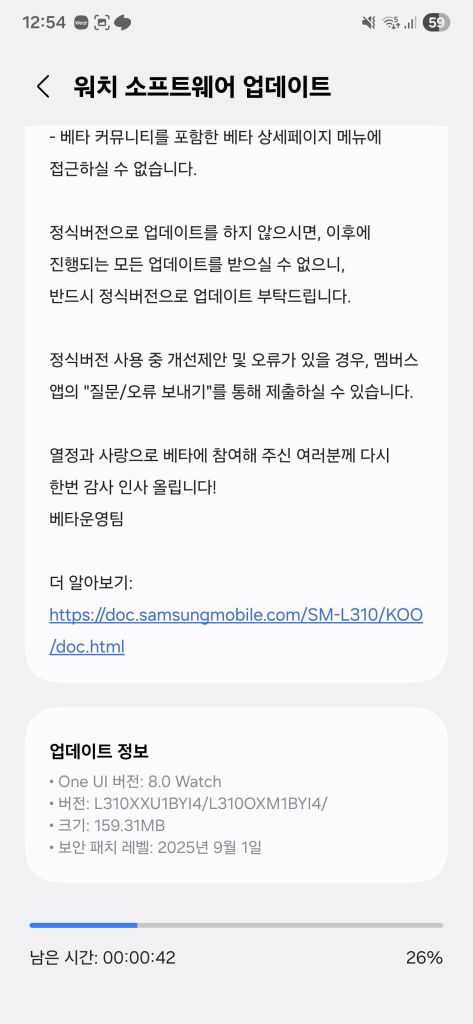
First of all, the Galaxy Watch6 series in Korea has started receiving the One UI 8 update across the entire region, and the beta program ended this Wednesday, which is November 19th. Shortly after the beta program was closed, the official rollout started for users who didn’t participate in the beta program, starting from the same home country.

One day before that, the Galaxy Watch6 Manager received the November 2025 update that brought redesigns that matched the aesthetics of One UI 8, the same design that is found in your Samsung phone running Android 16. When this update happened, we felt that the One UI 8 Watch stable rollout for this watch series would start very soon, and the stable rollout in Korea confirmed it.

However, users in other regions, such as the United States of America, still didn’t get the update yet, and the global rollout is expected to start within the next Wednesday, if we can count on the rhythm of smartwatch updates, which is usually seven days after the Korean rollout. This means that our best guess is that November 26th is expected to be the big day for the global Watch6 users.

One UI 8 Watch brings the design aesthetics of the phone version of One UI 8 to your wrist, allowing you to perform tasks more efficiently than before, complete with new features that make tracking your health more efficient. Additionally, it brings several new features that make your smartwatch easier to use.

One UI 8 Watch Beta 2 for the Watch5

In addition to the Galaxy Watch6 getting its stable update of One UI 8 Watch in Korea, the Galaxy Watch5 has received the second beta of One UI 8 Watch that fixes performance-related issues, along with the DST time fixes. The Galaxy Watch5 is an older smartwatch series than the later smartwatches, but it is still eligible for the One UI 8 Watch update, with the next version of One UI Watch, scheduled for next year, being the last generational upgrade, according to the promised four-year policy.

There is no release date for the stable version of the One UI 8 Watch software for the Galaxy Watch5 series, but if you see the Watch5 Manager update that is released to the stable channels, then you’ll know that the stable rollout will start very soon. Currently, there is no such update, so those who didn’t participate in the beta program will have to wait longer.

November 2025 update for later smartwatches

In addition to the older smartwatches getting their One UI 8 Watch updates that we’ve mentioned above, recent smartwatches have also obtained their November 2025 update that allowed them to utilize the November 2025 security patch level, including the Galaxy Watch8. Here is the list of smartwatches that obtained this update:

Next week will, hopefully, be bigger than this week, because the global rollout will commence soon.

#android #galaxyWatch #galaxyWatch5 #galaxyWatch6 #galaxyWatch6Classic #galaxyWatch7 #galaxyWatch8 #news #oneUi #oneUi8 #oneUi8Watch #oneUi80 #samsung #samsungGalaxyWatch5 #samsungGalaxyWatch6 #samsungGalaxyWatch6Classic #samsungGalaxyWatch7 #samsungGalaxyWatch8 #smartwatches #tech #technology #update #watch #watch5 #watch6 #watch6Classic #watch7 #watch8
Galaxy Watch5 One UI 8 Watch Beta Program is now open!

As Samsung announced the availability of the Galaxy Watch Beta program in an article, the company has opened the Galaxy Watch Beta Program for the Galaxy Watch5 series in Korea (Wi-Fi, LTE) and in the USA (Wi-Fi, LTE connected to T-Mobile).

You can participate to the Beta Program using Samsung Members on your phone using either a beta banner or the “Beta Program” page, the same method as we have showcased earlier for the Galaxy S25 One UI 8 Beta opened May 28th.

In order to participate, follow these steps:

  1. Ensure that your Galaxy Watch and your phone are both from the USA (XAA) or Korea (KOO) to ensure maximum compatibility
    • On your phone, open Settings > About phone > Software information, and look for “Service provider software version”. Make sure it contains XAA or KOO.
    • On your watch, unlock Developer settings by opening Settings > About > Software information and tapping “Software version” 4 times, and refer to the second line that contains your watch’s CSC. Make sure it contains XAA or KOO.
    • If you’re using the Galaxy Watch in the USA, make sure that you are on the active plan with T-Mobile.
  2. Open Samsung Members
  3. Scroll down to Beta Program
  4. Search for entries like “One UI 8 Watch5 Beta”
  5. Read the description and follow the steps on the screen
  6. Press “Join”
  7. Check for software updates

Please note that this Beta Program is for users to test all aspects of One UI 8 Watch and to report all bugs found.

Make sure that you have stable internet connectivity when downloading the update, as it can be large in size. When installing the update, make sure that your watch is fully charged and in a cold environment to avoid interruptions caused by heat and by low battery. Never interrupt the update installation in any way during the process, or you may face problems later.

#android #galaxyWatch5 #galaxyWatch6 #galaxyWatch7 #galaxyWatch5 #galaxyWatch6 #galaxyWatch6Classic #galaxyWatch7 #news #oneUi #samsung #samsungGalaxyWatch5 #samsungGalaxyWatch6 #samsungGalaxyWatch7 #samsungGalaxyWatch5 #samsungGalaxyWatch6 #samsungGalaxyWatch6Classic #samsungGalaxyWatch7 #smartwatch #smartwatches #tech #technology #update #watch5 #watch6 #watch7 #watch5 #watch6 #watch6Classic #watch7

One UI 8 Watch for the Galaxy Watch7 LTE released in the USA!

After the release of the fifth One UI 8 Watch Beta for the Watch7, Samsung was putting their final touches on the stable release for this smartwatch series. Today, Samsung has released One UI 8 Watch for the Galaxy Watch7 LTE series, starting from the USA, which means that regular users can now download the stable version of One UI 8 Watch. This was a very long wait after the release of the stable version of One UI 8 Watch back in July for the Galaxy Watch8 and Watch Ultra.

Currently, this update is only available for the LTE version of the Watch7, including T-Mobile, AT&T, and Verizon. Those who are on the Bluetooth version will have to wait a bit longer.

You can identify the stable release with the L305USQU1BYI4 or the L315USQU1BYI4 version as the build version for your Galaxy Watch7 in ATT, TMB, and VZW CSCs.

You can now update your smartwatch, but if you still didn’t receive any update, you’ll have to wait for a few days. You can periodically check for updates to see if this update has reached your device. We recommend that you update your watch manager in your phone to ensure compatibility with the latest software.

To update your watch, follow these steps:

  • With your phone
    1. Open Galaxy Wearable
    2. Select your watch
    3. Open Watch settings
    4. Navigate to Software Update
    5. Tap Download and Install
    6. Wait until the update shows up, then press Download
    7. Wait until the update gets downloaded and copied to your watch, then press Install
  • With your watch
    1. Open Settings
    2. Navigate to Software update
    3. Tap Download and Install
    4. Wait until the update shows up, then press Download
    5. Wait until it gets downloaded to your watch, then press Install

In an event that something went wrong with copying the update, disconnect your phone from your watch by turning Bluetooth off or by disconnecting it through Galaxy Wearable, then try again from your watch. Make sure to turn Wi-Fi on in your watch to download the update faster.

Make sure that both your phone and your watch are charged before performing the update, and that your internet connection is stable. Never interrupt the update process, or there could be problems later. The update process may take a few minutes to finish, and if it appears to be stuck, just wait for more minutes.

#Android #GalaxyWatch7 #news #oneUi #Samsung #SamsungGalaxyWatch7 #smartwatch #Smartwatches #Tech #Technology #update #Watch7

One UI 8 Watch for the Galaxy Watch7 released!

After the release of the fifth One UI 8 Watch Beta for the Watch7, Samsung was putting their final touches on the stable release for this smartwatch series. Today, Samsung has released One UI 8 Watch for the Galaxy Watch7 series, starting from Korea, which means that regular users can now download the stable version of One UI 8 Watch. This was a very long wait after the release of the stable version of One UI 8 Watch back in July for the Galaxy Watch8 and Watch Ultra.

The USA will have to wait a bit longer, as we haven’t seen any update regarding the closure of the beta program there yet. If you’re on a cellular network, you may have to wait a bit longer.

You can identify the stable release with the L300XXU1BYI4 or the L310XXU1BYI4 version as the build version for your Galaxy Watch7.

You can now update your smartwatch, but if you still didn’t receive any update, you’ll have to wait for a few days as this rollout is a gradual rollout that starts from Korea. You can periodically check for updates to see if this update has reached your device. We recommend that you update your watch manager in your phone to ensure compatibility with the latest software.

To update your watch, follow these steps:

  • With your phone
    1. Open Galaxy Wearable
    2. Select your watch
    3. Open Watch settings
    4. Navigate to Software Update
    5. Tap Download and Install
    6. Wait until the update shows up, then press Download
    7. Wait until the update gets downloaded and copied to your watch, then press Install
  • With your watch
    1. Open Settings
    2. Navigate to Software update
    3. Tap Download and Install
    4. Wait until the update shows up, then press Download
    5. Wait until it gets downloaded to your watch, then press Install

In an event that something went wrong with copying the update, disconnect your phone from your watch by turning Bluetooth off or by disconnecting it through Galaxy Wearable, then try again from your watch. Make sure to turn Wi-Fi on in your watch to download the update faster.

Make sure that both your phone and your watch are charged before performing the update, and that your internet connection is stable. Never interrupt the update process, or there could be problems later. The update process may take a few minutes to finish, and if it appears to be stuck, just wait for more minutes.

#Android #GalaxyWatch7 #news #oneUi #Samsung #SamsungGalaxyWatch7 #smartwatch #Smartwatches #Tech #Technology #update #Watch7

One UI 8 Watch Beta Program closes for the Galaxy Watch7!

After the release of the fifth One UI 8 Watch Beta for the Watch7, Samsung was putting their final touches on the stable release for this smartwatch series. Today, Samsung has shut down the One UI 8 Watch Beta program for the Galaxy Watch7 series, starting from Korea, which means that the beta testers can now download the stable version of One UI 8 Watch. This was a very long wait after the release of the stable version of One UI 8 Watch back in July for the Galaxy Watch8 and Watch Ultra.

The USA will have to wait a bit longer, as we haven’t seen any update regarding the closure of the beta program there yet. If you’re not a beta tester, or if you’re on a cellular network, you may have to wait a bit longer.

You can identify the stable release with the L300XXU1BYI4 or the L310XXU1BYI4 version as the build version for your Galaxy Watch7.

You can now update your smartwatch, but if you still didn’t receive any update, you’ll have to wait for a few days as this rollout is a gradual rollout that starts from Korea. You can periodically check for updates to see if this update has reached your device. We recommend that you update your watch manager in your phone to ensure compatibility with the latest software.

To update your watch, follow these steps:

  • With your phone
    1. Open Galaxy Wearable
    2. Select your watch
    3. Open Watch settings
    4. Navigate to Software Update
    5. Tap Download and Install
    6. Wait until the update shows up, then press Download
    7. Wait until the update gets downloaded and copied to your watch, then press Install
  • With your watch
    1. Open Settings
    2. Navigate to Software update
    3. Tap Download and Install
    4. Wait until the update shows up, then press Download
    5. Wait until it gets downloaded to your watch, then press Install

In an event that something went wrong with copying the update, disconnect your phone from your watch by turning Bluetooth off or by disconnecting it through Galaxy Wearable, then try again from your watch. Make sure to turn Wi-Fi on in your watch to download the update faster.

Make sure that both your phone and your watch are charged before performing the update, and that your internet connection is stable. Never interrupt the update process, or there could be problems later. The update process may take a few minutes to finish, and if it appears to be stuck, just wait for more minutes.

#Android #GalaxyWatch7 #news #oneUi #Samsung #SamsungGalaxyWatch7 #smartwatch #Smartwatches #Tech #Technology #update #Watch7

Galaxy Watch7 Manager gets the October 2025 update!

Samsung has recently released the Galaxy Watch7 Manager update today in Korea as users report this on Samsung Members. This is done under the October 2025 date as Samsung gets ready for the One UI 8.0 Watch update that will bring a redesigned interface to match the One UI 8.0 and 7.0’s aesthetics. This is done to update the Galaxy Watch7 Manager app to v2.2.15.25092551 to get ready for One UI 8.0 Watch that will be released later.

The rollout of the app update will expand to more regions in the coming days. To update the Galaxy Watch7 Manager app, follow these steps:

  • Open Galaxy Store
  • Navigate to Updates
  • You should see “Galaxy Watch7 Manager”
  • Press the update button
  • Wait until the update finishes

Another way to update the manager is to open the Wearable app, navigate to Settings > About, and tap on “Update now” if the update is available.

Currently, it’s unknown if the new watch faces that were exclusive to the Galaxy Watch8 series will make it to the Galaxy Watch7 series, especially given that the Galaxy Watch Ultra has already received the One UI 8.0 update in July, with the Galaxy Watch7 and older still being stuck on One UI 6.0 Watch released on November 2024.

#Android #GalaxyWatch7 #GalaxyWatch7 #news #Samsung #SamsungGalaxyWatch7 #SamsungGalaxyWatch7 #smartwatch #Smartwatches #Tech #Technology #update #Watch7 #Watch7

Galaxy Watch6 One UI 8 Watch Beta Program is now open!

As Samsung announced the availability of the Galaxy Watch Beta program in an article, the company has opened the Galaxy Watch Beta Program for the Galaxy Watch6 series in Korea (Wi-Fi, LTE) and in the USA (Wi-Fi, LTE connected to T-Mobile).

You can participate to the Beta Program using Samsung Members on your phone using either a beta banner or the “Beta Program” page, the same method as we have showcased earlier for the Galaxy S25 One UI 8 Beta opened May 28th.

In order to participate, follow these steps:

  1. Ensure that your Galaxy Watch and your phone are both from the USA (XAA) or Korea (KOO) to ensure maximum compatibility
    • On your phone, open Settings > About phone > Software information, and look for “Service provider software version”. Make sure it contains XAA or KOO.
    • On your watch, unlock Developer settings by opening Settings > About > Software information and tapping “Software version” 4 times, and refer to the second line that contains your watch’s CSC. Make sure it contains XAA or KOO.
    • If you’re using the Galaxy Watch in the USA, make sure that you are on the active plan with T-Mobile.
  2. Open Samsung Members
  3. Scroll down to Beta Program
  4. Search for entries like “One UI 8 Watch6 Beta”
  5. Read the description and follow the steps on the screen
  6. Press “Join”
  7. Check for software updates

Please note that this Beta Program is for users to test all aspects of One UI 8 Watch and to report all bugs found.

Make sure that you have stable internet connectivity when downloading the update, as it can be large in size. When installing the update, make sure that your watch is fully charged and in a cold environment to avoid interruptions caused by heat and by low battery. Never interrupt the update installation in any way during the process, or you may face problems later.

#Android #GalaxyWatch5 #GalaxyWatch6 #GalaxyWatch7 #GalaxyWatch5 #GalaxyWatch6 #GalaxyWatch6Classic #GalaxyWatch7 #news #oneUi #Samsung #SamsungGalaxyWatch5 #SamsungGalaxyWatch6 #SamsungGalaxyWatch7 #SamsungGalaxyWatch5 #SamsungGalaxyWatch6 #SamsungGalaxyWatch6Classic #SamsungGalaxyWatch7 #smartwatch #Smartwatches #Tech #Technology #update #Watch5 #Watch6 #Watch7 #Watch5 #Watch6 #Watch6Classic #Watch7

Galaxy Watch7’s One UI 8 stable release is getting closer!

After the release of the fifth One UI 8 Watch Beta for the Watch7 last week for Korea and for the USA, it looks like that Samsung is putting their final touches on the stable release for this smartwatch series. Today, we have spotted a new stable build for the One UI 8 Watch, and you can check the info below:

The full firmware information is below:

  • SM-L300: L300XXU1BYI4 [KOO, XAA]
  • SM-L310: L310XXU1BYI4 [KOO, XAA]

Meanwhile, the LTE versions have also been updated to reflect the same stable build, as in below:

However, due to an error in the SM-L315U info, we got YXIB instead of BYI4, and looking at the test firmware info shows this:

The full firmware information is below:

One UI 8 Watch will be released to the smartwatches soon. It’s going to be a huge upgrade over the One UI 6 Watch software that was released last November.

#Android #GalaxyWatch7 #news #oneUi #Samsung #SamsungGalaxyWatch7 #smartwatch #Smartwatches #Tech #Technology #update #Watch7

More Galaxy smartwatches to get One UI 8 Watch soon

One UI 8 Watch was officially released to this year’s smartwatches introduced to us back in July 2025 in the Galaxy Unpacked event. The Galaxy Watch8 and the Watch Ultra have both been provided the One UI 8 Watch software to enable users to use the new features, including the redesigned UI elements (inspired by One UI 7), the Now Bar, and the revamped application listing.

Moreover, the Galaxy Watch7 is still in the beta program, which was released on June 30th, until now, with the Galaxy Watch6 and Watch5 still waiting for their official release, if not for the Beta Program to open.

Nevertheless, we are getting closer and closer to the official One UI 8 release for both the smartphones and the smartwatches, with new features being on the way to the older Galaxy devices when the gradual rollout starts. The Galaxy Watch7 and Watch6 smartwatches are expected to get their One UI 8 Watch update on October 1st according to Güncel Miyiz, but this date may not be the day.

Since the One UI 8 Watch Beta program started, we had the following Beta versions released for the Galaxy Watch7:

  • One UI 8 Watch Beta 1 (build ZYFE): June 30th, 2025
  • One UI 8 Watch Beta 2 (build ZYH2): August 12th, 2025
  • One UI 8 Watch Beta 3 (build ZYHA): August 26th, 2025
  • One UI 8 Watch Beta 4 (build ZYI2): September 5th, 2025
  • One UI 8 Watch Beta 5 (build ZYI4): September 12th, 2025

To recap, here are the new features that will make it to some of the older smartwatches, according to the changelogs:

One UI 8 Watch Upgrade

Get things done

Stay on top of important tasks with the Now bar
Check the information you need right now and start essential features straight from your watch face. Ongoing tasks will appear in the Now bar at the bottom of your watch face so you can check key information quickly.

Do more with double pinch
Just pinch your thumb and index finger together twice to scroll through notifications, control music, take pictures, and more. You can also customize what happens when you double pinch on the watch face, music controller, as well as alarm, calendar, and reminder alerts. Choose the actions you need most in each situation.

Mark reminders as important
Mark reminders as important by tapping the Star icon. Important reminders will appear at the top of your reminder list to make sure you notice them.

Get reminders at specific places
You can now set location-based reminders on your watch. For example, you can make your watch remind you to do the laundry when you arrive at home.

New charging effects
When your watch is charging, the new screen layout and animations make it easier to check the current battery level and remaining charging time.

Stay connected

Easily respond to notifications and alerts
Use gestures to quickly respond to notifications and alerts. When a notification appears, you can double pinch to view the details or send a reply. You can also shake your wrist to return to the watch face.

Enhanced notification view
Notifications on your watch are now easier to use with an attractive new design. Notifications from the same app are stacked vertically, allowing you to view more notifications with fewer swipes.

Smarter notification settings
It’s now easier to decide how to receive notifications from your phone on your watch. If you choose Smart device selection, notifications will appear on your phone only when you’re using it and on your watch when you’re not using your phone. If you choose Always show on both, notifications will always appear on both your phone and watch.

Upgrade your health

Bedtime guidance
Get to sleep at the right time so you wake up feeling refreshed. The new Bedtime guidance feature analyzes your sleep data and recommends the best time to go to sleep each night.

Mindfulness
Manage stress and anxiety in your daily life with the new Mindfulness feature in Samsung Health. You can keep track of your moods and emotions and practice breathing exercises to reduce stress.

Tailored to you

Find the perfect watch face
It’s now easier to find the watch face that’s right for you. Just choose a few keywords such as your preferred style, color, and information to show. The best matches will be suggested from our collection of more than 300 watch faces.

Recommended watch faces
Discover new watch faces that you might like. Watch faces with colors, style, or information similar to your current watch face will be recommended on the watch face selection screen.

Create your own tiles
Create your own custom tiles that show the information you need. You can even combine information from different apps into a single tile. You can include weather information, calendar events, reminders, and more.

Personalized Apps screen
Featured apps now appear at the top of your Apps screen to give you quick access to the apps you need the most. Apps will be featured based on how often you use them and other usage patterns. You can also view your apps as a list with names instead of only icons.

Choose calendars to show on your watch
You can now choose which calendars to show in the Calendar app on your watch. You can show all of the same calendars that are on your phone or customize to show only the calendars you need.

The following smartwatches are eligible to get the One UI 8 Watch update:

  • Galaxy Watch Ultra (rolled out)
  • Galaxy Watch7
  • Galaxy Watch6
  • Galaxy Watch5
  • Galaxy Watch4
  • Galaxy Watch FE

We are looking forward for future Galaxy Watch updates for the One UI 8 Watch update, which is expected to start its rollout soon.

#Android #GalaxyWatch4 #GalaxyWatch5 #GalaxyWatch6 #GalaxyWatch6Classic #GalaxyWatch7 #news #oneUi #OneUI8 #OneUI8Watch #OneUI80 #OneUI80Watch #Samsung #SamsungGalaxyWatch4 #SamsungGalaxyWatch5 #SamsungGalaxyWatch6 #SamsungGalaxyWatch6Classic #SamsungGalaxyWatch7 #Tech #Technology #update #Watch4 #Watch5 #Watch6 #Watch6Classic #Watch7

One UI 8 Watch Beta 5 released for Galaxy Watch7!

Samsung has released the fifth beta of the One UI 8 Watch set to be released later this year. This beta version is applicable to Galaxy Watch7 users only, since the Ultra has already received the stable version back on July in preparation for the 2025 rebooted version launch.

The following changes were made in the ZYI4 version:

  • Improved the issue where exercise would end when medication reminders were triggered during a run.
  • Improved the issue where Healthstyle was displayed as blank.
  • Improved the issue where the watch would not turn on when the watch was in use.
  • Improved the issue where the wrist-waving (or Always On Display) would be forcibly disabled when exiting sleep mode.
  • Improved the issue where the current time would not be correct when the screen was scrolled during Always On Display operation.
  • Improved the issue where the timer map would not run.

The following firmware information is available:

  • SM-L300: L300XXU1ZYI4 [KOOXAA]
  • SM-L310: L310XXU1ZYI4 [KOOXAA]
  • SM-L305N: L305NKOU1ZYI4 [KOOSKCKTCLUC]
  • SM-L315N: L315NKOU1ZYI4 [KOOSKCKTCLUC]
  • SM-L305U: L305USQU1ZYI4 [TMB]
  • SM-L315U: L315USQU1ZYI4 [TMB]

Samsung still didn’t open the Beta Program for the Galaxy Watch6 and Watch5, so users will still need to wait.

Galaxy Watch8 comes with the One UI 8 Watch, which Samsung is constantly working on through the beta program for older smartwatches, while the newest smartwatches are getting constant updates.

#Android #GalaxyWatch7 #news #oneUi #OneUI8Watch #Samsung #SamsungGalaxyWatch7 #Tech #Technology #update #Watch7

Samsung is working on One UI 8 Watch Beta 5 for the Watch7!

Five days after the fourth beta of One UI 8 Watch was released, the fifth beta version is already being worked on, because the official firmware testing server has confirmed tue details of a brand new beta build.

This new beta build will mark the start of the fifth beta of One UI 8 Watch, which will be released to the Galaxy Watch7 smartwatches that are in the Beta program.

The following testing firmware information is available:

  • SM-L300: L300XXU1ZYI4 [KOO, XAA]
  • SM-L310: L310XXU1ZYI4 [KOO, XAA]
  • SM-L305N: L305NKOU1ZYI4 [KOO, SKC, KTC, LUC]
  • SM-L315N: L315NKOU1ZYI4 [KOO, SKC, KTC, LUC]
  • SM-L305U: L305USQU1ZYI4 [TMB]
  • SM-L315U: L315USQU1ZYI4 [TMB]

Samsung still didn’t open the Beta Program for the Galaxy Watch6 and Watch5, so users will still need to wait.

To install the Beta 5 update on your Galaxy Watch7 once it releases, follow these steps:

  1. Open the watch settings
  2. Navigate to Software update
  3. Press Download and install
  4. You should see the changelogs for Beta 5
  5. Press Download, and let it download from your Wi-Fi network
  6. After download is complete, press Install.

Make sure that your watch is fully charged before you attempt to do the update. Never interrupt the update process in any way, or problems could manifest later. The update process may take 20 minutes, and the watch may be “stuck” on the Samsung logo after the first reboot, which indicates that it’s loading the update.

Galaxy Watch8 comes with the One UI 8 Watch, which Samsung is constantly working on through the beta program for older smartwatches, while the newest smartwatches are getting constant updates.

#Android #GalaxyWatch7 #news #oneUi #Samsung #SamsungGalaxyWatch7 #smartwatch #Smartwatches #Tech #Technology #update #Watch7

One UI 8 Watch Beta 4 released for Galaxy Watch7!

Samsung has released the fouth beta of the One UI 8 Watch set to be released later this year. This beta version is applicable to Galaxy Watch7 users only, since the Ultra has already received the stable version back on July in preparation for the 2025 rebooted version launch.

The following changes were made in the ZYI2 version:

  • Improved accuracy for health-related activities (running, swimming)
  • Applied Android security patch (Security Patch Level 250901).

The following firmware information is available:

  • SM-L300: L300XXU1ZYI2 [KOOXAA]
  • SM-L310: L310XXU1ZYI2 [KOOXAA]
  • SM-L305N: L305NKOU1ZYI2 [KOOSKCKTCLUC]
  • SM-L315N: L315NKOU1ZYI2 [KOOSKCKTCLUC]
  • SM-L305U: L305USQU1ZYI2 [TMB]
  • SM-L315U: L315USQU1ZYI2 [TMB]

Samsung still didn’t open the Beta Program for the Galaxy Watch6 and Watch5, so users will still need to wait.

Galaxy Watch8 comes with the One UI 8 Watch, which Samsung is constantly working on through the beta program for older smartwatches, while the newest smartwatches are getting constant updates.

#Android #GalaxyWatch7 #news #oneUi #OneUI8Watch #Samsung #SamsungGalaxyWatch7 #Tech #Technology #update #Watch7

One UI 8 Watch Beta 3 released for Galaxy Watch7!

Samsung has released the third beta of the One UI 8 Watch set to be released later this year. This beta version is applicable to Galaxy Watch7 users only, since the Ultra has already received the stable version back on July in preparation for the 2025 rebooted version launch.

The following changes were made in the ZYHA version:

  • Improved GPS acquisition delay when resuming exercise after pausing during exercise.
  • Improved hiking route accuracy.
  • Fixed an issue where the watch screen would not turn off when charging while tilted vertically.
  • Applied Android security patch (Security Patch Level 250801).

The following firmware information is available:

  • SM-L300: L300XXU1ZYHA [KOOXAA]
  • SM-L310: L310XXU1ZYHA [KOOXAA]
  • SM-L305N: L305NKOU1ZYHA [KOOSKCKTCLUC]
  • SM-L315N: L315NKOU1ZYHA [KOOSKCKTCLUC]
  • SM-L305U: L305USQU1ZYHA [TMB]
  • SM-L315U: L315USQU1ZYHA [TMB]

Galaxy Watch8 comes with the One UI 8 Watch, which Samsung is constantly working on through the beta program for older smartwatches, while the newest smartwatches are getting constant updates.

#Android #GalaxyWatch7 #news #oneUi #OneUI8Watch #Samsung #SamsungGalaxyWatch7 #Tech #Technology #update #Watch7

Galaxy Watch7 receives the August security patch!

Samsung has pushed the Galaxy Watch7 August 2025 security patch update based on One UI 6 Watch for those who are not on the beta program for the upcoming One UI 8 Watch operating system. While the Galaxy Watch Ultra received the same security update, it’s based on One UI 8 Watch.

According to a report made by a user on the Korean Samsung community forums, a screenshot has been taken showing the user updating their Galaxy Watch7 to the latest security patch update we’re talking about right now.

The update is currently only available in Korea, but we expect that the rollout expands to the USA, then Europe and other countries.

The following firmware information is available:

  • SM-L310: L310XXS1AYH1 [KOO]
  • SM-L300: L300XXS1AYH1 [KOO]

To install the update on your watch, it’s preferable to do it directly from your watch’s Wi-Fi connection while being disconnected from your phone, as copy errors may occur, but you can also choose to update it via Galaxy Wearable on your phone. Follow these steps on your watch:

  1. Open Settings
  2. Navigate to Software update
  3. Tap Download and Install
  4. You should see the update screen detailing the August 2025 security patch
  5. Press Download now
  6. Let it download from your Wi-Fi connection
  7. Press Install now

Make sure that your watch is fully charged and in a cold environment before attempting to perform the update. Never try to interrupt the update in any way, or problems could occur later. Make sure that your watch uses the Wi-Fi connection that is stable instead of the mobile data network, as data charges could be expensive, depending on the carrier. The watch may appear to be “stuck” at the Samsung logo for a good 5 minutes, but let it update.

#Android #GalaxyWatch7 #news #oneUi #Samsung #SamsungGalaxyWatch7 #smartwatch #Smartwatches #Tech #Technology #update #Watch7

One UI 8 Watch Beta 2 is available!

Samsung has pushed the second beta version of One UI 8 Watch to the Galaxy Watch7 users more than a month after the first beta was launched. This update is only available to those who have joined the Beta program in Korea and in the USA with either the active T-Mobile network plan or the Bluetooth smartwatch.

Reports of the availability began to surface, with the evidence of the release being shown below:

The following improvements were made in the ZYH2 version:

  • Fixed the issue where the device would not automatically end after automatically recognizing outdoor cycling exercise
  • Fixed the issue where the wrist-wake function would not work when waking from sleep mode
  • (LTE ONLY) Fixed the issue where calls would be automatically rejected intermittently when receiving a call to a mobile phone number while simultaneous incoming calls were set

The following firmware information is available:

  • SM-L300: L300XXU1ZYH2 [KOO, XAA]
  • SM-L310: L310XXU1ZYH2 [KOO, XAA]
  • SM-L305N: L305NKOU1ZYH2 [KOO, SKC, KTC, LUC]
  • SM-L315N: L315NKOU1ZYH2 [KOO, SKC, KTC, LUC]
  • SM-L305U: L305USQU1ZYH2 [TMB]
  • SM-L315U: L315USQU1ZYH2 [TMB]

Galaxy Watch8 comes with the One UI 8 Watch, which Samsung is constantly working on through the beta program for older smartwatches, while the newest smartwatches are getting constant updates.

#Android #GalaxyWatch7 #news #oneUi #OneUI8 #OneUI8Watch #Samsung #SamsungGalaxyWatch7 #Tech #Technology #update #Watch7

One UI 8 Watch Beta 2 will be released soon!

Looks like that we’ve seen some progress in the One UI 8 Watch Beta program for the Galaxy Watch7 series nearly two weeks after the Galaxy Watch Ultra has been updated! Today, we’ve spotted new Beta builds, corresponding to August builds, for the following Galaxy Watch7 smartwatch models (only the Beta eligible devices are listed):

  • SM-L315N: L315NKOU1ZYH2 [KOO]
  • SM-L315U: L315USQU1ZYH2 [TMB]
  • SM-L305N: L305NKOU1ZYH2 [KOO]
  • SM-L305U: L305USQU1ZYH2 [TMB]
  • SM-L310: L310XXU1ZYH2 [XAA, KOO]
  • SM-L300: L300XXU1ZYH2 [XAA, KOO]

The mystery has been solved, because Samsung has finally worked on the second Beta version of the One UI 8 Watch software for the Galaxy Watch7 series, which is a relief in itself. This was especially since there were no new beta builds for the entirety of July, which caused users to wonder if their Galaxy Watch7 smartwatches that joined the beta program would ever get an update.

Meanwhile, there are no new beta builds yet for either the Galaxy Watch6 or the Galaxy Watch5 smartwatches, but the above build mentioned should be a sign that the beta program for these smartwatches will start very soon.

One UI 8 Watch brings a design change to match the upcoming One UI 8 operating system for phones, while using the design aesthetics that come from One UI 7, which was released in April 17th.

#Android #GalaxyWatch5 #GalaxyWatch6 #GalaxyWatch7 #GalaxyWatch5 #GalaxyWatch6 #GalaxyWatch6Classic #GalaxyWatch7 #news #oneUi #OneUI8 #OneUI8Watch #OneUI8WatchBeta #Samsung #SamsungGalaxyWatch5 #SamsungGalaxyWatch6 #SamsungGalaxyWatch7 #SamsungGalaxyWatch5 #SamsungGalaxyWatch6 #SamsungGalaxyWatch6Classic #SamsungGalaxyWatch7 #Tech #Technology #update #Watch5 #Watch6 #Watch7 #Watch5 #Watch6 #Watch6Classic #Watch7

You can try out One UI 8 Watch faces on your Watch7!

Today, Samsung has rolled out an update for the Galaxy Watch7 manager application to update it to version 2.2.15.25070951. Some users in Korea began reporting that they’ve seen a banner corresponding to the One UI 8 Watch faces. If you’ve updated your Watch7 Manager app, you should be able to see the below banner.

Currently, the reports are scarce, and seem to only come from the Korean forums, but the version will be rolled out more widely as time passes. The following watch faces will be added to your smartwatch:

  • Sporty Classic
  • Heritage Classic
  • Daily Dashboard
  • Circle Dashboard
  • Minimal Analog
  • Minimal Digital
  • Dynamic Digits

Please note that you’ll need to install the One UI 8 Beta software before being able to use the abovementioned watch faces, since they may require features that are not available in One UI 6 Watch released last November.

#Android #GalaxyWatch7 #GalaxyWatch7 #news #oneUi #Samsung #SamsungGalaxyWatch7 #SamsungGalaxyWatch7 #smartwatch #Tech #Technology #update #Watch #Watch7 #Watch7

Galaxy Watch7 One UI 8 Watch Beta Program is now open!

As Samsung announced the availability of the Galaxy Watch Beta program in an article, the company has opened the Galaxy Watch Beta Program for the Galaxy Watch7 series in Korea and the US. The new features, such as Vascular Load and Antioxidant Index that have been quietly revealed in Samsung Health, will only be available for the newest smartwatch models that will be released this year, alongside two features, Running Coach and AGEs Index, that will be available for Galaxy Watch7 or newer.

The software update is available for Galaxy Watch7 and Watch Ultra.

One UI 8 Watch Beta is now available for those who reside in the USA and in Korea and have the Wi-Fi version. You can participate to the Beta Program using Samsung Members on your phone using either a beta banner or the “Beta Program” page, the same method as we have showcased earlier for the Galaxy S25 One UI 8 Beta opened May 28th.

In order to participate, follow these steps:

  1. Ensure that your Galaxy Watch and your phone are both from the USA (XAA) or Korea (KOO) to ensure maximum compatibility
    • On your phone, open Settings > About phone > Software information, and look for “Service provider software version”. Make sure it contains XAA or KOO.
    • On your watch, unlock Developer settings by opening Settings > About > Software information and tapping “Software version” 4 times, and refer to the second line that contains your watch’s CSC. Make sure it contains XAA or KOO.
  2. Open Samsung Members
  3. Scroll down to Beta Program
  4. Search for entries like “One UI 8 Watch Beta”
  5. Read the description and follow the steps on the screen
  6. Press “Join”
  7. Check for software updates

Please note that this Beta Program is for users to test all aspects of One UI 8 Watch and to report all bugs found.

Make sure that you have stable internet connectivity when downloading the update, as it can be large in size. When installing the update, make sure that your watch is fully charged and in a cold environment to avoid interruptions caused by heat and by low battery. Never interrupt the update installation in any way during the process, or you may face problems later.

#Android #GalaxyWatch5 #GalaxyWatch6 #GalaxyWatch7 #GalaxyWatch5 #GalaxyWatch6 #GalaxyWatch6Classic #GalaxyWatch7 #news #oneUi #Samsung #SamsungGalaxyWatch5 #SamsungGalaxyWatch6 #SamsungGalaxyWatch7 #SamsungGalaxyWatch5 #SamsungGalaxyWatch6 #SamsungGalaxyWatch6Classic #SamsungGalaxyWatch7 #smartwatch #Smartwatches #Tech #Technology #update #Watch5 #Watch6 #Watch7 #Watch5 #Watch6 #Watch6Classic #Watch7

One UI 8 Watch Features Revealed

One UI 8 Watch is in the works, and Samsung has officially revealed some of the One UI 8 Watch features that will make it to the latest of the smartwatches. According to Samsung, those features “help users build healthier habits.” Why? Because it take time to form lasting behavior patterns. Your Galaxy smartwatches will be more smarter with this update that adapts to the design language of One UI 7.

The following features will make it to the latest smartwatches:

  • Bedtime Guidance (Android 11 or later, Samsung Health v6.30.2)
  • Vascular Load (Galaxy Watch Ultra or later)
  • Running Coach (Galaxy Watch7 or later)
  • Antioxidant Index (Galaxy Watch Ultra or later)

Those features will be available to the limited amount of users through the One UI 8 Watch Beta Program, which will only be available in Korea and in the USA, later.

Bedtime guidance allows users to utilize such tool to optimize sleep based on the recommendations for the most optimal sleep according to the lifestyle and the sleep patterns. It also uses reminders to make users stay consistent in their sleep.

Vascular load meter measures the stress on the vascular system. The vascular system on your body is responsible for carrying blood through the entire body to deliver oxygen and other important nutrients and for getting rid of waste. Normally, when you sleep, stress on the vascular system gets reduced, but excessive fluctuations may negatively impact cardiovascular health. With this feature to land on the latest Galaxy Watch, you can receive insights into vascular load.

Running coach helps users train safely for running marathons through optimized intensity and injury-preventive routines. Due to over-pacing or under-training, many runners experience injuries during their running session. It offers real-time guidance during your run, along with the motivation, to create a personalized experience.

Finally, antioxidant index gives you an analytical data of how much balance of your antioxidant that you maintain. To support healthy aging and to prevent chronic illnesses, your Galaxy Watch will be able to measure your carotenoids in your skin.

#Android #GalaxyWatch5 #GalaxyWatch6 #GalaxyWatch7 #GalaxyWatchUltra #GalaxyWatch5 #GalaxyWatch6 #GalaxyWatch6Classic #GalaxyWatch7 #news #oneUi #OneUI8Watch #OneUIWatch8 #Samsung #SamsungGalaxyWatch5 #SamsungGalaxyWatch6 #SamsungGalaxyWatch7 #SamsungGalaxyWatchUltra #SamsungGalaxyWatch5 #SamsungGalaxyWatch6 #SamsungGalaxyWatch6Classic #SamsungGalaxyWatch7 #smartphone #Tech #Technology #update #Watch5 #Watch6 #Watch7 #WatchUltra #Watch5 #Watch6 #Watch6Classic #Watch7

Galaxy Watch6 LTE will be updated in Canada soon!

After Samsung rolled out the stability update to the Galaxy Watch7 series, Samsung has started rolling out a new software update that is rather massive to the Galaxy Watch6 series in the USA, Canada, India, Saudi Arabia, the UAE, and more, starting from the Bluetooth variant. The cellular versions might take longer to receive the update, though.

According to our tests on our BT version of the Galaxy Watch6 that got the update, the battery life has significantly improved! Not only will your battery last longer on usage, but suspend will no longer consume too much battery.

The LTE version of the flagship watches will be updated to the following versions in Canada on May 21st:

  • Galaxy Watch6 40mm (Cellular, SM-R935F): BYD1
  • Galaxy Watch6 44mm (Cellular, SM-R945F): BYD1
  • Galaxy Watch6 Classic 40mm (Cellular, SM-R955F): BYD1
  • Galaxy Watch6 Classic 44mm (Cellular, SM-R965F): BYD1

You can update your smartwatch once it gets released, but if you still didn’t receive any update, you’ll have to wait for a few days. You can periodically check for updates to see if this update has reached your device. We recommend that you update your watch manager in your phone to ensure compatibility with the latest software.

To update your watch, follow these steps:

  • With your phone
    1. Open Galaxy Wearable
    2. Select your watch
    3. Open Watch settings
    4. Navigate to Software Update
    5. Tap Download and Install
    6. Wait until the update shows up, then press Download
    7. Wait until the update gets downloaded and copied to your watch, then press Install
  • With your watch
    1. Open Settings
    2. Navigate to Software update
    3. Tap Download and Install
    4. Wait until the update shows up, then press Download
    5. Wait until it gets downloaded to your watch, then press Install

In an event that something went wrong with copying the update, disconnect your phone from your watch by turning Bluetooth off or by disconnecting it through Galaxy Wearable, then try again from your watch. Make sure to turn Wi-Fi on in your watch to download the update faster.

Make sure that both your phone and your watch are charged before performing the update, and that your internet connection is stable. Never interrupt the update process, or there could be problems later. The update process may take a few minutes to finish, and if it appears to be stuck, just wait for more minutes.

#Android #GalaxyWatch7 #GalaxyWatch7 #news #oneUi #OneUI6Watch #Samsung #SamsungGalaxyWatch7 #SamsungGalaxyWatch7 #smartwatch #Smartwatches #Tech #Technology #update #Watch #Watch7 #Watch7 #Wearable

Client Info

Server: https://mastodon.social
Version: 2025.07
Repository: https://github.com/cyevgeniy/lmst