
Zum zweiten Mal in 24h hängt sich der #ZHA-Stick komplett auf.
Das hat er vorher praktisch nie getan und jetzt befürchte ich fast dass ich das Ding bald entsorgen muss - hab ja eh noch passende Hardware rumliegen um auf #Z2M umzusteigen und wollte das "irgendwann" mal machen.
Ich hab nur null Bock 100+ Geräte neu verknüpfen zu müssen… aber wann sollte ich das jemals tun, wenn nicht "zwischen den Jahren "?
#HomeAssistant #Zigbee #Zigbee2MQTT #Heimautomatisierung
#Z2M


Set up a local cross-compilation environment for building Synology DSM kernel modules, specifically USB-to-serial modules (because Synology sucks, and removed these modules when they launched DSM 7, leaving a lot of people that ran things like Home Assistant or Zigbee2MQTT on their NAS in the cold).
I've always compiled these in an Ubuntu VM based on Synology's own toolchain, but for some reason, this was very prone to failure (a build would randomly fail about 90% of the time).
I moved everything to my main Ubuntu server to run locally and it's not based on Synology's toolchain anymore (only parts of it), and it seems to work much better now. I only tested with x86_64 platforms, ARM platforms will have to wait until tomorrow.
Synology DSM toolchain: https://github.com/SynologyOpenSource/pkgscripts-ng
DSM USB serial driver repository: https://github.com/robertklep/dsm7-usb-serial-drivers/

Home Assistant Pain und mehr…
Ein mal eben während des Urlaubs von der Terrasse beim kühlen Bier initiiertes Home Assistent-Update (2025.7.4) und seine Auswirkungen.
Anmerkung: Solche Update-Kapriolen sind der Grund, warum ich mich manchmal frage, warum ich diese ganze Hausautomationsnummer überhaupt mache. Der Aufwand zur dauerhaften Maintenance und die Komplexität erscheinen tlw. unverhältnismäßig.
#HomeAssistant #Wiz #SMA #Zigbee #Zigbee2MQTT #Z2M #SONOS #Unifi… (1/6)

I'm in the process of switching from #ZHA to #Zigbee2MQTT and I'm really impressed by how much better everything is.
I know many people say this for a while, but after years of ZHA it's surprising what I've missed. Especially for some devices that exposed much less entities to Home Assistant via ZHA.
Suddenly I have so much more data about my home that I can not only see but also use for automations. Suddenly I can control stuff about some devices that were never available via ZHA.
I'm glad that I'm also switching the Coordinator in this process as it costs an unexpected amount of time to do this, as I have to update automations, the dashboards etc.
But in this process I can clean up so much stuff I did wrong in the last months and years.


I have some #MQTT entity in #HomeAssistant with customized entity names.
How can I, without directly selecting that entity, get the entity by-function from the device?
MQTT topic is "temperature_sensor_select".
Also: Generically, so this should also work with #ZHA, instead of #Z2M.
In an automation, with a device-filter, how can I select an owned entity by-function?
This is everything I got.

@cemizm Meine #Zigbee Reise mit Home Assistant ist lang und „kurvenreich“ … 😂 Am Anfang (noch zu Raspi-Zeiten), war ich auf #ZHA. Dann, mit Wechsel auf einen Nuc, zuerst auch bei ZHA, dann aber gewechselt auf #Z2M. Dann habe ich mich wieder von ZHA überzeugen lassen und alles migriert. Jetzt bleibe ich erstmal bei ZHA, so lange es geht. Mal sehen, ob sich das Netz jetzt gut einrüttelt, seit ich #SourceRouting aktiviert habe. 😊
@cemizm Und dann kommt ja noch dazu, dass manche Leute sagen, dass Zigbee2MQTT „besser“, auch im Sinne von „stabiler“ wäre … 🤔 (So, jetzt bin ich erstmal still. 😂) #SmartHome #HomeAssistant #Zigbee #ZHA #Z2M #Zigbee2MQTT


I use zigbee2mqtt and there it is done automatically. Or lets say it differently, i was to lazy to look for a manual trigger in the options.

This could help, but #zigbee should "balance" the net by moving the devices to the best routing devices.
My Network needs about one week to regroup new devices to a better router/receiver.
@sarahdal
Your are talking about battery powered devices ? Some of these are well known for this behavior, look up your devices on the #zigbee2mqtt database.
Your can also place a net powered device near the dropping out devices.

Wenn einem langweilig ist, dann kann man immernoch #SmartHome machen für ein bisschen Spannung im Leben.
Habe dann mal mutig das #HomeAssistant 2025.1.0 Update und #zigbee2mqtt #z2m Update auf 2.0.0 (major update, breaking changes) eingespielt.
Und was soll ich sagen? Es lief (soweit ich es bisher sehe) flawless. Alles funktioniert noch, die Umstelungen bei mir waren minimal.

Home Assistant and air quality – Ikea Vindstyrka
The problem
I’d like to monitor air quality in my kitchen/dining room to ventilate the rooms more frequently. Sometimes I simply forget to open windows.
But again, there is no problem really. I just like to play with IoT gadgets and spend money on something else than drugs.
The ‘solution’
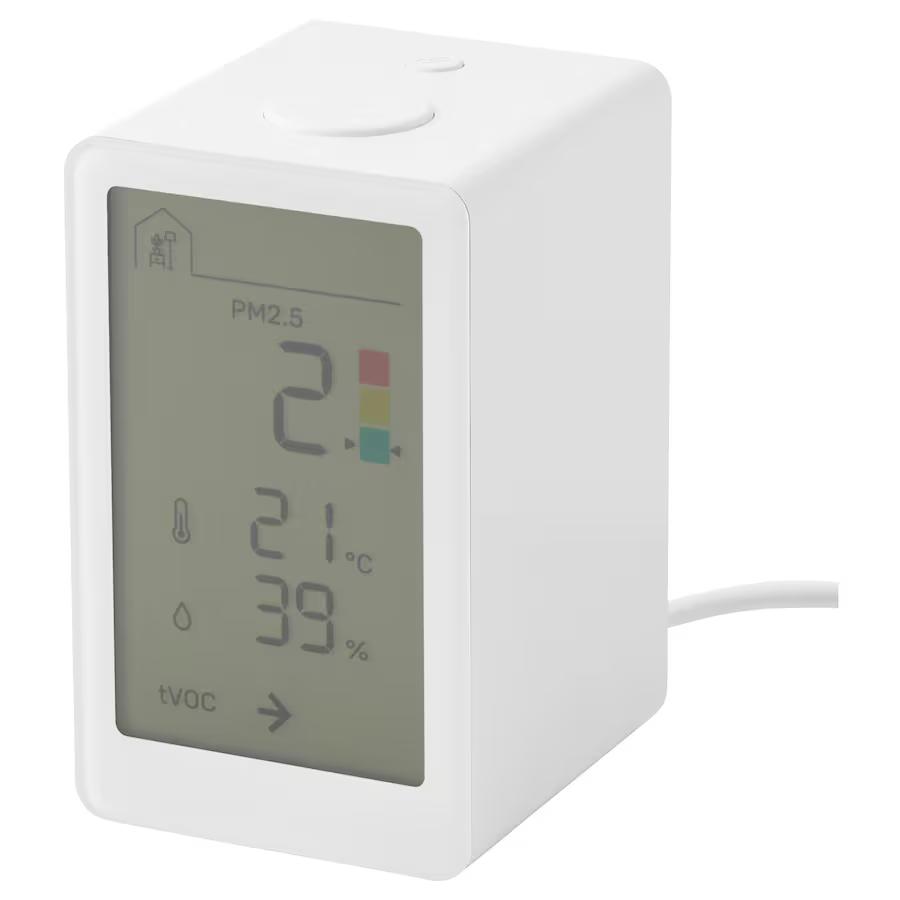
So I did a little ‘research’ on cheap air quality sensors and then decided to buy Ikea’s Vindstyrka (zigbee) device.
“But Tomi, you should trust your nose!” some might say. That’s true, but after breathing stale air for some time I don’t notice it anymore.
After some googling I found out I should monitor VOC (Volatile Organic Compounds) that are emitted (off-gassed) from paints, furniture, cleaning products, burning wood, mold, cooking, frying etc. [definition of VOC].
Also small particles (PM2.5) are worth to monitor. They are emmited by cooking (frying, burning food), candles, smoking, plants (pollen) and also by people (skin shedding) [sources of particulate matter].
This Ikea’s device detects both (tVOC – total VOC and PM2.5) besides temperature and relative humidity.
Installation
Installation was pretty straightforward. Firstly, I had to buy USB-C charger (1A) to power it. It comes only with an USB cable, charger is sold separately.
To connect it to my #zigbee network I had to press the big button on top 4x and then allowed the device to join to HomeAssistant/Zigbee2MQTT. Immediately it found a firmware update and installed it successfully OTA.
Long press to pair it to z2m doesn’t do the trick – although the link icon on the device display blinks, it’s purpose is to connect the device to other Ikea devices such as air purifier. I found out that after RTFM. So – use 4x press.
The first biggest issue was – where to place it, physically? Near the kitchen hood? Above the kitchen sink?
Firstly I put it on a kitchen shelf approx. 1.6m above the floor. It wasn’t the best idea, because this device is loud. I read before that the fan emmits audible buzz, but I didn’t expect I will hear it 7-8m far sitting on the couch. Finally it ended in an open narrow kitchen cabinet, directed away from the couch. Maybe the air flow is not so good there, but at least I can’t hear it anymore.
It will definitely not be used in the bedroom.
Adding it to Home Assistant
I’ve added it to my Home Assistant / Kitchen dashboard:
The device doesn’t show tVOCs (only a trend – stable, increasing, decreasing), but it reports values over zigbee (1-500). Nice!
How did I define the colours (severity) of the measurements on the Gauge?
tVOC index
tVOC index is a Sensirion’s way of measuring VOCs. I‘ve used documentation from Sensirion tVOC sensor and defined ranges: green: 1-150, yellow: 150-250, orange: 250-400 and red: 400-500.
Value of tVOC index is a moving average and 100 represent an average VOC concentration in last 24hr. So in a way mimics a human nose. The Sensirion’s image:
While trying to define colours for HA’s Gauge card I found out it can’t be defined using UI.
So I edited Gauge’s yaml and defined ranges of colours. See the other post >>
PM2.5 Gauge
For defining PM2.5 Gauge colours, I’ve used levels from Vindstyrka’s documentation (page 13): green: 0-35, yellow: 35-120, red: >120 ug/m3 (img):
First measurements
After 10 days or so I started to make sense out of measurements.
Temperatue and relative humidity: I noticed it doesn’t report temperature decimals, only whole numbers (20, 21C…). I don’t understand that design decision, because the cheapest Xiaomi BLE thermomethers report decimals and are .2 -.3 accurate. It bothers me somehow that 30€ device can’t report temp. decimals.
Relative humidity measurements are similar to other (Xiaomi BLE) sensors, +- 5%.
What about tVOC and PM2.5? I was most interested in these measurements.
tVOC index
tVOC increases when we cook. It increases more when we’re frying something, using an oven or using a toaster. Only cooking a soup doesn’t increase tVOC as much.
Opening windows decrease tVOCs quickly, 5 minutes are enough.
PM2.5
Small particles are elevated when cooking. There is more to it: sometimes PM2.5 increase when I open windows to ventilate. Now it’s winter and some neighbours use wood for heating, probably that’s the reason (img).
Automations
I don’t have an air purifyer or recuperation system, so my first automations related to air quality are quite simple.
- notify when tVOCs > 450 for 10 minutes
This automation notifies FireHD tablet to say: “Warning, the air is dirty, open windows!” and also sends a text message to my and wife’s phone (img):
It works really good and our ventilation habits improved already.
I’m also playing with automation to turn on bathroom exhaust fan if tVOCs are increased. But the bathroom is on the other side of the house and I don’t know yet if it will have any effect.
Plans:
- Maybe I’ll smartify my kitchen hood to turn it on when the air is dirty. I ‘just’ have to figure out how to connect some esp32 to its fan buttons… and how to convert hood’s light 12V to 5V to power the esp32.
- Do I need CO2 sensor too? Probably yes, especially in the bedroom.
TL;DR
- it’s a cheap device (30€) in comparison with similar air quality sensors
- it works well with z2m and Home Assistant
- its fan is loud (imagine some angry flies trapped in a box)
- the temperature sensor returns only whole numbers, no decimals
Tags: #homeassistant #zigbee #z2m #zigbee2mqtt #ikea #vindstyrka #tvoc #pm25
If you’re reading this on fediverse and the layout (embedded pics) is off or missing, here’s the link to the original blog post.
https://blog.rozman.info/home-assistant-and-air-quality-ikea-vindstyrka/
#homeassistant #ikea #pm25 #tvoc #vindstyrka #z2m #Zigbee #Zigbee2MQTT



Neat, I found that certain bulbs (Hue, Ikea, LIDL) in #z2m support setting a `transition` time in fractions of a second. Always thought I could only set either 0 or 1. But 0.4s/0.5s is a nice fade on. And this can set the "default" for whatever turns it on.
Well that was a seemless migration:
1. Plug in SLZB-06 into switch
2. Replace /dev/USB0 with tcp://slbz-06:6638 in the config file
3. Restart #z2m
4. Unplug the USB Dongle
Like am I missing something? Looks like there's a couple options to tweak but that's about it

Hat jemand eine Idee wie ich lokal den Fingerprint eines Devices bei #zigbee2mqtt einer existierenden Definition hinzufügen kann?
Ja, ich kann ein komplett neues Device anlegen. Aber das erscheint mir als Overkill, denn die Definition existiert bereits.
Client Info
Server: https://mastodon.social
Version: 2025.07
Repository: https://github.com/cyevgeniy/lmst