
Dites vous connaissez un truc bien sur Android pour faire du speech to text libre sans pisteurs qui marche bien ? J'ai vu que sayboard qui fasse ça mais ça marche pas super bien. Et c'est un brin galère, faut changer de clavier pour s'en servir.
#speechToText

Tìm kiếm mô hình chuyển giọng nói thành văn bản tốt nhất cho năm 2025? Công ty hiện tại yêu cầu chuyển ghi âm cuộc gọi thành văn bản nội bộ, chạy trên server cao cấp (RTX 4090, 64GB RAM) nhưng mô hình Whisper chỉ đạt 75% độ chính xác và không xử lý tốt tiếng ồn nền. Cần tư vấn kỹ thuật hoặc mô hình tối ưu? #AI #SpeechToText #NhậnDiễn #CôngNghệ #MachineLearning
https://www.reddit.com/r/LocalLLaMA/comments/1prmjt3/best_speechtotext_in_2025/

Handy https://handy.computer/ À tester, un logiciel open-source de transcription basé sur les modèles de whisper, à installer en local https://shaarli.obliv.fr/shaare/UUxAfA #speechtotext #opensource

Before a few years ago, speech to text / voice control sucked terribly. Your best option was a £700 piece of software called Dragon, first released in 1997. Whisper and Vosk utterly changed the game for making the transcription accessible, and Talon for controlling your computer.
Thinking about what you're trying to say is much easier and faster when you don't have to think about how to write it at the same time.
I put that in a transcription tool based off WhisperX to use as a base for what I'm writing, so I'm starting with thousands of words rather than a blank page.
Tìm mô hình chuyển giọng nói thành chữ nhỏ gọn, chính xác, hoạt động offline trên iOS - hỗ trợ đa ngôn ngữ (cần ít hơn vài trăm MB, không dùng mạng). Apple Speech framework chưa đủ offline, cần giải pháp chạy 100% cục bộ. #AIonDevice #SpeechToText #iOSDev #DeepLearning #TốiƯuHóaApp #OfflineProcessing #MLVietNam

Multi-API Ensemble: 95% точности транскрипции региональных топонимов
В статье полный разбор архитектуры, алгоритмы scoring, примеры кода и расчёт экономики. Один STT-сервис дал 60-70% точности на специфической лексике (топонимы, названия улиц, профессиональные термины). Два сервиса параллельно + взвешенное голосование + AI-fusion для спорных случаев дали 95%+ точности. Время обработки 5-8 секунд.
https://habr.com/ru/articles/974978/
#speechtotext #whisper #gemini #salutespeech #транскрипция #распознавание_речи #сезон_ии_в_разработке #ensemble #python #asyncio

TL;DR: I'm using WhisperIMEplus on my phone, and I think I will finally live in the XXIst century with my phone.
https://github.com/woheller69/whisperIMEplus
I refrained myself from using speech recognition on my android since the beginning because I didn't like the idea of my voice used for other reasons than my need which would have been speech-to-text.
And having on-device speech recognition was pretty niche for a while (I was interested in mycroft and snips at that time). Then there was Mozilla with CommonVoice and deepspeech, unfortunately, DeepSpeech has been shut down (it seems), and the results are far from the Whisper model from OpenAI.
I'm clearly not an OpenAI fan (if you haven't figured it out yet, you will soon if you follow me), but Whisper seems to be the best thing that got out of this, mostly because it's way more open than any other things from OpenAI which are not open at all.
Anyway, I found that now, there is a project called WhisperIMEplus that is used as a keyboard on my android, and it processes my voice, locally, on my device. And the app has NO internet connection rights, so, even if OpenAI added some backdoor to send data online in their Whisper model, well, Android app rights wouldn't allow it.
I'm fine with all of this, so now, I can finally take notes by talking to my phone, in English and French, without having second thoughts about it.
It's good when technology helps you, instead of trying to screw you in different and sneaky ways.
#SpeechRecognition #android #privacy #SpeechToText #OpenAI #whisper #ai
Cập nhật cách cài đặt **Whisper AI** trên Windows để chuyển đổi âm thanh thành văn bản! Không cần dùng điện toán đám mây, không trả phí ứng dụng – hoàn hảo cho lập trình viên, nhà sản xuất podcast. Dữ liệu và bản ghi được bảo mật cục bộ, hỗ trợ chuyển đổi và dịch nhiều file âm thanh. Tham khảo hướng dẫn chi tiết để tự quản lý hiệu quả. #AI #SpeechToText #Privacy #LocalModel #CôngNghệAI #ĐổiText #BảoMậtDữLiệu
https://www.reddit.com/r/LocalLLaMA/comments/1p6iytz/local_whisper_model_for_speechtote

Randomly-related issue: this month I've discovered #iOS #SpeechToText really doesn't believe such a word exists.
Alas I forget offhand the various unrelated phrases it has used instead, but sheesh, seriously? 🙄😂
Welp, this might well be the weirdest #iOS #SpeechToText error I've had yet:
"Sorry to rant"* was transcribed as "Duran Duran."
I did happen to randomly watch something on my YT timeline about a song by that band recently but I can't think of any time I've written the name since acquiring computing technology.
😂😂😂
*Not going to get into this now: maybe later, we'll see what transpires and whether my private ranting needs to escalate to something of a more formal complaint. 😐

Thanks for these sources, will check them in time :)
I saw that iodeOS runs on the obscure Brax phones. Is that the main OS for them? I thought they had an own one.
Before reading any of this: it is clear that #GrapheneOS is way more secure than #LineageOS, which is the base for both iodeOS and /e/OS.
I dont know if they added bad things, afaik /e/OS did quite some shady proprietary additions [1]. I know that #iodeOS has some nice additions, but from the outside neither are very transparent.
But I would not call them scams right now. Maybe after I know more about their details.
I know for sure that LineageOS is kinda scary as a base. Their releases are all nightlies and they lack verified boot support even on phones that allow custom keys [2].
[1] like integrating #OpenAI #SpeechToText https://community.e.foundation/t/70509/10
[2] Example for the Pixel 9: https://download.lineageos.org/devices/tokay/builds
Tôi vừa tạo GUI cho Truyển Giọng Nói thành Văn Bản (OpenWhisper) trên máy tính cục bộ, hoàn toàn miễn phí và không phụ thuộc vào đám mây. #SpeechToText #TruyểnGiọngNói #OpenWhisper #TrìnhDịchGiọngNói #TiệnÍchMinPhí #LocalApp #ngDụngCụcBộ #TruyềnGiọngNóiThànhVănBản
https://www.reddit.com/r/LocalLLaMA/comments/1p58g1e/i_created_a_gui_for_local_speechtotext/

via #AIFoundry : Foundry Local comes to Android—plus on-device speech, on-prem support, and a simpler SDK
https://ift.tt/yZ8O3qF
#FoundryLocal #Android #OnDeviceAI #SpeechToText #Privacy #MobileApps #AI #Microsoft #EdgeAI #SDK #MachineLearning #TechInnovation #CloudComputing …
Голосовой ввод для Windows через Vosk своими руками
Я пытался найти в Windows похожий встроенный инструмент или готовое решение, но все они либо брали на себя слишком много неактуального для меня функционала, так как задумывались для людей с ограниченными возможностями, либо были платными, либо были недоступны для русского языка. Лучшим выходом из моей ситуации было создать свое минималистичное решение, и вот как это было:
https://habr.com/ru/articles/969360/
#vosk #распознавание_речи #speechtotext #python #голосовые_интерфейсы #winapi
via #AIFoundry : Introducing GPT-4o Audio Models in Microsoft Foundry: A Practical Guide for Developers
https://ift.tt/ckpHieu
#GPT4o #AudioModels #MicrosoftFoundry #OpenAI #Developers #SpeechToText #TextToSpeech #Transcription #AI #MachineLearning #Azure #VoiceTechnology #Cu…

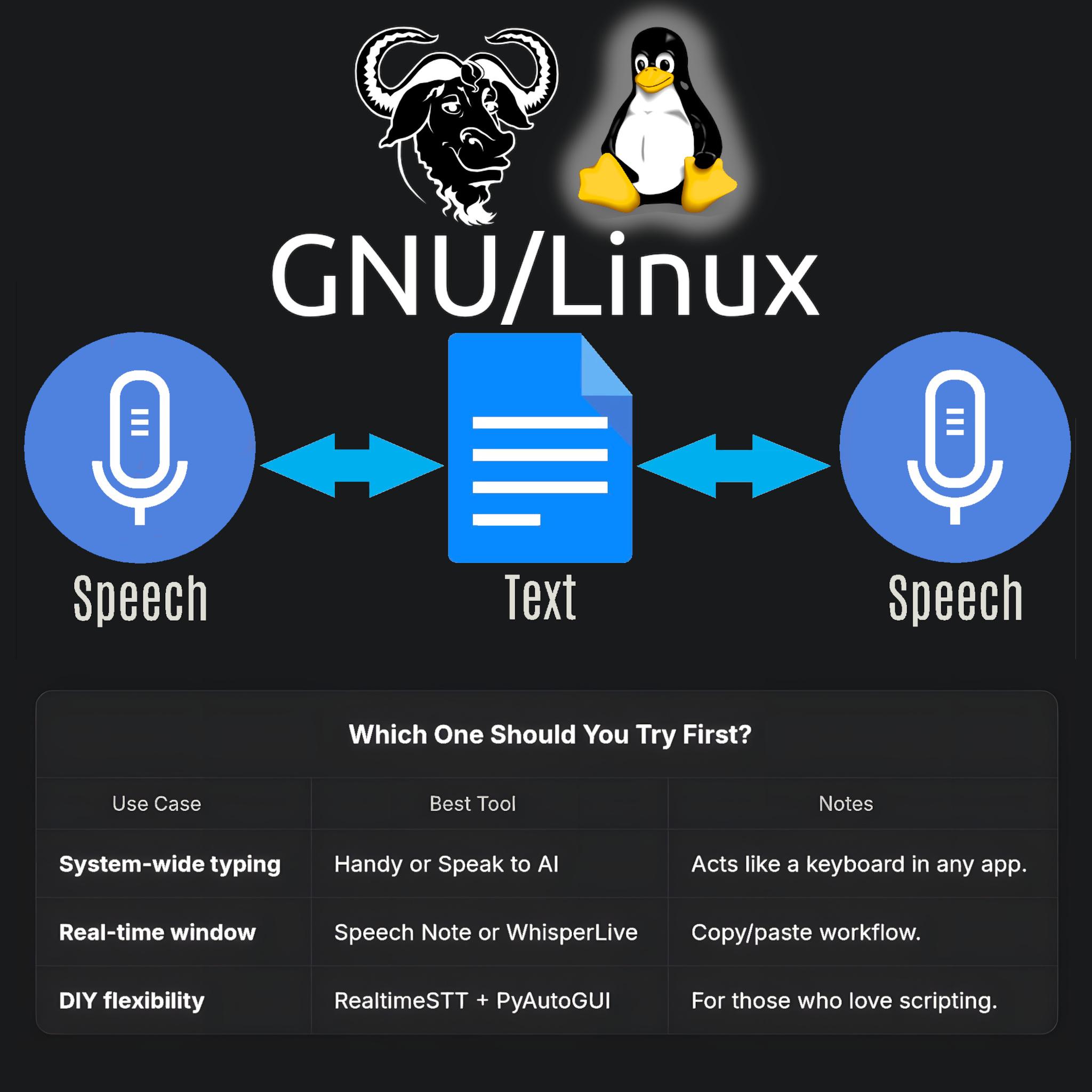
🗣️🎤📝 :linux: Speech to Text and Text to Speech on GNU/Linux :disability_flag: 📝🔊💻
Why This Matters to Me (and Maybe You Too)
If you’re anything like me—a Linux user who counts on voice typing and TTS because of visual impairment—you know that accessibility is not a luxury, it’s a necessity. Speaking from experience as someone who depends on voice typing (and TTS) , the quest for a seamless, local, FLOSS speech-to-text (STT) setup on Linux can be frustrating.
Here’s how you can succeed with modern tools using Linux. FLOSS means freedom and privacy; working locally means real control.
Let’s dive in! I’ll tell you what I’ve learned and what I use—and hope you’ll share your favorite tools or tips!
System-Wide Voice Keyboard: Speak Directly in Any App
Want to speak and have your words typed wherever your cursor is—be it a terminal, browser, chat, or IDE? Here’s what actually works and how it feels day-to-day:
- Speak to AI (Offline, Whisper-based, global hotkeys)
This tool is my current go-to. It uses Whisper locally, lets you use global hotkeys (configurable) to type into any focused window, and doesn’t need internet. Runs smoothly on X11 and Wayland; just takes a bit of setup (AppImage available!).
GitHub Repo https://github.com/AshBuk/speak-to-ai) | Dev.to Post https://dev.to/ashbuk/i-built-an-offline-voice-typing-app-for-linux-speak-to-ai-3ab5)
- DIY: RealtimeSTT + PyAutoGUI
For the true tinkerers, RealtimeSTT plus a Python script lets you simulate keystrokes. You control every step, can lower latency with your tweaks, but you’ll need to be comfortable with scripting.
RealtimeSTT Guide https://github.com/KoljaB/RealtimeSTT#readme)
- Handy (Free/Libre, offline, Whisper-based, acts as a keyboard)
I’ve read lots of positive feedback on Handy—even though I haven’t tried it myself. The workflow is simple: press a hotkey, speak, and Handy pastes your text in the active app. It’s fully offline, works on X11 and Wayland, and gets strong accuracy thanks to Whisper.
Heads up: Handy lets you pick your own shortcut key, but it actually overrides the keyboard shortcut for start/stop recording. That means it can clash with other tools that depend on major shortcut combos—including Orca’s custom keybindings if you use a screen reader. If your workflow relies on certain shortcuts, this might need adjustment or careful planning before you commit.
GitHub Repo https://github.com/cjpais/Handy) | Demo https://handy.computer)
Real-Time Transcription in a Window (Copy/Paste Workflow)
If you’re okay with speaking into a dedicated app, then copying, these options offer great GUIs and power features:
- Speech Note by @mkiol https://mastodon.social/@mkiol
FLOSS, offline, multi-language GUI app—perfect for quick notes and batch transcription. Not a system-wide keyboard, but super easy to use and works on both desktops and Linux phones.
Flathub https://flathub.org/apps/net.mkiol.SpeechNote | LinuxPhoneApps https://linuxphoneapps.org/apps/net.mkiol.speechnote/)
- WhisperLive (by Collabora)
Real-time transcription in a terminal or window—great for meetings, lectures, and captions. Manual copy/paste required to get the text to other apps.
GitHub Repo https://github.com/collabora/WhisperLive)
More Tools for Tinkerers
If you like building your own or want extra control, check out:
- Vosk: Lightweight, lots of language support. GitHub https://alphacephei.com/vosk/)
- Kaldi: Powerful, best for custom setups. Website https://kaldi-asr.org/)
- Simon: Voice control automation. Website https://simon-listens.org/)
- voice2json: Phrase-level and command recognition. GitHub https://github.com/synesthesiam/voice2json)
Pro Tips
- Desktop Environment: X11 vs. Wayland affects how keyboard hooks and app focus actually operate.
- Ready-Made vs. DIY: If you want plug-and-play, try Speech Note or Handy first. Into automation or customization? RealtimeSTT is perfect.
- Follow the Community: @thorstenvoice offers tons of open-source voice tech insights.
Screen Reader Integration
Looking for robust screen reader support? Linux has you covered:
- Orca (GNOME/MATE): The most customizable GUI screen reader out there. The default voice (eSpeak) is robotic, but you can swap it for something better and fine-tune verbosity so it reads only what matters.
- Speakup: Console-based, ideal for terminal.
- Emacspeak: The solution for Emacs fans.
💡 Orca is part of my daily toolkit. It took time to get the settings just right (especially verbosity!) but it’s absolutely worth it. If you use a screen reader—what setup makes it bearable or even enjoyable for you?
Final Thoughts
If you’re starting from scratch, try Handy for direct typing (just watch those shortcuts if you use a screen reader!) or Speech Note for GUI-based transcription. Both are privacy-friendly, local, and accessible—ideal for everyday Linux use.
Is there a FLOSS gem missing here?
Sharing what works (and what doesn’t!) helps the entire community.
Resources:
Speech Note on Flathub https://flathub.org/apps/net.mkiol.SpeechNote
Handy GitHub https://github.com/cjpais/Handy
Speak to AI Guide https://dev.to/ashbuk/i-built-an-offline-voice-typing-app-for-linux-speak-to-ai-3ab5
RealtimeSTT https://github.com/KoljaB/RealtimeSTT
#Linux #SpeechToText #FLOSS #Accessibility #VoiceKeyboard #ScreenReader #Whisper #Handy #SpeechNote #OpenSource #Community #voicetyping #LocalSTT #TTStools #SpeechRecognition #A11y #Linuxtools #Voicekeyboard #Whisper #Handy #speech-to-text #SpeechNote #review #ScreenReaders #ORCA #FOSS
Tôi sẽ chuyển sang Gemini 3 ngay khi có thể nhưng công cụ ghi âm thành văn bản hiện tại vẫn chưa ổn – từ bỏ, lăn lộn, không được ghi lại trọn vẹn khi nói. Mặc dù Gemini 3 mạnh hơn GPT‑5 trong hầu hết những tính năng khác, nhưng vì tôi dựa vào nói và có khó khăn đọc lách, sự bất ổn này làm tôi buộc phải giữ lại. #Gemini3 #AI #SpeechToText #AIinVietnam #Giaiphap #Mongtungtien
(Note: This post is within 500 characters.)
https://www.reddit.com/r/singularity/comments/1p1ob4m/the_one_thing_stopping_
Mô hình mã nguồn mở tốt nhất cho speech to text và hỗ trợ streaming qua websockets là gì? #SpeechToText #MãNguồnMở #Streaming #Websockets #MôHìnhNhậnDạngGiọngNói #OpensourceModel #RealtimeTranscription #GiọngNóiSangVănBản
https://www.reddit.com/r/LocalLLaMA/comments/1oz9n3y/best_opensource_model_for_speech_to_text_and/
Ha, someone has beaten me to it :awesome:
handy - the free and open source app for speech to text
Looks really awesome!
Client Info
Server: https://mastodon.social
Version: 2025.07
Repository: https://github.com/cyevgeniy/lmst