#WebInspector

eurozerozeroeurozerozero
2026-01-20

Also, does the Safari Web Inspector not understand nested CSS syntax, or is the red syntax highlighting colour an intentional choice for nested rules? Because having this displayed in red sure suggests that it’s invalid syntax.

(I can only assume it doesn’t understand nesting because there’s also no way to edit nested rules directly in the Styles pane of the Elements tab)

WebKit/Safari team: FB21689793

A screenshot of the Web Inspector Sources page in Safari Technology Preview 235, showing the contents of a CSS file where a nested CSS definition is displayed in red, which suggests that it is invalid syntax even though it is valid.
eurozerozeroeurozerozero
2026-01-20

While working with the dialog element over the past week I keep seeing this Safari Web Inspector bug:

Having a nested @ starting-style rule within dialog::backdrop causes the Web Inspector to display the wrong style definitions when inspecting elements within a dialog element.

e.g. inspecting a button inside a form in the dialog shows the form’s styles as the button’s styles, an off-by-one type bug.

WebKit/Safari team: FB21689457

A screenshot of the Web Inspector in Safari Technology Preview 235, inspecting the styles of an h2 element inside a dialog element.  Because the dialog::backdrop contains a nested @starting-style definition, the Web Inspector is showing the wrong style definitions when inspecting any elements inside the dialog.

In this case, the "opacity: 0" definition that is being displayed for h2 is actually a definition from the @starting-style of dialog::backdrop.
Inautiloinautilo
2025-08-22


Using the Safari developer tools · How to get started with Safari’s Web Inspector ilo.im/165xux

_____

2025-06-21

A web developer (me) tries to order some Pizza Hut.

#webdev #pizza #PizzaHut #broken #javascript #webinspector

Web Inspector showing huge # of javascript errors from Pizza Hut payment page
Sascha Presnac 🙄🤦‍♂️paladin@mastodon.online
2025-06-16
eurozerozeroeurozerozero
2024-02-10

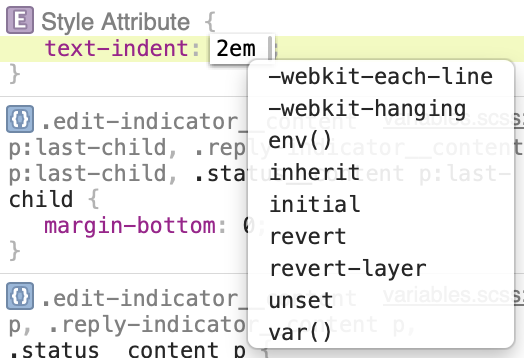
Hmm, it seems the Web Inspector in Safari (including in Safari Technology Preview) doesn’t know about the hanging and each-line keywords of the text-indent property.

Instead, it still lists -webkit-each-line and -webkit-hanging, neither of which actually even works now.

Maybe it never got updated when Safari started supporting the unprefixed versions?

Also, Firefox finally supports these keywords (since December), but Chrome still doesn’t!

A screenshot of the Safari Web Inspector Elements tab, editing the style attribute of the currently selected element.  I have typed text-indent: 2em

The auto-complete/suggestion list is open and is displaying keywords that would be suitable for the text-indent property.  The first two suggestions in the list are -webkit-each-line and -webkit-hanging, but the list does not contain the unprefixed each-line and hanging keywords.
2023-06-06

@jensimmons excited to see the updates for #WebInspector and #visionOS. I use inspector daily in my work and I’m curious about web design and W3C standards for special computing web sites.

Steven G. Harrisstevengharris
2023-04-12

TIL you need to enable Safari’s Web Inspector explicitly for any WKWebView in iOS 16.4. Such fun sorting out the “No Inspectable Applications” item that shows up unexpectedly in Safari’s Develop menu.

webkit.org/blog/13936/enabling

Timothy Hatcherxeenon
2023-02-03

@cory We added support for to last fall. Just need the frameworks to release their extensions now.

eurozerozeroeurozerozero
2022-12-20

I finally got frustrated enough with this bug in the Web Inspector in Safari (and Safari Technology Preview) that I made a Feedback Assistant report about it.

Adding properties to a new/existing rule in the Elements details sidebar will often result in the property just disappearing (or being replaced with something random) as soon as you type the closing ;

Submitted as FB11886541

Client Info

Server: https://mastodon.social
Version: 2025.07
Repository: https://github.com/cyevgeniy/lmst