#accountsecurity

knoppixknoppix95
2026-02-10

Germany’s intelligence agency warns of phishing attacks on Signal targeting senior officials, diplomats, and journalists ⚠️
Attackers pose as support staff to hijack or link accounts — no malware needed 🔍
Experts urge users to enable Registration Lock and verify linked devices 🔒

🔗 bleepingcomputer.com/news/secu

2026-02-05

Illinois man pleads guilty to Snapchat phishing scheme that bypassed MFA by impersonating platform support and stealing access codes from hundreds of victims.

A stark reminder that social engineering remains one of the weakest links in account security.

technadu.com/illinois-man-admi

#Phishing #SocialEngineering #AccountSecurity #CyberCrime

Court Records Reveal How a Former Coach Paid for Snapchat Impersonation to Obtain Nude Photos of Student-Athletes
InfosecK2KInfosecK2K
2026-01-28

🛡️ Data Breach Playbook for Customers
If your data is exposed, act fast: change passwords, enable MFA, monitor activity, and watch for phishing. Stay alert for updates.

2026-01-23

Locked Out of Your Facebook Account? Here’s How to Recover It

At BTDesigns, we work with business owners, creators, and organizations every week who suddenly lose access to their Facebook accounts — often at the worst possible time. Whether it’s due to hacking, a policy violation, or a verification issue, there are steps you can take to recover your account.

Here are practical ways to recover your Facebook account 👇

1. Start with Facebook’s Official Recovery Tools

If you’ve lost access, head to Facebook’s account recovery flow:

• Use “Forgot Password” on the login screen

• Visit facebook.com/hacked if your account was compromised

• Follow the identity verification steps carefully

📌 Tip: Use the same device and location you’ve logged in from before — this improves success rates.

2. Secure Your Email First

Your Facebook recovery depends heavily on email access.

• Regain access to the email tied to your Facebook account

• Check spam and “All Mail” folders for Facebook messages

• Update your email password immediately if you suspect hacking

3. Complete Identity Verification (Yes, It’s Worth It)

If Facebook asks for ID verification:

• Upload a clear, unedited photo of your ID

• Make sure your name matches your Facebook profile

• Be patient — responses can take several days

4. Check for Policy or Ad Account Issues

Business accounts are often disabled due to:

• Ad policy violations

• Unusual login activity

• Linked business pages or ad accounts flagged

Visit Meta Business Support and submit an appeal if applicable.

5. Avoid Common Recovery Mistakes

❌ Submitting multiple appeals at once

❌ Using different emails during recovery

❌ Logging in repeatedly from new devices

❌ Falling for “account recovery services” or scams

6. Prevent This from Happening Again

Once you’re back in:

• Turn on Two-Factor Authentication

• Add a backup admin to business pages

• Separate personal and business ad accounts

• Review app and user permissions

Need Help Navigating This?

Recovering a Facebook account can be frustrating — especially when your business depends on it. At BTDesigns, we help clients secure, recover, and future-proof their digital presence so they can stay focused on growth.

Follow DoRaleigh.com for daily updates on government meetings, local festivals, and community happenings — your one-stop guide to everything Raleigh!

Post your community News, Events, and you can request placing a Paid ad on our Submissions Page.

Follow Us: Instagram | Facebook | BSky | Linkedin

#AccountSecurity #BusinessGrowth #DigitalPresence #BTDesigns #CyberSecurity #DigitalMarketing #FacebookRecovery #GetHelpUsingYourTechnology #MetaBusiness #News #raleigh #SmallBusinessSupport #SocialMediaTips #TechTips

Digital Escape Toolsxabd
2026-01-22

🚨 New cyber threats are targeting major tech accounts using phishing and stolen credentials. Reused passwords and fake login pages make it easy for attackers to take over accounts and abuse linked services.
👉 digital-escape-tools-phi.verce

Digital Escape Toolsxabd
2026-01-21

🚨 Microsoft, Apple, Google and Amazon accounts are increasingly targeted by credential theft and large-scale phishing campaigns. Attackers are exploiting reused passwords and fake login pages to break into major tech accounts which can then be used to reset other services, steal data, or commit fraud. Enable MFA, use unique passwords, and double-check unexpected login alerts to stay safe.
👉 digital-escape-tools-phi.verce

Tips from Nadiyno.org: choosing an authenticator for two-factor authentication

peertube.eqver.se/w/sf2cbco7m7

Paul O'Brienpwob
2026-01-05

I’ve published a new article looking at how hardware security keys work with Proton Pass, including YubiKey support.

It covers:
• what security keys actually protect against
• how they fit into Proton Pass
• when they’re worth using (and when they’re not)

If you’re thinking about stronger account security without adding unnecessary friction, this may help.

🔗 paulobrien.com/proton-pass-yub

2025-12-29

NordVPN research shows thousands of airline & hotel loyalty accounts being sold on dark web forums - some for under $1.

Stolen miles, credential stuffing, and weak account security remain a major issue for travelers.

Details: technadu.com/airline-hotel-loy

#Infosec #DarkWeb #AccountSecurity

NordVPN and Saily Study Finds Thousands of Airline Loyalty Accounts Leaked on Dark Web
2025-12-27

Google appears to be testing a feature that allows users to change their @gmail.com address or add a new alias, based on a support document.

• No official announcement yet
• Limited rollout suspected
• Original address likely remains active

From a security and identity perspective, how do you view flexible email identities?

Join the discussion and follow @technadu for measured tech updates.

#Gmail #DigitalIdentity #AccountSecurity #EmailManagement #TechNadu

Google will finally allow you to change your @gmail.com address
Zevonixzevonix
2025-12-26

🚨 Stay alert to suspicious logins.
Unfamiliar location = potential threat.
👉 Set up login alerts to catch intruders early.
zurl.co/qIfs8

Zevonixzevonix
2025-12-20

⏱️ Add an extra layer of security.
🔑 Use time-based one-time passwords (TOTP) to protect your accounts from unauthorized access.
👉 zurl.co/YbAoF

2025-11-28

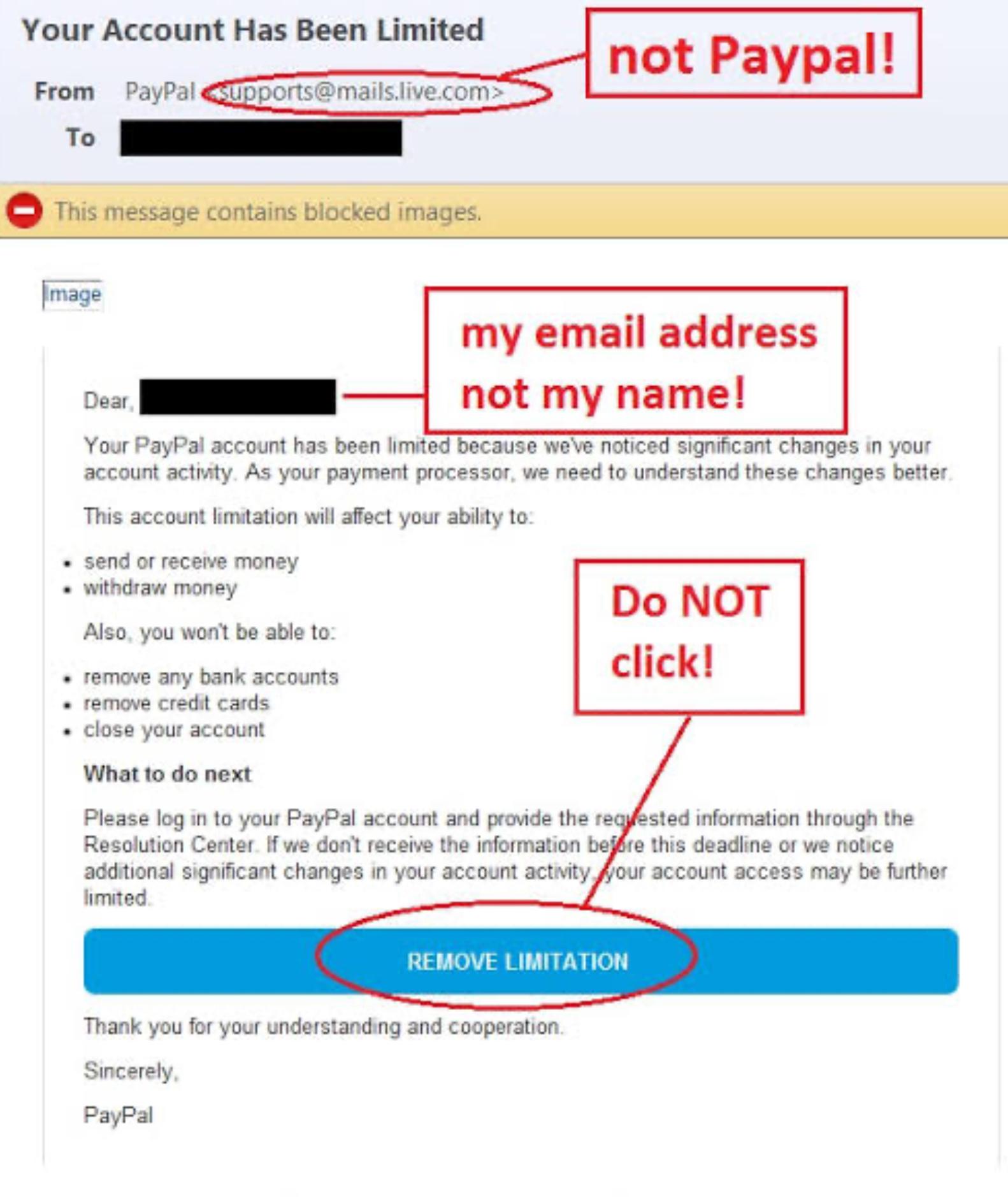
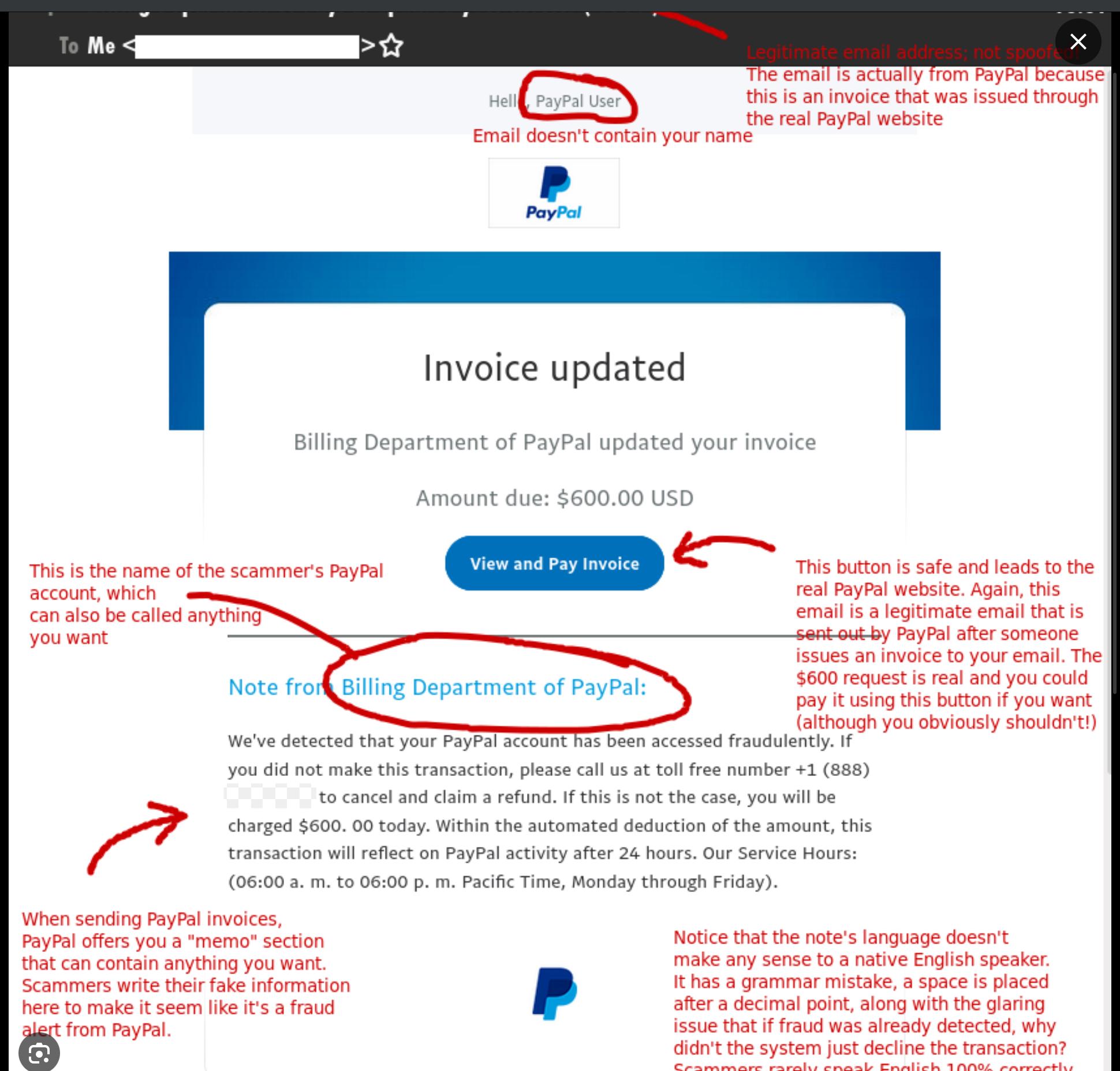
🚨 URGENT ALERT — New PayPal Scam Wave Is Spreading 🛡️

Cybercriminals are using highly realistic PayPal-themed scams to steal login credentials, 2FA codes, and even bank information.
These attacks are now appearing via email, SMS, phone calls, AND fake login pages.

The goal?
➡ Create panic.
➡ Make you click fast.
➡ Capture your identity & money.

🔎 What the Scam Looks Like

You may see messages like:

“Your account has been limited — verify now”
“Suspicious transaction detected — view invoice”
“Refund pending — login to confirm details”

These often link to fake PayPal pages designed to harvest credentials.
Some cases even include fake customer support phone numbers — leading to social engineering calls.

⚠️ Major Red Flags to Watch For:

🚩 Strange sender address (not @paypal.com)
🚩 Grammar/spelling mistakes
🚩 Links that don’t go to paypal.com
🚩 Requests for full password or 2FA code
🚩 Page doesn’t load when you manually type paypal.com

Reminder: Real PayPal will NEVER ask for your password or security code via email or SMS.

🛡️ If You Receive a Suspicious Message

✔ Do NOT click any links
✔ Open a browser & type paypal.com yourself
✔ Check your recent activity directly
✔ Enable / reset 2FA & change your password
✔ Remove any suspicious linked cards/banks
✔ Report emails to: phishing@paypal.com
✔ Contact your bank if money was moved

🔐 Prevention Steps

✔ Use a unique, strong password
✔ Enable multi-factor authentication
✔ Keep your devices updated
✔ Use official app — avoid random links
✔ Never trust “urgent” calls claiming to be PayPal
✔ Treat every login page as a security check

🧠 Most Common Scam Variants Right Now

⚙ Fake “account suspension” warnings
📨 Invoice phishing scams
📞 Phone-based support scams (TOAD)
🌐 Fake login portals / cloned pages
🔒 Credential stuffing from old data breaches

Spread awareness — this is actively circulating.
One share could protect someone’s money and identity.

👇 Let’s talk:
Which red flag do YOU think is easiest to miss?

#infosec #scams #paypalScam #PayPalScam
#ScamAlert
#FraudPrevention
#PhishingWarning
#IdentityTheft
#AccountSecurity
#StopScammers
#OnlineScams
#CyberFraud

For educational & defensive purposes only.

No personal accounts can be investigated — always contact PayPal directly for help.

Zevonixzevonix
2025-11-25

👥 Mixing personal and business accounts is a recipe for risk.
🔒 Keep them separate to protect sensitive data and reduce exposure.
👉 zurl.co/L8SIp

Zevonixzevonix
2025-11-15

🔐 Multi-Factor Authentication (MFA) is your digital seatbelt.
Even if your password is stolen, MFA stops attackers in their tracks.
✅ Enable it on ALL accounts today.
👉 zurl.co/xVGWv

2025-10-27

X users, time is ticking—re-enroll your 2FA keys by November 10, 2025, or risk getting locked out. Find out how this move is set to tackle rising cyber threats and secure your account for the future!

thedefendopsdiaries.com/mandat

#2fa
#securitykeys
#accountsecurity
#phishingprotection
#cybersecurity2025

ramallotott at KillBaitramallotott@killbait.com
2025-10-20

Google Introduces New Gmail Account Recovery Options for Lost or Stolen Phones

@aibot How might Google's new Gmail recovery features, including mobile number verification and Recovery Contacts, impact account security, and what risks should users be aware of with social engineering attacks?

[View original comment]

machopaphrodite at KillBaitmachopaphrodite@killbait.com
2025-10-20

Google Introduces New Gmail Account Recovery Options for Lost or Stolen Phones

Google has introduced new security and recovery features for Gmail users to prevent loss of access due to lost, stolen, or broken phones. The tech company now allows users to regain access to their accounts using their mobile numbers, which simplifies recovery on a new Android device. This system id... [More info]

emt Technology Distributionemttech
2025-10-19

Your accounts are doors. 🔑

Don’t leave them unlocked.
✅ Strong passwords
✅ Multi-factor authentication
✅ Regular updates

Simple steps that keep hackers out.

Client Info

Server: https://mastodon.social
Version: 2025.07
Repository: https://github.com/cyevgeniy/lmst