#s22

2026-02-21

Update: vergeben

Möchte jemand diese Hülle für ein Galaxy ? Sie wurde zwar bereits genutzt, befindet sich aber noch immer in einem ziemlich guten Zustand.

Ich möchte hierfür nur das Porto in Höhe von 1,80 € als mobile Brief- oder Internetmarke.

Wer Interesse hat, meldet sich einfach per DM bei mir.

Foto der im Post erwähnten Hülle. Sie ist zur Front hin offen, schützt aber die Rückseite und die Seiten. Es gibt eine Aussparung für die Kamera, die Rückseite ist grau und transparent.
2026-02-15

Did #Samsung with their latest #Android update break the camera on the #S22 for everyone or just for me?

2026-02-06

listening to the VOD of yesterdays slayradio show: youtube.com/watch?v=PPW9vXM-f_U #c64 #music #remix before i head over to kjell.com/se/butiker/taby-cent and getting help putting a screen protector i bought from: kjell.com/se on my @Samsung@mastodon.cloud @samsung@lemmy.world @samsung@lemdro.id used #s22 #GalaxyS22 #SamsungGalaxyS22

WinFuture.deWinFuture
2026-02-04

Nun hat den Software-Support für seine -#S21-#Smartphones eingestellt - mit einer Ausnahme. Besitzer eines erhalten zudem nur noch eingeschränkte Sicherheits-Updates. winfuture.de/news,156622.html?

Samsung releases the January 2026 security patch for the Galaxy S22 series

January 2026 is here, and Samsung have focused on releasing the January 2026 security patch for the majority of Galaxy users worldwide. As per their rollout schedule for security updates, Samsung have released the January 2026 security patch to the Galaxy S22 users, starting from the Korean version.

The following firmware information is found:

To update your Galaxy to this security update, follow these steps:

  1. Open Settings, and navigate to System Update
  2. Tap on Check for Updates
  3. Press Download Now
  4. Wait until the download is complete, then press Install Now
  5. Wait until the phone installs the update successfully

Make sure that you’re connected to a stable and fast Wi-Fi network to avoid high mobile data fees. Never interrupt the update in any way, or problems could occur later. Make sure that you apply all available updates once you update your phone for maximum stability. An update might take 5 to 10 minutes to apply, depending on the device and the type of the update being applied.

If you’re seeing “Your software is up to date,” this means that the update hasn’t reached your device yet. Keep checking for updates, as Samsung rolls it out gradually to all devices from country to country, usually starting from Korea.

#Android #Android16 #AndroidB #AndroidBaklava #GalaxyS22 #GalaxyS22Ultra #news #oneUi #S22 #S22Ultra #Samsung #SamsungGalaxyS22 #SamsungGalaxyS22Ultra #smartphone #Tech #Technology #update

Samsung Galaxy S22 gets the One UI 8 update again!

We are excited to announce that starting from today, users can now download the One UI 8 update to their Galaxy S22 smartphones in Europe and in India as Samsung has finally released this exciting version of One UI. This happened after a brief rollout pause. Your Galaxy has now become more powerful as One UI 8 brings more powerful features.

The firmware information states:

  • Galaxy S22: GYI7 [EUX], GYIF [INS]
  • Galaxy S22+: GYI7 [EUX], GYIF [INS]
  • Galaxy S22 Ultra: GYI7 [EUX], GYIF [INS]

To obtain the update, perform the following steps:

  1. Open the Settings app
  2. Navigate to Software Updates
  3. Tap on Download and Install
  4. Wait until you see One UI 8 at the top of the page, then tap on Download
  5. Wait for the download to complete, then tap on Install

After you perform the above steps, your phone will be running One UI 8 based on Android 16, and you can enjoy its new features and with many improvements on place. This makes sure that your experience gets improved.

If you still didn’t get the update for your device, wait for a few days or a few weeks, then check for updates again. If you still see “Your software is up to date,” this means that the update didn’t reach your region yet.

Note that the update process may take 15 to 20 minutes, and this can vary from device to device. The download process may incur extra charges if you’re using the cellular network as the update size is around 5 GB, depending on the device, so we recommend downloading it through Wi-Fi. Never interrupt the update process in any way, or problems may occur. Make sure that your phone gets charged before you initiate the installation process.

#Android #Android16 #AndroidB #AndroidBaklava #GalaxyS22 #GalaxyS22Ultra #news #oneUi #OneUI8 #OneUI80 #S22 #S22Ultra #Samsung #SamsungGalaxyS22 #SamsungGalaxyS22Ultra #smartphone #Tech #Technology #update
Samsung pauses the One UI 8 rollout for the Galaxy S22

The update has been resumed for the Galaxy S22 with the same build numbers. You can now download the update.

Earlier, Samsung has pushed the One UI 8 update to the Galaxy S22 in Europe and in India last week as build GYI7 and GYIF, respectively, on October 6th. Now, the company has removed the update from the official OTA servers and reverted it to FYI2 and FYI3, which are the last security update builds for One UI 7.

According to a reliable tipster, Akhilesh Kumar, the company has officially pulled the update from the servers. This means that anyone in Europe and India who didn’t update to One UI 8 yet will not be able to do so at this current moment. This is a huge disappointment, considering that the One UI 8 rollout went smoothly, starting from the Galaxy S25, with only one occurrence of the rollout pause for the Z Fold SE.

https://twitter.com/Koram_Akhilesh/status/1977923444613497162

This means that Samsung may have found issues with the initial One UI 8 build severe enough (release critical) that the company decided to pause the rollout. There is no date as to when the revised build will be released. The same build that was pulled wasn’t released in Korea.

Additionally, a new testing build has been spotted to upgrade your device’s security once the revised build is up with build S901BXXSJGYJ1, but we can’t guarantee that GYJ1 is the final revised build.

The global rollout should resume for all devices, while some other devices like the Galaxy Tab S8 are still waiting for the update. As for the Galaxy S22, we will let you know once Samsung pushes a revised build.

#Android #GalaxyS22 #GalaxyS22Ultra #news #oneUi #OneUI8 #OneUI80 #S22 #S22Ultra #Samsung #SamsungGalaxyS22 #SamsungGalaxyS22Ultra #smartphone #Tech #Technology #update

Samsung Galaxy S22 gets the One UI 8 update!

We are excited to announce that starting from today, users can now download the One UI 8 update to their Galaxy S22 smartphones as Samsung has finally released this exciting version of One UI. Your Galaxy has now become more powerful as One UI 8 brings more powerful features.

Due to the Chuseok 2025 holidays, Korean users are currently unable to download the One UI 8.0 update to their Galaxy S22 devices. The wider rollout is expected to start soon for other countries.

The firmware information states:

  • Galaxy S22: GYI7 [EUX]
  • Galaxy S22+: GYI7 [EUX]
  • Galaxy S22 Ultra: GYI7 [EUX]

To obtain the update, perform the following steps:

  1. Open the Settings app
  2. Navigate to Software Updates
  3. Tap on Download and Install
  4. Wait until you see One UI 8 at the top of the page, then tap on Download
  5. Wait for the download to complete, then tap on Install

After you perform the above steps, your phone will be running One UI 8 based on Android 16, and you can enjoy its new features and with many improvements on place. This makes sure that your experience gets improved.

If you still didn’t get the update for your device, wait for a few days or a few weeks, then check for updates again. If you still see “Your software is up to date,” this means that the update didn’t reach your region yet.

Note that the update process may take 15 to 20 minutes, and this can vary from device to device. The download process may incur extra charges if you’re using the cellular network as the update size is around 5 GB, depending on the device, so we recommend downloading it through Wi-Fi. Never interrupt the update process in any way, or problems may occur. Make sure that your phone gets charged before you initiate the installation process.

#Android #Android16 #AndroidB #AndroidBaklava #GalaxyS22 #GalaxyS22Ultra #news #oneUi #OneUI8 #OneUI80 #S22 #S22Ultra #Samsung #SamsungGalaxyS22 #SamsungGalaxyS22Ultra #smartphone #Tech #Technology #update

2025-07-26

anybody have experience with the #cat #s22 flip phone? thinking of picking one up...

#tech #android

Heinz Bradbeckerheinzbradbecker
2025-06-23

Neulich habe ich mein Auf under upgedatet. Seitdem ist der Stromverbrauch derart gestiegen, dass ich ohne Nachladen nicht mehr über den Tag komme.
Geht es jemandem ähnlich?

2025-06-05
Ospiti in giardino #s22 5g #nature #funghi #casa #sorpresa
2025-05-17

Die Stadt #Kamenz feiert in diesem Jahr 800-jähriges Jubiläum. Die Mitglieder von #S22 bringen sich voll ein. Durch gute Beziehungen zur Stadtverwaltung konnten sie einen schönen Bungalow für ihren Auftritt ausstatten. Pressevertreter sagten sich auch schon an.

DM800KM auf dem Stadtfest in Kamenz

Samsung Galaxy S22 gets the One UI 7 update in Europe!

We are excited to announce that starting from today, users can now download the One UI 7 update to their Galaxy S22 smartphones in Europe as Samsung has finally released this exciting version of One UI. Your Galaxy has now become more powerful, amazing, and gorgeous as One UI 7 brings more powerful features and a redesigned appearance consisting of a simple, impactful, and emotive design.

The firmware information states:

You can see the overview of what One UI 7 brings in the above linked article at the bottom section. Meanwhile, you can see a two-minute video trailer for One UI 7 highlighting its biggest features here.

https://youtu.be/P4AEIu3V6F4

To obtain the update, perform the following steps:

  1. Open the Settings app
  2. Navigate to Software Updates
  3. Tap on Download and Install
  4. Wait until you see One UI 7 at the top of the page, then tap on Download
  5. Wait for the download to complete, then tap on Install

After you perform the above steps, your phone will be running One UI 7 based on Android 15, and you can enjoy its new features and with many improvements on place. This makes sure that your experience gets improved.

If you still didn’t get the update for your device, wait for a few days or a few weeks, then check for updates again. If you still see “Your software is up to date,” this means that the update didn’t reach your region yet.

Note that the update process may take 15 to 20 minutes, and this can vary from device to device. The download process may incur extra charges if you’re using the cellular network as the update size is around 5 GB, depending on the device, so we recommend downloading it through Wi-Fi. Never interrupt the update process in any way, or problems may occur. Make sure that your phone gets charged before you initiate the installation process.

#Android #Android15 #AndroidV #GalaxyS22 #GalaxyS22Ultra #news #oneUi #OneUI7 #OneUI70 #S22 #S22Ultra #Samsung #SamsungGalaxyS22 #SamsungGalaxyS22Ultra #smartphone #Tech #Technology #update

2025-05-07
The Champions Burger.

Estuvimos el fin de semana pasado degustando hamburguesas. Si aún no has ido, todavía estás a tiempo.

#thechampionburger #burguer #food #castellon #photography #samsung #s22 #lightroom
The Champions Burger, Castellón

Exclusive: Samsung Galaxy S22 gets the One UI 7 update in the USA!

We are excited to announce that starting from today, users can now download the One UI 7 update to their Galaxy S22 smartphones in the USA for some locked carrier models. You should be able to get the update soon. Your Galaxy has now become more powerful, amazing, and gorgeous as One UI 7 brings more powerful features and a redesigned appearance consisting of a simple, impactful, and emotive design.

UPDATE: You can now update your unlocked USA phone to One UI 7 under the FYDB build!

The firmware information states:

  • Galaxy S22: FYDB
  • Galaxy S22+: FYDB
  • Galaxy S22 Ultra: FYDB

You can see the overview of what One UI 7 brings in the above linked article at the bottom section. Meanwhile, you can see a two-minute video trailer for One UI 7 highlighting its biggest features here.

https://youtu.be/P4AEIu3V6F4

To obtain the update, perform the following steps:

  1. Open the Settings app
  2. Navigate to Software Updates
  3. Tap on Download and Install
  4. Wait until you see One UI 7 at the top of the page, then tap on Download
  5. Wait for the download to complete, then tap on Install

After you perform the above steps, your phone will be running One UI 7 based on Android 15, and you can enjoy its new features and with many improvements on place. This makes sure that your experience gets improved.

If you still didn’t get the update for your device, wait for a few days or a few weeks, then check for updates again. If you still see “Your software is up to date,” this means that the update didn’t reach your region yet.

Note that the update process may take 15 to 20 minutes, and this can vary from device to device. The download process may incur extra charges if you’re using the cellular network as the update size is around 5 GB, depending on the device, so we recommend downloading it through Wi-Fi. Never interrupt the update process in any way, or problems may occur. Make sure that your phone gets charged before you initiate the installation process.

#Android #Android15 #AndroidV #GalaxyS22 #GalaxyS22Ultra #news #oneUi #OneUI7 #OneUI70 #S22 #S22Ultra #Samsung #SamsungGalaxyS22 #SamsungGalaxyS22Ultra #smartphone #Tech #Technology #update

Samsung Galaxy S22 gets the One UI 7 update!

We are excited to announce that starting from today, users can now download the One UI 7 update to their Galaxy S22 smartphones as Samsung has finally released this exciting version of One UI. Your Galaxy has now become more powerful, amazing, and gorgeous as One UI 7 brings more powerful features and a redesigned appearance consisting of a simple, impactful, and emotive design.

The firmware information states:

  • Galaxy S22: FYD9
  • Galaxy S22+: FYD9
  • Galaxy S22 Ultra: FYD9

You can see the overview of what One UI 7 brings in the above linked article at the bottom section. Meanwhile, you can see a two-minute video trailer for One UI 7 highlighting its biggest features here.

https://youtu.be/P4AEIu3V6F4

To obtain the update, perform the following steps:

  1. Open the Settings app
  2. Navigate to Software Updates
  3. Tap on Download and Install
  4. Wait until you see One UI 7 at the top of the page, then tap on Download
  5. Wait for the download to complete, then tap on Install

After you perform the above steps, your phone will be running One UI 7 based on Android 15, and you can enjoy its new features and with many improvements on place. This makes sure that your experience gets improved.

If you still didn’t get the update for your device, wait for a few days or a few weeks, then check for updates again. If you still see “Your software is up to date,” this means that the update didn’t reach your region yet.

Note that the update process may take 15 to 20 minutes, and this can vary from device to device. The download process may incur extra charges if you’re using the cellular network as the update size is around 5 GB, depending on the device, so we recommend downloading it through Wi-Fi. Never interrupt the update process in any way, or problems may occur. Make sure that your phone gets charged before you initiate the installation process.

#Android #Android15 #AndroidV #GalaxyS22 #GalaxyS22Ultra #news #oneUi #OneUI7 #OneUI70 #S22 #S22Ultra #Samsung #SamsungGalaxyS22 #SamsungGalaxyS22Ultra #smartphone #Tech #Technology #update

Samsung Galaxy S22 series experiences bootloop caused by latest software update

Since before the holidays of the last year, Samsung Galaxy S22 series got the latest update of the One UI 6.1 software with version:

  • S22: S901BXXSDEXKA
  • S22+: S906BXXSDEXKA
  • S22 Ultra: S908BXXSDEXKA

This update was a security update that updated your phones to December 1st, 2024 security patch. However, the update was met with significant disapproval as people were reporting that their phones got bricked, especially those who were in European regions.

Posts like this, this, this, this, this, this, and this were made on Samsung European forums, with multiple users reporting a bootloop issue, and they’re attributing this issue to the December security update. Similar, but older, bootloop was also discovered, but it was linked to a faulty SmartThings update, at which it was pulled to fix the issue.

This is affecting all Samsung Galaxy S22 users, and those who are affected can go to their local Samsung service center and get it fixed. What’s weird is that Samsung didn’t even acknowledge the issue yet. If your phone is still not updated, we recommend that you skip this update and wait for the newer patch that, hopefully, fixes this issue when the January 2025 patch gets released.

So, we advise you to be careful when trying to install this update.

#Android #Android14 #AndroidU #Bootloop #December #December2024 #FirmwareUpdate #GalaxyS22 #GalaxyS22Ultra #GalaxyS22_ #news #S22 #S22Ultra #S22_ #Samsung #SamsungGalaxyS22 #SamsungGalaxyS22Ultra #SamsungGalaxyS22_ #security #smartphone #SoftwareUpdate #Tech #technology #update

Hernâni Marqueshernani@chaos.social
2024-07-12

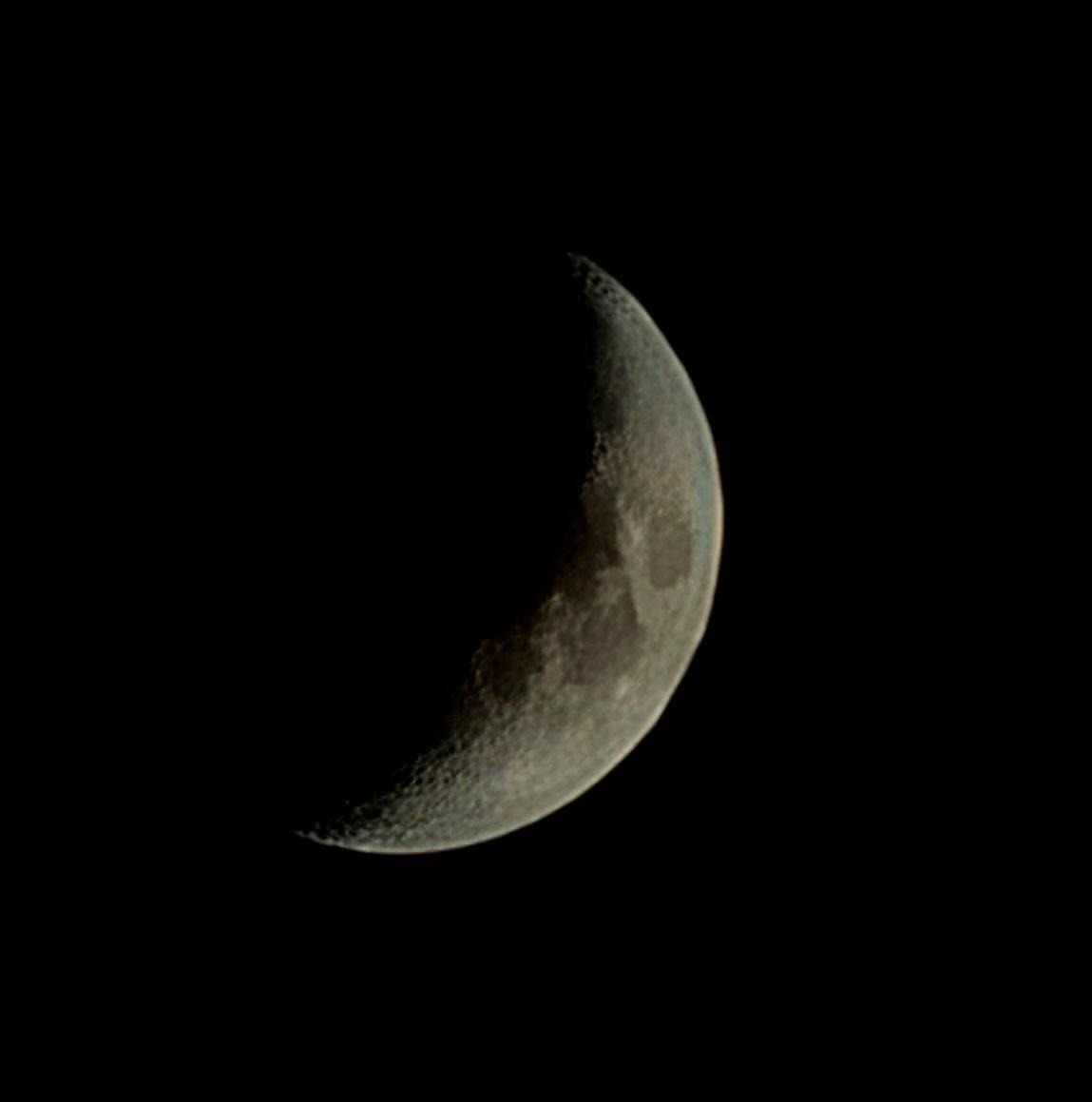
📷 #MoonPic w/ #Samung #S22, 12x digital zoom (w/ appropriate ISO and speed settings in "Pro" mode). 🌚

#Mond (#MondBild / #MondBilder) / #Moon (#MoonPics / #MoonPix / #MoonPicture / #MoonPictures) #Lua #Luna

Picture of the moon, zoomed 12x with appropriate ISO / speed settings; Samung S22 ("Pro" mode).
2024-05-13

سامسونج تعمل على إصلاح مشكلة قفل الشاشة في سلسلة Galaxy S21 و Galaxy S22

https://todaypic.net/technology/176955/

Client Info

Server: https://mastodon.social
Version: 2025.07
Repository: https://github.com/cyevgeniy/lmst