#wordpresshelp

2025-12-06

How to Enable or Disable the Falling Snow Effect on Your WordPress Blog

Have you noticed that snow is falling on some WordPress blogs? As you read the post, small flakes of snow gently drift down. Meanwhile, on other blogs, like mine, there’s no snow.

WordPress introduced the festive snowfall feature a few years ago. It only works when reading a post via the WordPress website. You won’t see it if you’re reading a post in the WordPress Reader or the Jetpack App unless you click through to the website. This time, it runs until 4th January 2026. But how do you turn the feature on or off? Easy – follow my instructions.

  • Go to your blog’s dashboard and click Settings – General.
  • Scroll down the page until you come to ‘Snow.’
  • You’ll see a box with the words ‘Show falling snow on my site until January 4th.’
Where to turn on/off falling snow on your WordPress blog
  • If you want snow to fall on your blog, tick the box. If you don’t want snow falling on your blog, untick the box.
  • Click the ‘Save Changes‘ box at the bottom of the page.
  • Ensure the changes are effective by opening one of your posts on the WordPress website.

I’m not a lover of anything moving onscreen while I’m reading, as I find it distracting. However, I know that many bloggers love the idea of gently drifting snowflakes while they read blog posts during the festive season.

The choice is yours. And now you know how to switch on or turn off snow falling on your blog.

For the above instructions, I’m using a desktop computer. The falling snow effect is only controlled through your WordPress.com dashboard, not the Jetpack mobile app.

Is it snowing on your blog? If not, do you want it to snow? Let me know why you like or dislike the idea of snowflakes drifting on WordPress blogs.

The featured image on this blog post is sourced from Pixabay. AI reviewed spelling and grammar errors.

You can follow me at the following sites.

Copyright @ 2025 hughsviewsandnews.com – All rights reserved.

#blogging #bloggingAdvice #bloggingHelp #bloggingTools #christmas #fallingSnow #howTo #snow #wordpress #wordpressHelp #wordpressTips

An image of the letter W in lots of blue badges.An image highlighting how to turn on/off the falling snow feature on the dashboard of a WordPress blog.
2025-11-30

November 2025 – This is a first! But I Have Good Reasons

The past three months have been busy outside the world of blogging, so much so that I didn’t get the chance to write and publish monthly round-up posts for September or October.

Did I feel bad? Did I apologise? No. Sometimes life gets in the way of schedules, and my blogging routine was thrown off course, but it happens to everyone, and nobody needs to apologise. From what I saw, my posts from September, October and November continued to receive engagement, and for me, it’s all about interacting with other bloggers, writers, and readers.

Better late than never. Without further ado, here is the monthly round-up for the past three months on Hugh’s Views and News.

  • WordPress has introduced a new blog recommendation feature that displays recommended blogs on your Gravatar profile, improving visibility. My post details how to add the blogs you love the most.

This New WordPress Feature Helps Promote The Blogs You Love

  • Here’s a fresh writing challenge that everyone is encouraged to try. Can you write a story using only 101 words (no more, no less) based on a featured image?

Bloggers/Authors: Are You Ready For A Writing Challenge?

  • Where do the images and photos in your blog posts originate? Are you certain you’re not infringing the law by using copyrighted images?

Where To Legally Source Amazing Images For Your Blog Posts

  • How easy do you make it for visitors to share your blog posts and boost the visibility of your blog? Take action: These nine options are easy to find and activate.

9 Important Options on Your WordPress Blog to Check Now!

  • This is why you should never forget to put the clocks back before going to bed.

When The Clocks Go Back

  • Springtime in Paris! Sounds romantic, doesn’t it? Think again!

Experience the Magic of Spring in Paris! But not as you know it!

  • Are photography blog posts worth commenting on? Why I Decided to Stop Publishing My Photography.

4 Never Before Seen Photos And Why You Need To See Them

  • This post outlines various scams affecting bloggers, including voicemail scams and email phishing claims that appear to come from WordPress. Don’t become a victim of a scam or fined for downloading copyrighted material.

The Latest Blogging and Publishing Scams You Need to Be Aware Of Now

The featured image on this blog post is sourced from Pixabay. AI reviewed spelling and grammar errors.

Follow Hugh On Social Media.

Copyright @ 2025 hughsviewsandnews.com – All rights reserved.

#blogPosts #bloggingAdvice #bloggingHelp #bloggingScams #bloggingTips #flashFiction #hughsViewsAndNews #hughsViewsNews #photography #wordpressHelp #wordpressThemes

An image of the letter W in lots of blue badges.
2025-11-17

The Latest Blogging and Publishing Scams You Need to Be Aware Of Now

Let me begin with a new scam that is unrelated to blogging or publishing. It’s a scam that comes via a voicemail message on mobile phones.

I’ve lost track of how many times I’ve had the same call and message saying, ‘Please add my number to WhatsApp.’ Each time, the number the scammer uses is slightly different, but it’s always the voice of the same woman.

Thanks to Apple’s advanced AI, my phone now does a great job at identifying spam calls and sends them straight to voicemail. It doesn’t even ring. The spammers’ numbers then show in my call list, which I mark as ‘Spam – Delete and send details to Apple.’ I should add that since I enabled AI on my phone, the number of spam calls I receive has dropped significantly.

The latest Blogging scams

Recently, I encountered a concerning blogging email scam. It purportedly originated from WordPress, claiming that my payment details were incorrect in my account and included a link for me to click to rectify them.

I immediately recognised the email as fraudulent because the email failed to address me by name. All it said was ‘Dear WordPress User,’ But what alarmed me was that the same scammer went on to also send me the same email through the ‘Contact Hugh‘ form on my blog, neglecting to begin the message with ‘Dear Hugh.’ It’s important to note that I request anyone using the form to begin their message with ‘Dear Hugh,’ as this practice helps identify potential spam, particularly from automated spam bots.

I don’t know how the scammer obtained my email address, but it must have appeared on a list with some connection to WordPress. This is likely how they discovered I had a WordPress blog, although nowhere on my blog do I provide an email address. Anyone wanting to contact me must go via the ‘Contact Hugh’ form.

Although this was an easy scam for me to spot, I still feel bad for any blogger who falls for it. If you are unsure whether an email from WordPress is genuine, always log in to your WordPress account to verify any details. Never click on any uninvited links and never give an email address anywhere on your blog.

Image generated using WordPress AI

However, more concerning was news of a blogging scam that involved using royalty-free platforms, such as Pixabay. Author, writer and blogger Jacqueline Lambert left a comment on my recent post, Where To Legally Source Amazing Images For Your Blog Posts.’ outlining how she was almost scammed by a company after using a royalty-free image from Pixabay on one of her posts.

I strongly encourage you to read Jacqueline’s insightful post ‘Bloggers Beware The Copyright Trolls – Even If You Use Royalty-Free Images‘ to glean valuable lessons from her experience. It is imperative to remain vigilant and not become a target of such scams that specifically seek to exploit bloggers.

I would also like to reiterate that downloading and publishing copyrighted images or photographs on your blog is strictly prohibited. Always verify that such materials are free for use. This also applies to reblogging blog posts from other bloggers that contain images or photos. If you share copyrighted images from another blogger’s post, you could be fined.

A plea to you – yes, you!

Despite my recent post addressing copyright infringement, I continue to observe bloggers (you know who you are) using images and photos in their posts without proper attribution regarding their sources. They probably believe that nobody will come after them for downloading and using copyrighted images, but I know of two bloggers who have been fined for doing so. Never believe that it will never happen to you.

Even if the images and photos are your own, I recommend that you indicate in your post that they are your property. If you don’t believe me, read Jacqueline’s post. As she elaborates, numerous companies are employing image recognition technology to scan the internet for unauthorised use of images and photographs, especially in blogging posts. Some bloggers have even been threatened with legal action and fines for using their own pictures.

The latest publishing scam

My thanks again to Jacqueline, who recently published a guest post by author Peter Barber about a publishing scam he fell for. Titled ‘Publish and Be Damned: How I Got Scammed, Learned My Lesson, and Came Out Fighting‘, Peter details how he fell head-over-heels for a scam many authors will probably encounter at some point in their writing lives. I urge you to read his post and learn from it because it could happen to you.

Are you aware of any current scams related to blogging or publishing? Please share details in the comments section. Have you ever fallen victim to a blogging or publishing scam? If so, what happened?

The featured image on this blog post is sourced from Pixabay. AI reviewed spelling and grammar errors.

You can follow me at the following sites.

Copyright @ 2025 hughsviewsandnews.com – All rights reserved.

#blogging #bloggingScams #copyright #phishing #pixabay #publishing #royalFreeImages #scammers #scams #wordpress #wordpressHelp

An image of the letter W in lots of blue badges.An image highlighting the word 'Scam'
2025-10-20

9 Important Options on Your WordPress Blog to Check Now!

I’m surprised by how many bloggers miss the opportunity of having their posts shared for free by not displaying sharing buttons on their blog posts.

Of course, some bloggers don’t want any of their posts shared, but they tend to be in the minority.

In today’s digital age, having social sharing buttons on your blog is crucial for expanding your reach and boosting engagement. This post will guide you through the steps to add sharing buttons to your WordPress blog and emphasise the benefits of including them.

For the purpose of this guide, I’m using an iMac desktop computer.

To add and edit sharing buttons on your WordPress.com blog, follow these steps:

  • Log in to your WordPress.com account.
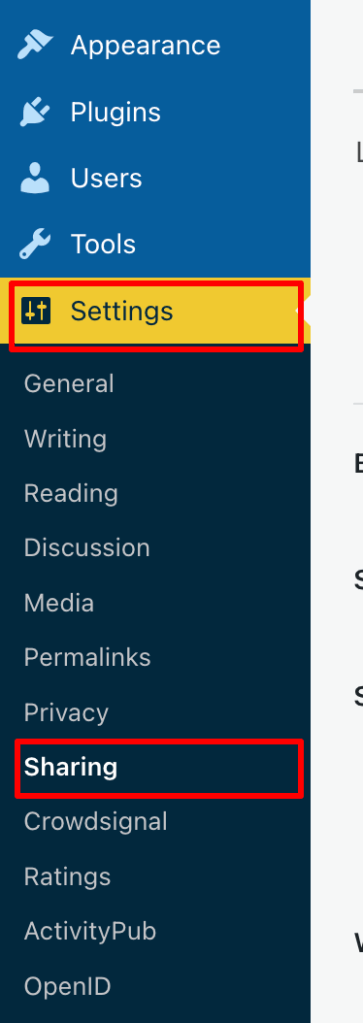
  • From your dashboard, navigate to ‘Settings‘ and select ‘Sharing.’
Click the ‘Sharing’ option.

You’ll be taken to the ‘Sharing Options‘ page of your blog, where you will see a variety of options that include –

  • Available services
  • Enabled services
  • Live preview
  • Button style
  • Sharing label
  • Show buttons on
  • WordPress.com Likes are
  • WordPress.com Reblog button
  • Comment Likes are

Let’s have a look at each of these options and what they mean.

Available services – This displays any sharing buttons not currently visible on your blog. To add an available sharing button, drag it to the ‘Enabled services‘ box and click the ‘Save‘ button at the bottom of the page.

There is also an ‘Add a new service‘ link that, when clicked, allows a user to add new sharing services that are not currently available on WordPress.

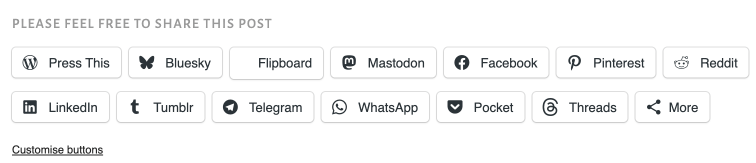
Enabled Services – This section shows all the sharing buttons currently on display on your blog. Here’s an image of the sharing buttons available on my blog posts and pages.

Sharing buttons on Hugh’s Views And News blog.

Notice the ‘Customise buttons‘ link under the buttons. Click this to be taken straight to the ‘Sharing options‘ page of your blog.

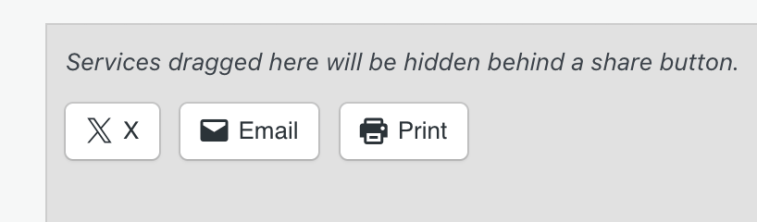
You may also have noticed the ‘More‘ sharing button. This is where you can group certain sharing buttons under one button. To do this, simply drag the buttons you want to hide to the ‘Services dragged here will be hidden behind a share button‘ box. On my blog, the ‘More‘ button includes sharing buttons for ‘X’, ‘Email’ and ‘Print.’

Hide sharing buttons behind one button.
  • To rearrange the order of how sharing buttons display on your blog, simply drag the buttons to the order you want them in. Remember to save any changes.
  • To remove a sharing button from your blog, drag the button to the ‘Available services‘ section and click the ‘Save‘ button at the bottom of the page.

Live preview – This section shows how the sharing buttons display on your blog.

Button style – There are four options to choose from.

  • Icon + Text
  • Icon only
  • Text only
  • Official buttons

On my blog, I have chosen sharing buttons to show ‘Icon + Text’ as this helps those using speech software know which sharing button is which. If you use ‘Icon only,’ speech software won’t know what each sharing button is.

Sharing label – This section allows users to change and display their own message above their sharing buttons. Simply add the text you want and click the save button.

Show buttons on – Choose where on your blog you want sharing buttons to appear. Place a tick next to the options and click the save button.

Choose where you want the sharing buttons to display on your blog.

WordPress.com Likes are – This is where you can turn off (or on) the ‘Like’ button on blog posts and pages.

WordPress.com Reblog button – This is where you can turn off (or on) the reblog button on blog posts and pages.

Comment Likes are – This is where you can turn off (or on) the availability of a ‘like’ button on comments on your blog.

  • Once you’ve added sharing buttons to your blog, remember to always test them. The best way to do this is to visit one of your blog posts to ensure the sharing buttons appear as intended. Click on each button to check that it links correctly to the respective social media platforms.

Top tip: If you have an account on a social media platform, remember to ensure that there is a sharing button for that platform on your blog. You don’t need to remove share buttons where you don’t have an account, as other bloggers and readers may want to share your posts and pages to their own social media accounts. For example, I don’t have a Facebook account, but I allow visitors to my blog to share my posts and pages on their Facebook accounts.

But, at the end of the day, it’s your decision as to how many sharing buttons you want to display on your blog.

Advantages of Having Sharing Buttons on Your Blog

  1. Increased Visibility: Sharing buttons allow visitors to easily share your content with their networks, leading to greater visibility and new readers.
  2. Enhanced Engagement: When users share your posts, it engages their followers, creating conversations and interactions around your content.
  3. Improved SEO: Social shares can boost your search engine rankings. Search engines often view shared content as more credible and relevant.
  4. Brand/Blog Awareness: Every share increases exposure for your brand/blog, helping you capture a larger audience over time.
  5. Traffic Boost: Each share potentially drives more traffic back to your blog, increasing your overall reach and influence in your niche.
  6. User-Friendly: A streamlined sharing process enhances the user experience, encouraging visitors to interact more with your content.

By integrating sharing buttons into your WordPress blog, you not only make it easier for readers to share your posts but also create new opportunities for engagement and growth.

Summary:

  • Many bloggers miss out on free content-sharing opportunities by not displaying sharing buttons. These buttons are crucial for expanding reach and boosting engagement.
  • It’s easy to add and display sharing buttons on your WordPress blog. Follow the guide in this post.
  • Ensure you deal with each option available to you on the ‘Sharing options‘ page of your blog.
  • There are many advantages of displaying sharing buttons on your blog, including increased visibility, enhanced engagement and improved SEO ratings.
  • If you have a social media account, ensure you display a sharing button for that account on your blog.
  • Add as many sharing buttons as you like, even for those social media platforms where you don’t have an account.
  • Test that the sharing buttons are working correctly at least once every few months.
  • Make the most of the other options available on the ‘Sharing options’ page of your blog, such as switching on/off the like button and whether or not you want a ‘Reblog’ button to show.

I want to open up the conversation and hear from you. What social media platforms do you find most effective for sharing your blog content? Have you noticed an increase in your blog traffic after adding sharing buttons? How much of a difference has it made? Have you experimented with the different button styles? Which one do you think looks best on your blog? If you could add one feature to the sharing buttons on your blog, what would it be and why?

Layout, content, settings, and format might differ on self-hosted blogs.

Follow Hugh on social media. Click the buttons below.

The featured image on this blog post is taken from Pixabay. AI checked spelling and grammar mistakes. Images, which were taken from screenshots of my blog, were created by me.

Copyright @ 2025 hughsviewsandnews.com – All rights reserved.

#Blogging #BloggingAdvice #BloggingHelp #BloggingQuestions #BloggingTools #HowTo #SharingButtons #SocialMedia #WordPress #WordPressHelp #WordPressTips

An image of the letter W in lots of blue badges.An image that highlights Settings and Sharing on the dashboard of a WordPress blog.An image showing the sharing buttons on a WordPress blogAn image showing hidden sharing buttons behind a 'More' button on a WordPress blog.
Cool Web Designcoolwebdesign
2025-07-16

Websites' MOT day! 🔧🙂
Every Wednesday, we check in with our Cool Care Plan clients – updating their sites, testing backups, squashing bugs, and offering support. It’s like an MOT for your website – peace of mind, no tech stress.

Cool websites, zero stress. Ask about the Cool Care Plan.

2025-03-31

Did You Miss Any Of These? Monthly Round-Up – March 2025

I only published four posts (including this one) this month, compared to eleven in March 2024. Yet, compared to March 2024, my blog only got around 100 fewer views.

SEO (Search Engine Optimisation) continues to play a big part in bringing new visitors to my blog, so don’t allow those who say that SEO doesn’t matter to tell you otherwise. SEO is important if you want more visitors and potentially new followers to your blog.

If you have any questions about SEO, leave them in the comments section.

Here is your opportunity to catch up on my three blog posts published in March 2025.

  • Bluesky is an engaging social media platform for bloggers and creators. It fosters community despite challenges from bots and scammers. My ultimate guide to Bluesky includes details on engaging with other users and dealing with bots and scammers.

The Ultimate Guide to Engaging on Bluesky: Tips, Features, and Strategies for Success

  • Engaging blog post titles are crucial for attracting visitors; they significantly influence click-through rates and post engagement. My post details how to create the best titles for your blog posts.

11 Tips to Craft Irresistible Blog Post Titles That Attract New Visitors

AI enhances blogging by improving efficiency, creativity, and SEO, but it also presents risks, such as a reduced personal touch and potential dependency. This post explores the benefits and drawbacks of using AI in blogging. Do you support using AI for blogging, or do you oppose it? Share your thoughts by joining the discussion.

Harnessing AI in Blogging: Benefits, Challenges, and Personal Insights

Don’t forget to add a BlueSky sharing button to your blog.

Follow Hugh On Social Media.

Copyright @ 2025 hughsviewsandnews.com – All rights reserved.

#AI #ArtificialIntelligence #BloggingAdvice #BloggingHelp #BloggingTips #BlueSky #HughSViewsAndNews #HughsViewsNews #SocialMedia #SocialMediaHelp #WordPressHelp

An image of a desktop computer, camera and mobile phone with the words 'Did You Miss Any Of These Blog Posts On Hugh's Views And News? March 2025
blauschrift (sie / she)blauschrift@literatur.social
2025-02-16

Hallo und "Help, please" an die WordPress-Expert*innen hier,
Ich komme über Suchmaschine und Chat-KI leider überhaupt nicht mehr weiter.

Habe mein Theme zu 2025 gewechselt (Permalinkstruktur hat sich nicht verändert). Seitdem funktionieren die Filter über Kategorien und Schlagworte nicht mehr. Statt der gefilterten Ergebnisse werden einfach immer alle Beiträge angezeigt. Woran kann das liegen und wie kann ich das beheben?

Thx a billion im Voraus. ✨

#wordpress #wordpresshelp

2024-12-07

#WebDev friends, I could use your advice! 💡💻
I’m working on improving my #WordPress portfolio page at laniecarmelo.tech. My current portfolio is here: laniecarmelo.tech/dev-in-progr. I thought I was happy with the setup, but I realized it’s not filterable, which I definitely need as I add more projects! 😅
Each project includes a description, GitHub link, live demo, screenshot, and embedded demo. As a #BlindDeveloper, I can't visually assess layout changes, so I’d love any feedback on both functionality and design.
Now I’m looking for solutions:
1️⃣ Can anyone recommend #AccessibleWordPress plugins for filterable portfolios?
2️⃣ Any way to add filtering to my existing setup without server access?
3️⃣ Tips for keeping the portfolio page #accessibility-friendly and well-organized?
Thanks in advance for your help! 🙏
#WebAccessibility #PortfolioDesign #WordPressHelp #BlindCoders #Developers #tech #technology #blind

2024-10-04

Does anyone know of a spam plugin that automatically marks posts with repeated keywords as spam. I don't need anything more complex.

(Yes, I know about Akismet. Do not want! Anything substantially more complex than what I'm asking about is likely to be looked at with suspicion, and not used.)

I get a lot of spam of the form:

"fnord fnord fnord
[blah]"

"glibble glibble glibble
[blah]"

I know these keywords are put there to see whether the comment is published. Marking these automatically as spam would cut down on a lot of crap.

Thanks.

#WordPress #WordPressHelp

2024-07-08

I've searched, not finding useful posts, hoping for help. I have a personal Wordpress blog bikestylespokane.com. It has a bunch of pages with random unknown "author" bios clearly set up to get clicks to various sites. I never authorized these and they don't show on the actual Author list. Only found them accidentally looking at my stats report. Any way to find/delete in batches? How do I stop these from being created? Screenshot example below.
#WordPress #WordPressHelp #Blogging #TechSupport

Screen shot of a page on the Bike Style Life blog for Author: Dolohi with a bunch of text about the term "iganony".
2024-04-02

Wordpress.com backup plugin question:

I just installed "UpdraftPlus" plugin to backup my Wordpress site.

It can backup to GDrive. But the access it requires seems excessive. Apart from having access to the specific folder that it's backing up to, which is understandable, it also wants access to be able to download and see ALL my GDrive files.

That's not right, right?

Anyone recommend a Wordpress backup plugin that is safer than this?

#WordPress #WordPressHelp

wpWax OfficialwpWax
2024-02-29

Client Info

Server: https://mastodon.social
Version: 2025.07
Repository: https://github.com/cyevgeniy/lmst