#PiCorePlayer

2026-03-11

@kuketzblog
Gerade #Tidal, #Deezer und #Quobuz selbst durchgetestet.
Was bei uns wichtig war:

1. Funktioniert die App auch #offline tadellos, wenn die Firewall sie vom WWW trennt (weil gerade nicht im WLAN)?
=> Frustriert schnell, wenn man nach Feierabend auf dem Fahrrad sitzt und ständig hängt das Ding.

2. Gibt es ein Plugin für unseren Lyrion Music Server (#LMS), so dass eine #Squeezebox / #PiCorePlayer gefüttert werden kann?
(Auch hier sind Amazon, Apple und YT/Google raus.)

3. Taugen Recommender und Benachrichtigungen zum Wochenende?
(Ich suche lieber selbst, aber SWMBO sieht das leider anders...)

#Spotify hat außerdem "exclusive" Podcasts, die man nicht einfach per AntennaPod catchen kann. 😏

zeitverschreib ⁂zeitverschreib@freundica.de
2026-03-06

Hätte ich mal nicht damit angefangen. ::cool::

Seit wenigen Tagen dudelt bei mir die Musik per #piCorePlayer auf einem Pi 3 aus der Stereoanlage im Wohnzimmer. Der #Lyrion dazu läuft auf der heimischen NAS, die sowieso schon die Audiodateien für #Plex, #Jellyfin und #Navidrome intus hat.

Dazu kam dann recht schnell eine Squeezebox aus der Bucht, die natürlich noch neue Knöpfe gedruckt bekommt. Badezimmer also auch abgedeckt.

Und was fehlt jetzt noch? Richtig, das Schlafzimmer und eventuell die Küche.

Halt, Moment. Der Onkyo-Receiver - schon recht betagt - will noch händisch bedient werden. Da muss es doch...

Ja, gibt es. HomeAssistant kann mit diversen Onkyos quatschen, hoffentlich auch mit meinem.

#Rabbithole

2026-02-25

@nan0 Ich habe mich vor 2 Jahren dem - und -Universum verschrieben (siehe mastodon.social/@macst3r/11185 ff.). Die -Android-App und die Web-GUI des Lyrion Music Servers sind nun nicht gerade sexy, aber ich komme damit sehr gut klar. Es gibt auch einen Desktop-Client, der quasi die UI des Radios in ein Fensterchen packt. Und das Highlight schlechthin ist für mich definitiv die Multiroom-Funktionalität.

Tiny Spheres of Baasheid1000baasheid@ieji.de
2026-02-15

Control of #piCorePlayer / #LyrionMusicServer via #android phone in this case is done via #Squeezer app, available via #fdroid. Setup is a breeze, filling in the IP address of the pi and making sure you're on the same WiFi network. :blush:
Attached to this toot some screenshots of Squeezer.
Submitting plays to #ListenBrainz via #SimpleScrobbler app that automatically picks up the player as soon as you start using it. Does anyone else still use this? I see the app is not on F-Droid anymore.

Setup was relatively straight forward, as presented on docs.picoreplayer.org/how-to/
Most of it is covered in these docs, although simply mentioning that you can reach the pi directly via the IP address would be more useful than only mentioning that SSH is disabled by default and then explain how to reach it via SSH without enabling SSH.

Screenshot of the Squeezer app, showing the now playing screen. At the top, it says "piCorePlayer". Then the cover of a release, in this case the album "Four" by "Sundl". Below the cover, the name of the song, "Oak", the album title, and the artist's name.

Below those, we see playback functions such as a shuffle button, the previous track button, pause button, next track button, and repeat button, with a progress bar above these for the track currently being played, turning orange for the part that has been played until now. At the bottom a volume bar.Screenshot of the Squeezer app, showing the Album Artists screen, showing a list of artists, artists's picture on the left, name to the right of the picture.
At the bottom, current song playing, with a pause button to the right.Screenshot of the Squeezer app, showing the Albums screen, showing covers of each album, two columns, three rows visible, name of release and artist's name below each cover.
At the bottom, current song playing, with a pause button to the right.Screenshot of the Squeezer app, showing the Albums screen, alternative view, showing a list of releases, release's picture on the left, year of release in brackets, release name, and artist's to the right of the cover.
At the bottom, current song playing, with a pause button to the right.
Tiny Spheres of Baasheid1000baasheid@ieji.de
2026-02-15

It's been a month since I set up #piCorePlayer with Lyrion Music Server (LMS) on my old Raspberry Pi 3 model B+ with #HifiBerry DAC Pro. Via the digital audio converter, the Pi is then connected to my stereo amplifier.

There's not really anything to look at. It's just a small box with cables in my combined bookcase/record cabinet.

At the same time, it's pretty great. 😍

Since I have no #streaming service subscription, this is a great way to play all the #FLAC and #MP3 files that I received with #record purchases, bought or received from #Bandcamp, and ripped from the CD's that I own. It also connects to Bandcamp, so you can listen to Bandcamp Weekly etc., or radio stations that broadcast online (, too).

Attached to this toot some screenshots of the desktop web version of LMS.
Submitting plays to #ListenBrainz via #WebScrobbler does not seem to work, so when controlling LMS via my laptop there are no scrobbles.

#LyrionMusicServer

Screenshot of Lyrion Music Server in browser. 
We're looking at the artist display, in this case the band Arab Strap, shown at the top left with photo, band name, genre (unknown), number of albums (5).
Below that are five album covers, followed by the album titles and years of release.
On the right is a column showing the current playlist, in this case the album Four by the artist Sundl.

At the bottom are playback functions such as the previous track button, pause button, and next track button, with a progress bar for the track currently being played. The track itself is directly to the right of the next track button, with the album cover.Screenshot of Lyrion Music Server in browser.
We're looking at the releases overview, showing album / release covers; below each cover the release title, year of release in parentheses, and below these, the artist's name.
Visible are ten covers per row, three rows. Some covers are visible twice, meaning the underlying database needs some cleaning up - I have MP3 and FLAC in separate folders but read at the same time.

At the bottom are playback functions such as the previous track button, pause button, and next track button, with a progress bar for the track currently being played. The track itself is directly to the right of the next track button, with the album cover.Screenshot of Lyrion Music Server in browser.
We're looking at the album artists overview, showing artists photos, if available, or dummy image; below each photo/image, the artist's name.
Visible are ten artists per row, three rows, fourth cut off at the bottom of the screen.

At the bottom are playback functions such as the previous track button, pause button, and next track button, with a progress bar for the track currently being played. The track itself is directly to the right of the next track button, with the album cover.
2026-01-13

#Spotify hat jetzt nicht nur 22€ fürs Familienabo abgebucht.
Die Schnittstelle zum #LMS (#LyrionMusicServer) ist auch fritten. 😡

Schluss damit!

Tidal gibts für 17€ mtl. und das Plugin für unsere Squeezeboxen (#PiCorePlayer) funktioniert. 👍

Was ich so in der Liste zum Reinhören hatte, gibts da auch.

(Mir persönlich reicht ja #Bandcamp, aber #SWMBO und die Kinder sind ein anderes Thema...)

Screenshot der in Tidal als Favorit markierten Alben.
αxel simon ↙︎↙︎↙︎axx@mstdn.fr
2026-01-11

As a counterpoint to my bad Volumio experience, i'd like to share my delightful experience with #picoreplayer

Straightforward install, runs very decently on raspberry pi 0 and 2, a wealth of info in the official docs and on the Lyrion forum (which are clearly frequented by lots of people who know what's what with the two projects) and managed to get everything working the way i wanted in a few hours, including the quirky little Pimoroni Pirate Audio amp with its cute screen.

(Post 1/3) - Music Assistant & PiCorePlayer: Der nächste Stolperstein

Nach dem großen Server-Neubau und der erfolgreichen Rettung meiner Daten wollte ich Music Assistant wieder zum Laufen bringen, um meinen PiCorePlayer mit FiiO DAC zu bespielen. Doch der Player blieb stumm. Music Assistant fand ihn nicht, oder der PiCorePlayer stürzte bei jedem Wiedergabeversuch ab.

Start einer neuen Fehlerforschung, die tief in Netzwerk, Firewalls und Audio-Treiber führte...

#MusicAssistant #PiCorePlayer #Debugging #HomeLab #Audio

2025-12-20

Ja krass, das ist ja schick:
Mit picoreplayer.org lässt sich sogar auf einem #Raspberry Pi 2+ performant (etwa 20% cpu) ein Line-In Streaming realisieren. Dies in Flac oder MP3. Einzurichten und unter Tweaks, Absatz "Audio tweaks" -> "set Streamer" aktivieren. Das ist so ziemlich mal die simpelste Lösung, um einen Audiostream irgendwohin zu schicken, z. B. auf einen Lyrion Music Server, mit etwa 3 Sekunden Versatz.
#multiRoomAudio #picoreplayer #squeezebox #linein #opensource #audio #rpi

Dendrobatus AzureusDendrobatus_Azureus@bsd.cafe
2025-12-04

✨ 💖💕🌹💐💖 💙💜💖🦋🌺💜🎼 🎶 🎸 Now playing Clifford Brown Max Roach Quintet - Clifford's Axe 🛍️ 🌑 🔔 88kHz Digital version 🎹 📚 📖 🎻🎻 🎼 🎶 ✨ 💖💕🌹💐💖 💙💜💖🦋

Signal Path
SBC Pi5
Pi Core Player
Playback hardware Audio Interface
Instrument Mixer
Mixing Console
Aux0 send Effect rack unit0 channel 0
Aux1 send Effect rack unit0 channel 1
Aux 0 return Master Bus channel 0
Aux 1 return Master Bus channel 1
Master faders
XLR output 0 1
Headphone Amps 0 1 (4 channel x 2)
1/4" output 0 1
Digitizer input 0 1
DAW

#NowPlaying #CliffordBrown #MaxRoach 🎶 #Jazz #Sax #Tenor #Trumpet #E_flat 💫 #Legacy #Music #RetroMusic

#PiCorePlayer #Raspberry #Pi5 #SBC #technology #ARM #OpenSource #programming

Photograph composed in total darkness illuminated by IPS LED panels only shows three screens displaying 

SBC Pi Core player left 

Web interface to Pi Core Player on dashboard nbk on middle 

Dashboard main display on right

Barely visible is the SBC before panel 0 with 2x micro HDMI cables power keyboard & digitizer / Audio Interface plugged in


Setup gives recording engineer max control.
Matt Knight (KN6HTM)matt@knight.fyi
2025-08-06

Big amp vs mini amp 🙈

From a power perspective it’s no comparison, but the HiFiBerry MiniAmp along with PiCorePlayer lets me use AirPlay 2 to play music which is useful in my office.

#hifi #av #audiophile #pioneer #hifiberry #miniamp #picoreplayer

Pioneer amp alongside the new HiFiBerry MiniAmp
2025-07-06

@matt303 picked up a CWWK P6 i3. Put 32GB ram and some SSDs in it. Pretty happy with it. Using Ubuntu server as used to that rather than a nas OS with docker/containers.

Don't have raid as not required (the files are copies of ones on my Mac mini)
Reset up #PiCorePlayer
So now have integration I want. Just wish Cambridge Audio would implement Lyrion or Plexamp

google.com/aclk?sa=L&ai=DChsSE

2025-07-06

New media server definitely an improvement on old one as only difference in setup with my #cambridgeaudio EVO150 which can now stream hi res files directly. Sadly there's no #LastFM or #LyrionMediaServer integration so still need #PiCorePlayer for better integration

2025-04-24

Ça me chauffe bien ce petit #DAC pour #RaspberryPi .

Vous me conseillez quoi comme serveur de musique local ?
Je vois qu'il existe des trucs comme #Volumio, #MoOde , #PiCorePlayer etc... mais j'ai jamais testé.

Site marchand electronique ou l'on voit l'article Raspberry Pi carte audio iQaudio DAC Pro. Il s'agit d'un HAT qui fait carte son que l'on broche sur les GPIO du raspberry.
2025-03-14

Okay, #Volumio war eine Vollkatastrophe. Die App funktionierte nicht zum einrichten, nachdem es installiert war, ließ sich nichts abspielen über #musicassistant .
Jetzt teste ich mal #PiCorePlayer . Funktioniert schon mal besser, aber noch nicht zuverlässig...

2025-03-12

@awfulwoman I have a couple of #chromecast Audio devices myself, but I'm slowly phasing them out with pi zero boards running #piCorePlayer hooked up to #homeassistant .

I'm curious about other alternatives, though.

2024-10-14

I'm trying to convince myself that I need some sort of voice assistant, smart screen thingy. I have a 1st gen Google nest hub, used as a timer in the kitchen and for listening to the radio. Bought before I de-googled my life.
So I want to do that, but also use with my picore player and IKEA trådfri lights.
I'm not technical, I don't know how to solder or code, but my thumbs are in the right places, mostly. Suggestions?

#HomeAssistant #HomeLab #PiCorePlayer #Linux #Rpi #RaspberryPi #FOSS

2024-08-06

I've been going back and forth over the last few years using #Volumio and #piCorePlayer. Just installed the latter again, mostly because I don't really like the UI of Volumio. I have simple needs, just playing music off an SMB share on another pi. I may try to get #Qobuz working at some point, but I don't have a subscription right now.

2024-07-20

To eliminate network issues have repurposed #Pi4 with #piCorePlayer and #lyrionmusicserver (4TB usb drive for storage) using a digital out DAC (coax) to my amp/streamer. Though for some reason that eludes me all sample rates are being down sampled to nearest multiple of 44.1 . Can't seem to find any documentation online to help fix. may need to play with the different options on #squeezelite tab

2024-05-18

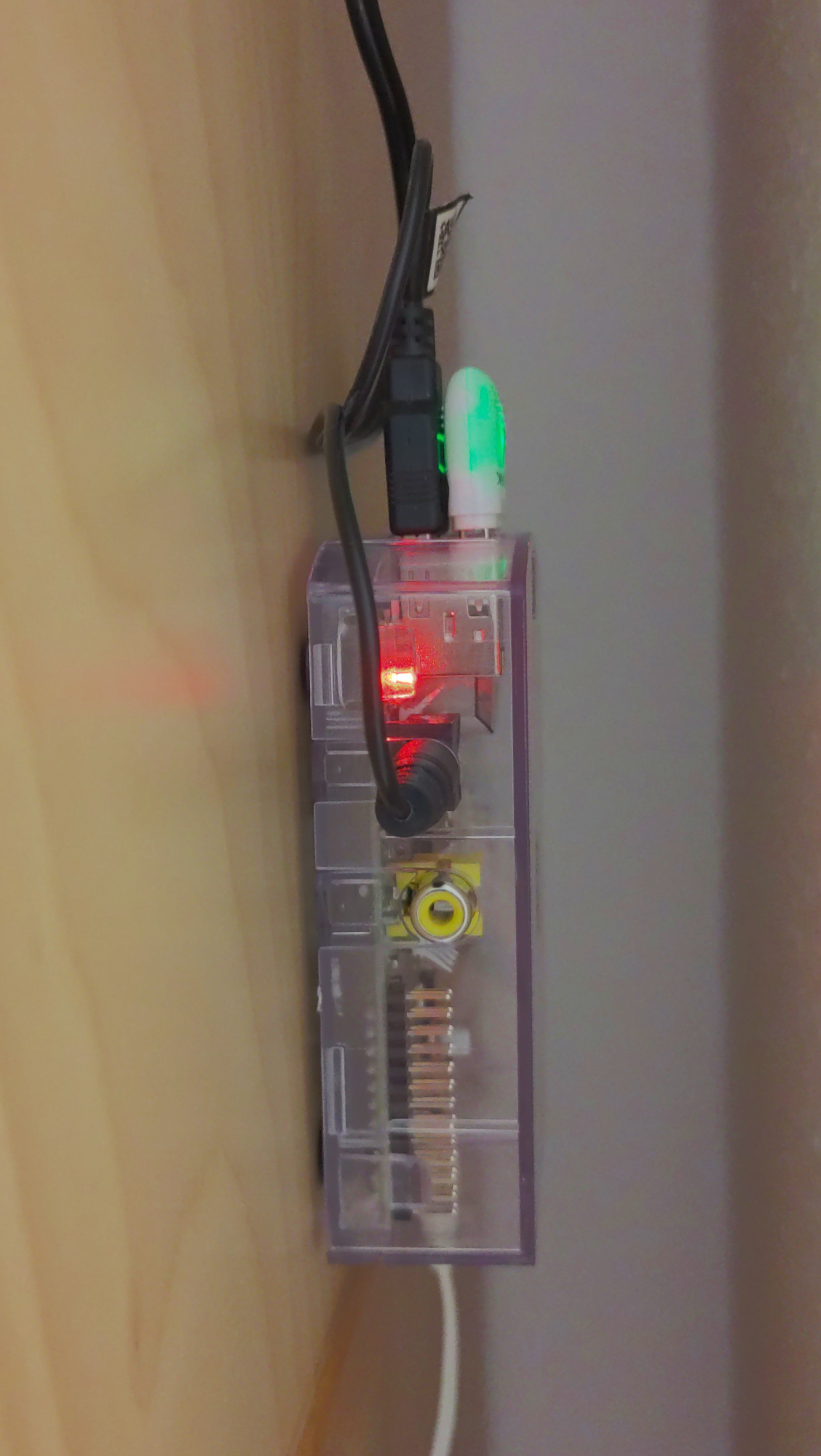
Ich habe den !#DECT 400-Taster kürzlich mit meinem -#piCorePlayer-Projekt kombiniert (mastodon.social/@macst3r/11236) und habe nun im Homeoffice zwischen Schrank und Wand ein kleines, verstecktes am Laufen. Ein kurzer Tastendruck pausiert die Wiedergabe bzw. startet sie erneut, während ein langer Druck die Stromversorgung kappt oder eben wiederherstellt. 🙌

Foto eines sich im Betrieb befindlichen Raspberry Pi Model B in einem transparenten Gehäuse. Zusätzlich zum MicroUSB-Stecker für die Stromversorgung stecken ein WiFi-USB-Adapter und ein USB- und Klinkenstecker von Lautsprecherboxen (nicht sichtbar) in dem Gerät. Das Raspberry Pi-Gehäuse klebt am Seitenteil eines Schranks und steckt zwischen diesem Schrank und einer Wand in einer Nische.

Client Info

Server: https://mastodon.social
Version: 2025.07
Repository: https://github.com/cyevgeniy/lmst