
@kuketzblog Wenn ich wüsste, dass ich als #blinder der auf einen Bildschirmleser wie #TalkBack oder #VoiceOver angewiesen ist, die Einrichtung selbst vornehmen könnte, dann würde ich mir das sofort ansehen. So habe ich die Qual zwischen Android und iOS.
#TalkBack
ボリューム調整不具合修正。「Android ユーザー補助設定ツール」v16.2.0.855052621配信
https://jetstream.blog/2026/01/15/android-accessibility-suite-v16-2-0-855052621-release/
#jetstream_blog #新機能情報 #Android #Android_Accessibility_Suite #Android_ユーザー補助設定ツール #TalkBack #選択して読み上げ
Any #TalkBack users know how to stop the constant reporting of font information that I've been getting lately? Or is it just something I'm stuck with?
*Update. RIM may work with screen readers other than JAWS.*
(Note: You will need to skip down several headings to find the beginning of the article)
I can't comment on this from a business perspective. But I do know that I have never been able to connect remotely to any of my computers, either from Windows to Windows or from Android or IOS to Windows, with any commercially made program for the purpose. The only one that works for me is NVDA Remote, which works on all three platforms, with Windows and the NVDA screen reader being a requirement. The limitation, however, is that I can't hear the sound on the controlled computer, nor can I transfer files between it and the controller. Fortunately, I don't really need these features and am happy just being able to control my machines at all. But for those who do need them, RIM allows this, but only for users of JAWS (which costs several hundred dollars/NVDA is free), and the last time I checked, it is also very expensive for an individual user who doesn't require it for work purposes. I'm also not sure if it is cross-platform, so it may only work with Windows. If anyone knows of a free, accessible solution that works with NVDA, please let me know.
Remote Incident Manager (RIM)
https://at-newswire.com/remote-incident-manager-from-pneuma-solutions/?utm_source=toptechtidbits&utm_medium=email&utm_campaign=01012026&utm_content=editorial
#accessibility #Android #blind #computers #IOS #JAWS #NVDA #RemoteAccess #Talkback #technology #Voiceover #W
indows
Of all the features designed for blind users that are present on mobile devices, virtual braille input is, by far, the most powerful one.
Typing on a virtual representation of a physical [insert your keyboard layout here] keyboard works okay when you can see the keys, but when you're blind and use a screen reader, you have to explore the keyboard by touch. There are ways of making that process a little faster, but it's clunky and error-prone at best. Virtual braille input offers input based on relative finger positions instead of absolute input of a single finger. If you know braille, you can type. Talkback for Android and Voiceover for iOS both have this, though I'm only familiar with the apple version.
When you're on the go, you don't always have room for a physical keyboard, and the one the phone offers is very slow. Activate virtual braille input, and you can type and edit way faster than with normal commands. Get practice with them, and you can come pretty close to parity with traditional touchscreen typing input. it addresses the biggest pain point in using a phone without vision. Most of the swiping and tapping is pretty straightforward, sans inaccessible apps, but typing was always clunky at best. This isn't a perfect solution, but it's a massive improvement.
#blind #voiceover #talkback #braille #BrailleScreenInput #accessibility
So I was just playing a game from 2010. Danki Rompa or something. I got an English patched version.
I was just thinking about how in 2010 I could never imagine playing a visual novel. I didn't even know what those were, besides Blazblue. Of course, most of the story was spoken, but I didn't know a thing about the silent parts. I found out later that those were either choices, or narrative text, and stuff like that.
Now, not only am I playing it on my phone, I have AI to not just read the text, but also describe the characters, locations, stuff like that.
#tech #accessibility #blind #gaming #game #emulation #AI #Android #psp #ppsspp #TalkBack #GeminiAI

TyfloPrzegląd Odcinek nr 313
https://tyflopodcast.net/tyfloprzeglad-odcinek-nr-313/Cette semaine sur le site, l'actu des nouvelles technologies et de l'accessibilité.
#Apple #VoiceOver #iOS #iPadOS #macOS #watchOS #TalkBack #GoogleTraduction #Paperback #ScribeMeLiveAssist #BlindRSS #Roborock #Atlantic #CozyTouch

@garo for me the most important is that it must answer calls in all the messengers, from bare phone to WhatsApp to Telegram to Teams to Signal, you name it. And on Android it's a freaking quest to answer a call, each and every time. It's a good system, I like its openness and stuff, but while it doesn't allow me to simply answer a simple call reliably and while it has those atrocious keyboard issues… sorry, no. #Android #Accessibility #TalkBack
I feel like the android keyboard is really bad with talkback at the moment. Like, really bad.
This morning when I was in the car I had an issue with my Pixel Buds. I wanted to google it, but this is where the issue appeared:
As you may know, typing on Android devices with Talkback is already a quite slow experience even using direct touch. But imagine even if your finger is on the proper letter, if you lift it it chooses one that is next to it basically every third letter. If you have at least some bit of imagination, this will probably be very bad in said. And let me tell you, it infact is as crappy as it sounds.
I sincerely hope this is something which gets fixed as soon as possible. I already noticed it two or three days ago. If this won't be fixed, my phone simply isn't workable with and I will need to use voice messages and dictation for everything.
#accessibility #a11y #google #android #pixel #googlepixel #talkback #blind
Google presenta funzioni AI per l’accessibilità Android
#Accessibilità #AI #Android #Disabilità #GeminiAI #Google #Inclusività #IntelligenzaArtificiale #Notizie #Novità #Smartphone #TalkBack #TechNews #TemaScuro
https://www.ceotech.it/google-presenta-funzioni-ai-per-laccessibilita-android/

Reposting. Slots available.
After a short break, I’m returning to accessibility training services.
I provide one-on-one training for blind and visually impaired users across multiple platforms. My teaching is practical and goal-driven: not just commands, but confidence, independence, and efficient workflows that carry into daily life, study, and work.
I cover:
iOS: VoiceOver gestures, rotor navigation, Braille displays, Safari, text editing, Mail and Calendars, Shortcuts, and making the most of iOS apps for productivity, communication, and entertainment.
macOS: VoiceOver from basics to advanced, Trackpad Commander, Safari and Mail, iWork and Microsoft Office, file management, Terminal, audio tools, and system upkeep.
Windows: NVDA and JAWS from beginner to advanced. Training includes Microsoft Office, Outlook, Teams, Zoom, web browsing, customizing screen readers, handling less accessible apps, and scripting basics.
Android: TalkBack gestures, the built-in Braille keyboard and Braille display support, text editing, app accessibility, privacy and security settings, and everyday phone and tablet use.
Linux: Orca and Speakup, console navigation, package management, distro setup, customizing desktops, and accessibility under Wayland.
Concrete goals I can help you achieve:
Set up a new phone, tablet, or computer
Send and manage email independently
Browse the web safely and efficiently
Work with documents, spreadsheets, and presentations
Manage files and cloud storage
Use social media accessibly
Work with Braille displays and keyboards
Install and configure accessible software across platforms
Troubleshoot accessibility issues and build reliable workflows
Make the most of AI in a useful, productive way
Grow from beginner skills to advanced, efficient daily use
I bring years of lived experience as a blind user of these systems. I teach not only what manuals say, but the real-world shortcuts, workarounds, and problem-solving skills that make technology practical and enjoyable.
Remote training is available worldwide.
Pricing: fair and flexible — contact me for a quote. Discounts available for multi-session packages and ongoing weekly training.
Contact:
UK: 07447 931232
US: 772-766-7331
If these don’t work for you, email me at aaron.graham.hewitt@gmail.com
If you, or someone you know, could benefit from personalized accessibility training, I’d be glad to help.
#Accessibility #Blind #VisuallyImpaired #ScreenReaders #JAWS #NVDA #VoiceOver #TalkBack #Braille #AssistiveTechnology #DigitalInclusion #InclusiveTech #LinuxAccessibility #WindowsAccessibility #iOSAccessibility #AndroidAccessibility #MacAccessibility #Orca #ATTraining #TechTraining #AccessibleTech

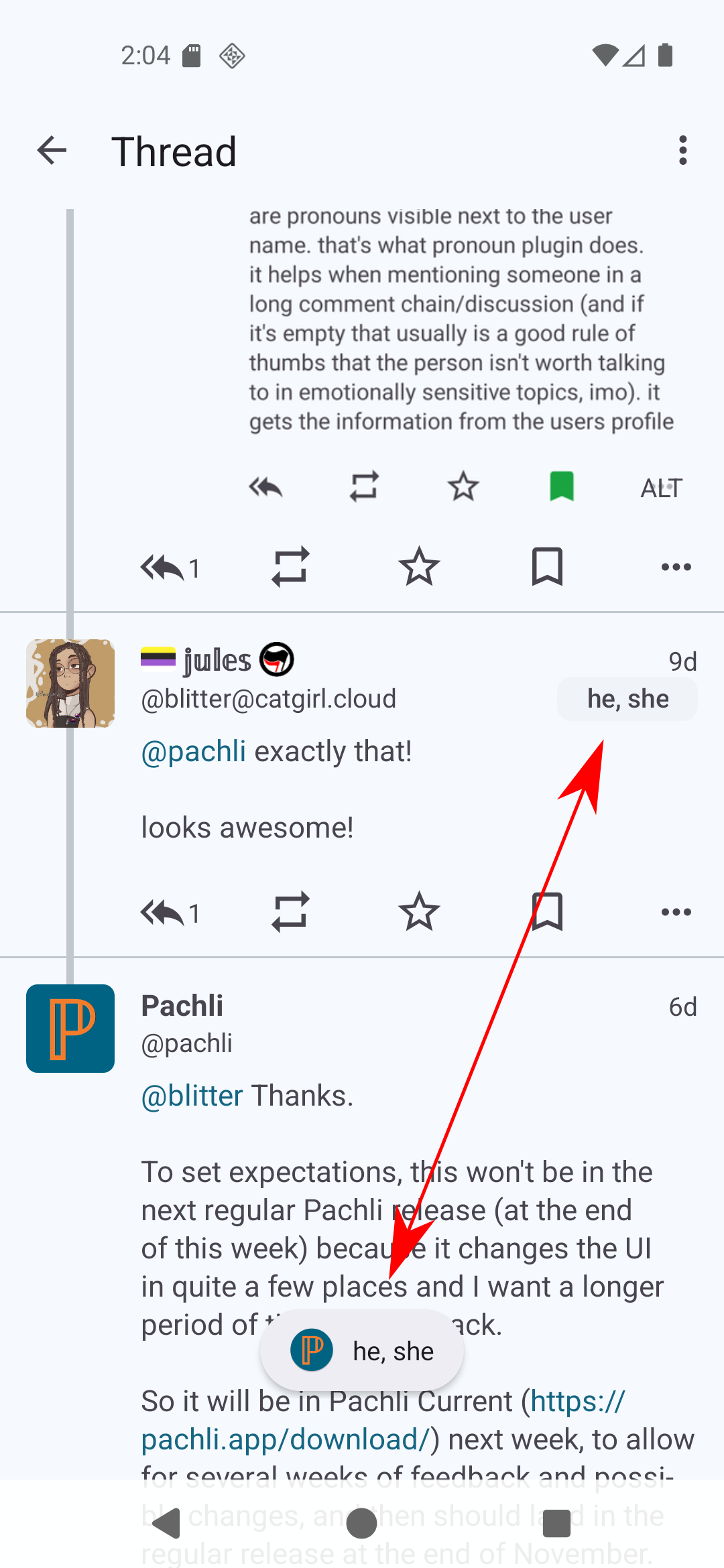
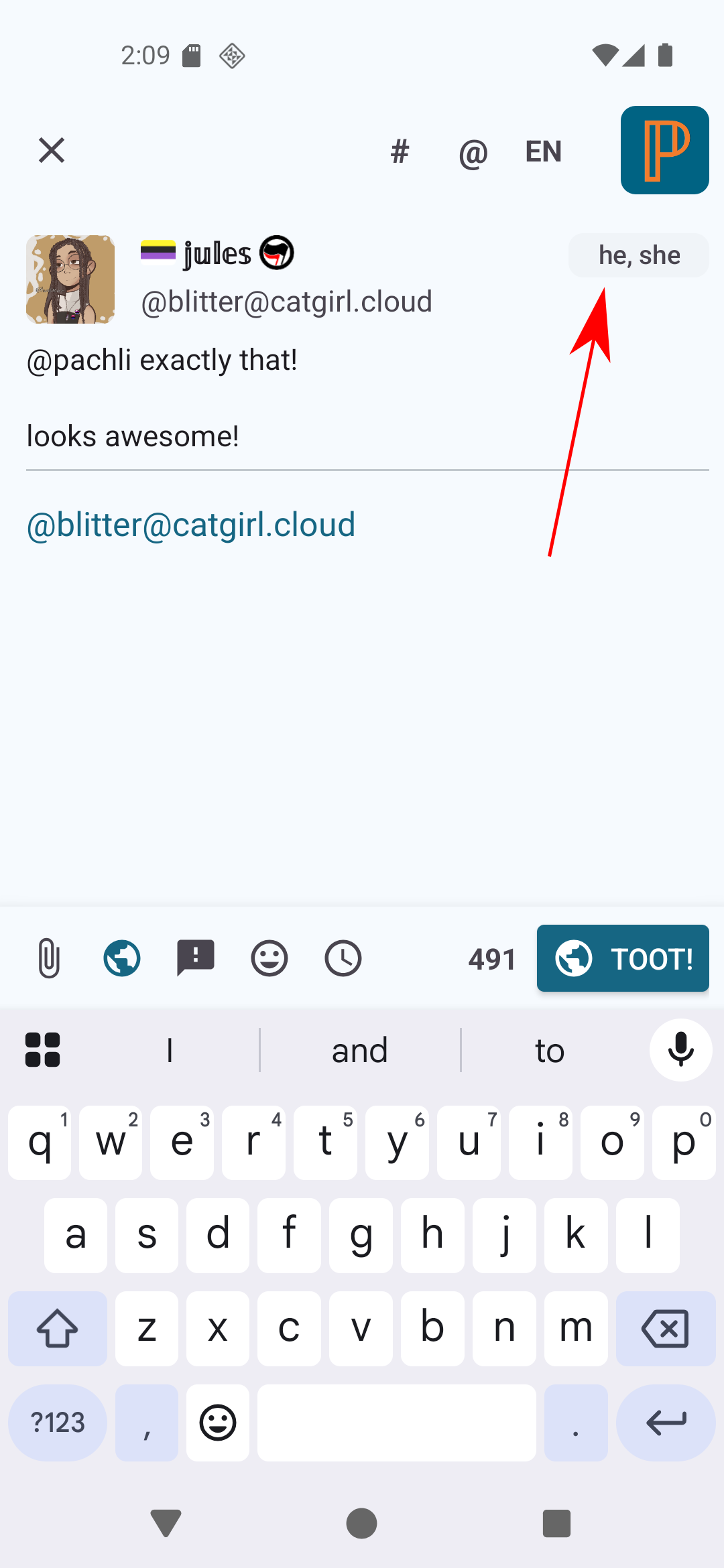
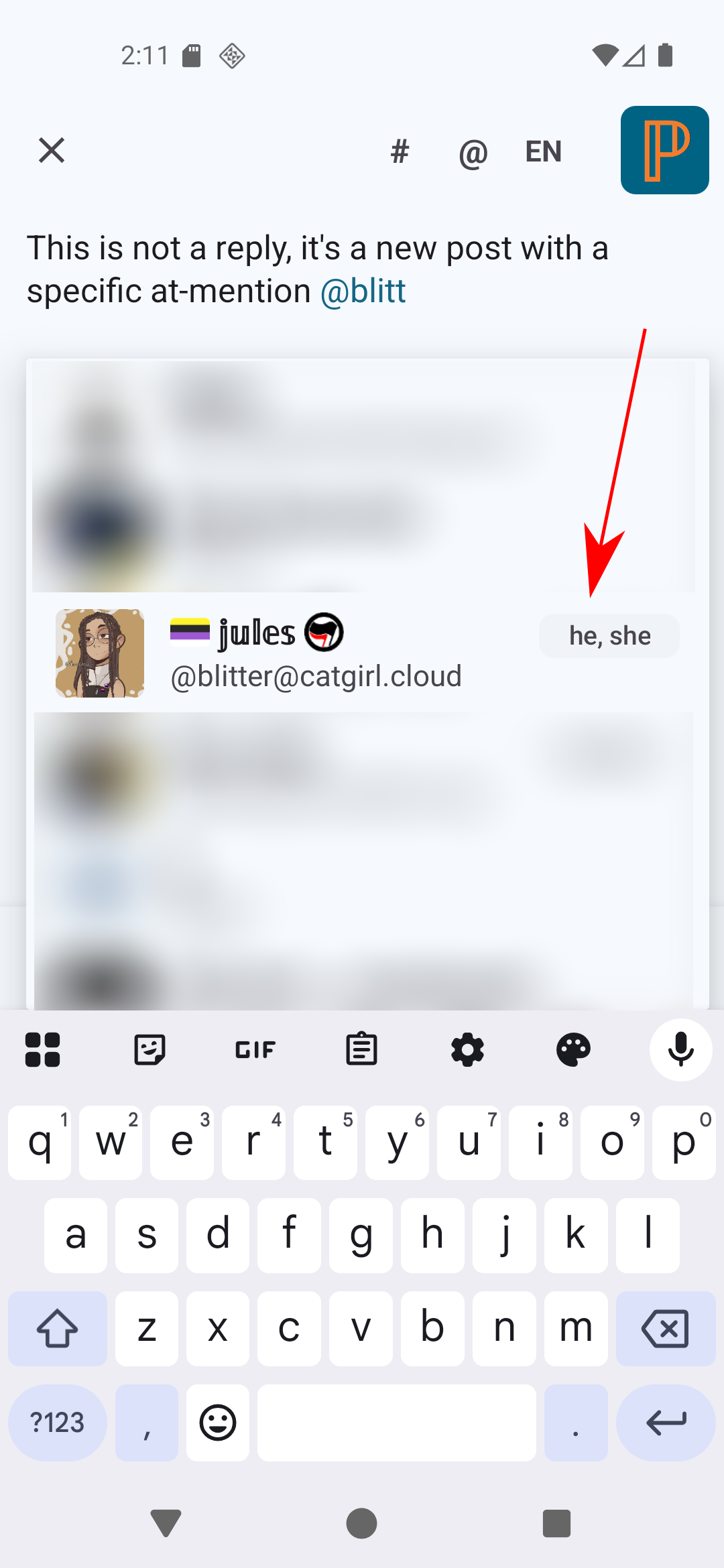
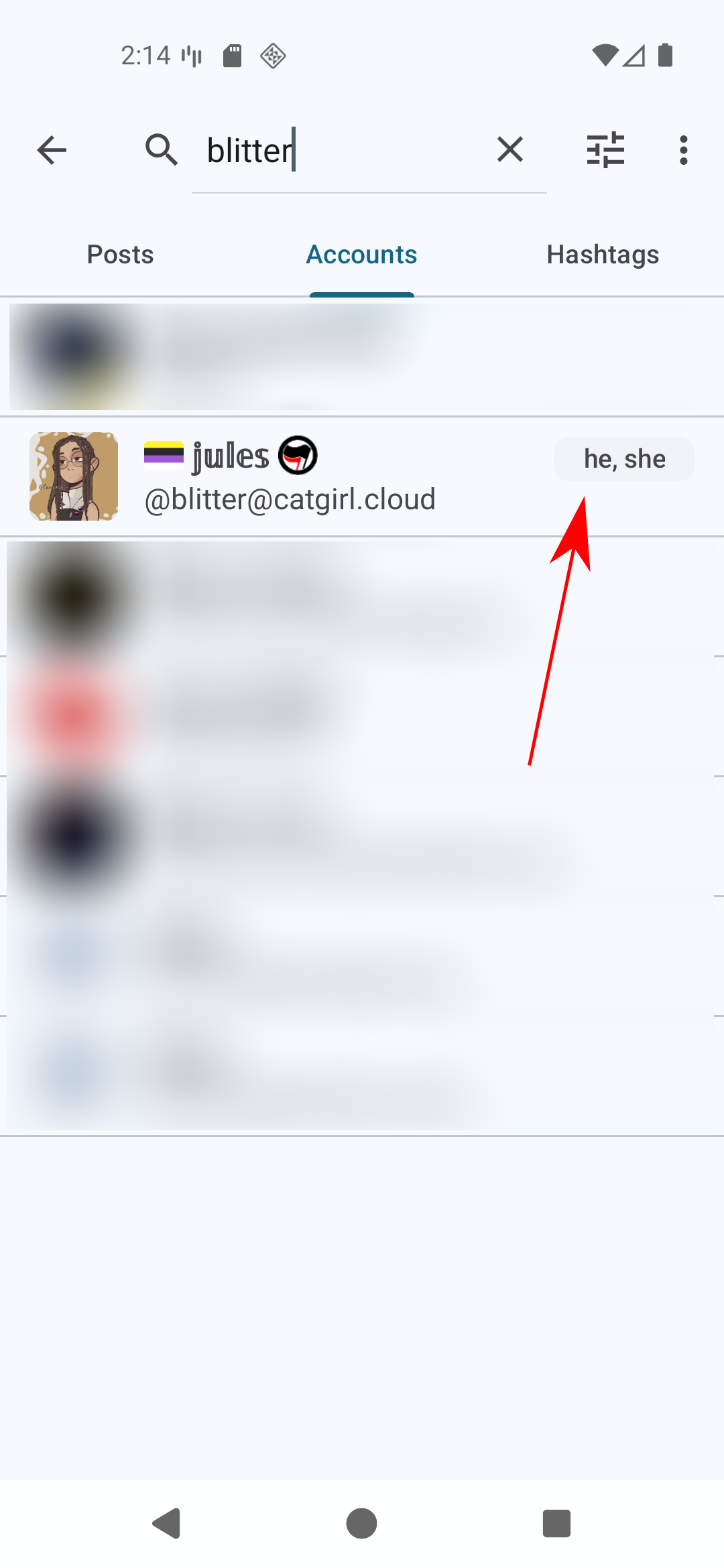
The attached screenshots show where you'll see it. The pronouns might be too long for the available space, so you can always tap the grey chip to show a message at the bottom of the screen to see them (as demonstrated in the first screenshot).
If you use #Android #accessibility features like #Talkback or similar a new "Show pronouns" action has been added so you can do this too.
🎉 Nova ponent a la #a11yConf2025!
Presentem a la @kariucr, especialista en tecnologia accessible amb més de 15 anys d’experiència en lectors de pantalla i eines per a persones amb discapacitat visual (JAWS, NVDA, VoiceOver i TalkBack).
🌍 Costarricense i ciutadana del món, ha treballat com a formadora en tecnologies de suport a Costa Rica i l’Argentina, i a Espanya s’ha dedicat a l’auditoria, la consultoria i la formació en accessibilitat digital.
🛠 En aquesta primera edició de la a11yConf oferirà, juntament amb @Amaterasu, el taller:
“La teva pantalla parla, t’atreveixes a escoltar-la?”
📍 Girona, 29 de novembre
🌐 https://a11yconf.com/ca/agenda#KarinaRamirez
#A11Y, #AccessibilitatDigital, #ScreenReaders, #Lectorsdepantalla, #VoiceOver, #TalkBack, #Workshop, #Taller, #Inclusió, #Girona

🎉 ¡Nueva ponente en la #a11yConf2025!
Hoy presentamos a @kariucr, especialista en tecnología accesible con más de 15 años de experiencia en el uso de lectores de pantalla y herramientas para personas con discapacidad visual (JAWS, NVDA, VoiceOver, TalkBack).
🌍 Costarricense y ciudadana del mundo, ha trabajado como formadora en tecnologías de apoyo en Costa Rica y Argentina, y en España se ha centrado en la auditoría, consultoría y formación en accesibilidad digital.
Amante de la moda y los gatos, continúa explorando cómo la tecnología puede transformar la vida de las personas con discapacidad visual.
🛠 En esta primera edición de la a11yConf ofrecerá, junto a @Amaterasu, el taller:
“Tu pantalla habla, ¿te atreves a escucharla?”,
una sesión práctica sobre el uso de VoiceOver y TalkBack.
📍 Girona, 29 de noviembre
🌐 https://a11yconf.com/es/agenda#KarinaRamirez
#A11Y, #AccesibilidadDigital, #VoiceOver, #Talkback, #Screenreaders, #Lectoresdepantalla, #Workshop, #Taller, #Inclusión, #Girona

🎉 La #a11yConf2025 segueix creixent💜
Presentem @Amaterasu, consultora en accessibilitat digital (CPACC – IAAP( Forma part de l'equip de Flat 101, i és creadora de SixSense Travel, un projecte que uneix viatges i inclusió.
🛠️ En aquesta primera edició de la a11yConf oferirà el taller:
«La teva pantalla parla, t’atreveixes a escoltar-la?», juntament amb @kariucr
Una experiència per descobrir VoiceOver (iOS) i TalkBack (Android).
📍 Girona, 29 de novembre
🌐 https://a11yconf.com/ca/agenda#NuriaAzanza
#A11Y, #Screenreaders, #Lectorsdepantalla, #Inclusió, #VoiceOver, #TalkBack, #Workshop, #Taller, #Girona

Client Info
Server: https://mastodon.social
Version: 2025.07
Repository: https://github.com/cyevgeniy/lmst