#SAMD21

Simple DIY Electronic Music Projectsdiyelectromusic.com@diyelectromusic.com
2025-06-29

XIAO ESP32-C3 MIDI Synthesizer – Part 6

Expanding on my previous posts, I thought it might be interesting to see how I might be able to add some additional IO to the MIDI Synth. This is an exploration of some options there.

  • Part 1 – Getting started and getting code running.
  • Part 2 – Swapping the ESP32-C3 for a SAMD21 to get USB MIDI.
  • Part 3 – Taking a deeper look at the SAM2695 itself.
  • Part 4 – A USB MIDI Synth Module using the SAMD21 again as a USB MIDI Host.
  • Part 5 – A Serial MIDI Synth Module using the original ESP32-C3.
  • Part 6 – Pairs the Synth with a XIAO Expansion board to add display and potentiometers.

Warning! I strongly recommend using old or second hand equipment for your experiments.  I am not responsible for any damage to expensive instruments!

These are the key tutorials for the main concepts used in this project:

If you are new to microcontrollers, see the Getting Started pages.

The Synth Grove Connector

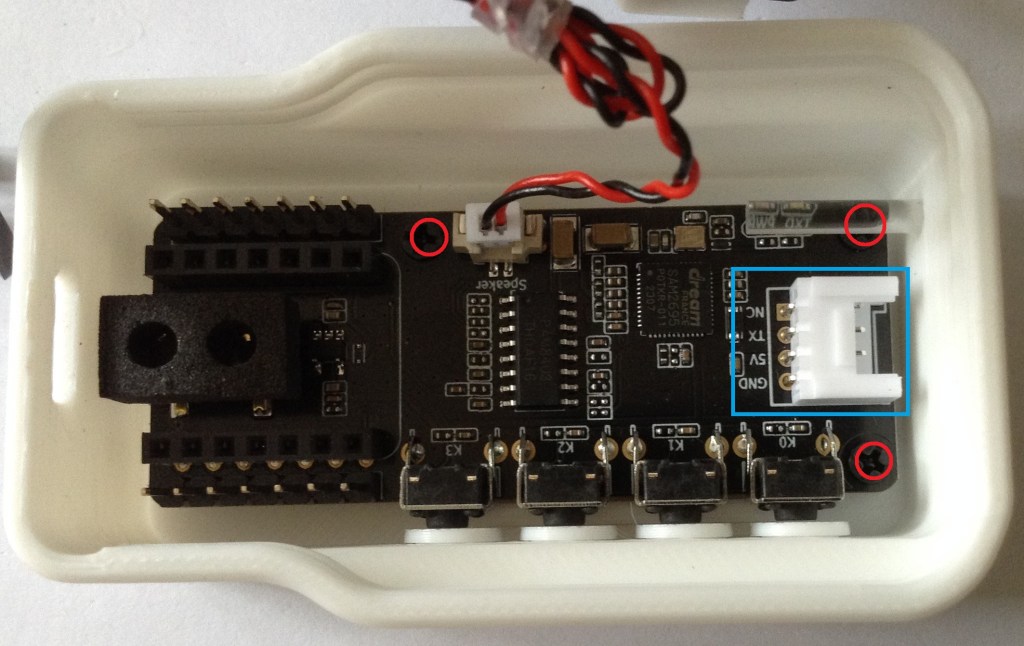
One option to immediately explore for me was the Grove connector on the Synth – highlighted by the blue rectangle in the photo below. I’m thinking at this stage of the XIAO Expander Module (more here) and how that might give some options for easily hooking up to the Synth.

There one obvious issue with this, and one not so obvious issue.

First, of course, there is no access to this connector through the case. My initial thought was to simply remove the PCB from the case and use it as a stand-alone board. On initial inspection it seemed that there were two screws holding it down. Not so, a more thorough inspection (after remove the two screws and still not being able to remove it), revealed a third screw underneath the “light pipe” for the LEDs.

Unfortunately that light pipe is pretty well wedged into the case making removal particularly tricky. But without removing the light pipe, it isn’t possible to get to the screw at all.

I did wonder about making a hole in the 3D printed case. A better option might be to get hold of the published 3D print files and add a hole and make my own (they are available via the product page).

But both options would probably end up changing the original case somehow – even if printing my own, I still need to get the original PCB out somehow and that brings me back to the light pipe issue.

The second issue isn’t quite so obvious. In that photo we can see that the pins for the Grove connector are labelled as follows (top to bottom):

  • NC
  • TX
  • 5V
  • GND

The UART on the XIAO expander board, which I’d like to use, is labelled:

  • RX7
  • TX6
  • 3V3
  • GND

Checking in with the Synth schematic, the connector is wired as follows:

SYS_MIDI connects to the MIDI_IN pin of the SAM2695, so actually connecting “TX to TX” in this instance should be ok.

5V might be an issue though, as it really does look like (to me) that it really means 5V – it is the input to the TPL740F33 that generates the 3V3 power signal, as well as feeding the amplifier directly. The datasheet of the TPL740F33 does seem to imply that if receiving 3V3 it can still generate 3V3 so it might be ok? The amplifier obviously won’t be as powerful though running off 3V3.

Anyway, for now, instead I’ve just opted to use the GPIO again, wired into the expansion sockets with the XIAO removed.

At the XIAO expander end, I’ve used the additional pins rather than the Grove connector, as they support a 5V output.

The downsides to this approach:

  • I’m not using the Grove connectors, which would have been really neat.
  • I have no access to the four buttons on the XIAO MIDI Synth.

But I do now have access to two I2C Grove connectors, a GPIO Grove, and the RX part of the UART Grove too as well as the on-board display.

If a XIAO SAMD21 is used, then the previous code for USB to the Synth can be used directly – see XIAO ESP32-C3 MIDI Synthesizer – Part 2.

If the XIAO ESP32-C3 is used, then an additional serial MIDI connection is required. This can be connected to the Grove UART connector (using the RX pin, and leaving TX unconnected) or the RX pin of the additional 8-way pin header on the expansion board. Then the code from this will work directly: XIAO ESP32-C3 MIDI Synthesizer – Part 5.

Adding a Display and Program Control

I already have some code that has done this for a XIAO on an expansion board here XIAO SAMD21, Arduino and MIDI – Part 6.

But for this to work usefully with the Synth module, I need to adjust the routing so that MIDI goes from USB to serial, but the program change messages are also sent via serial to the synth module. That has already been address in previous parts, to I just need to merge the code with that from XIAO ESP32-C3 MIDI Synthesizer – Part 4.

This is the result.

There is a bit of jitter on the analog pot, but that is only because I’m using the original fairly simplified algorithm to detect changes. If I was fussed about it, I’d reuse the averaging class from Arduino MIDI Atari Paddles. And to be honest, a capacitor on the pot would probably go quite a long way too…

As a test, I also powered the device from the Grove UART port connecting it as follows:

  • Expander GND – GND Synth
  • Expander 3V3 – 5V IN Synth
  • Expander TX – RX/D6 Synth
  • Expander RX – N/C

And this all worked fine. So I think a Grove to Grove lead would work fine if I had access to the Synth’s Grove port.

This does mean that the exact same code can work with the M5 Synth module using a Grove to Grove lead. The downside of this, even though it is a lot simpler in connectivity terms, is that there is now external audio out like there is on the XIAO Synth.

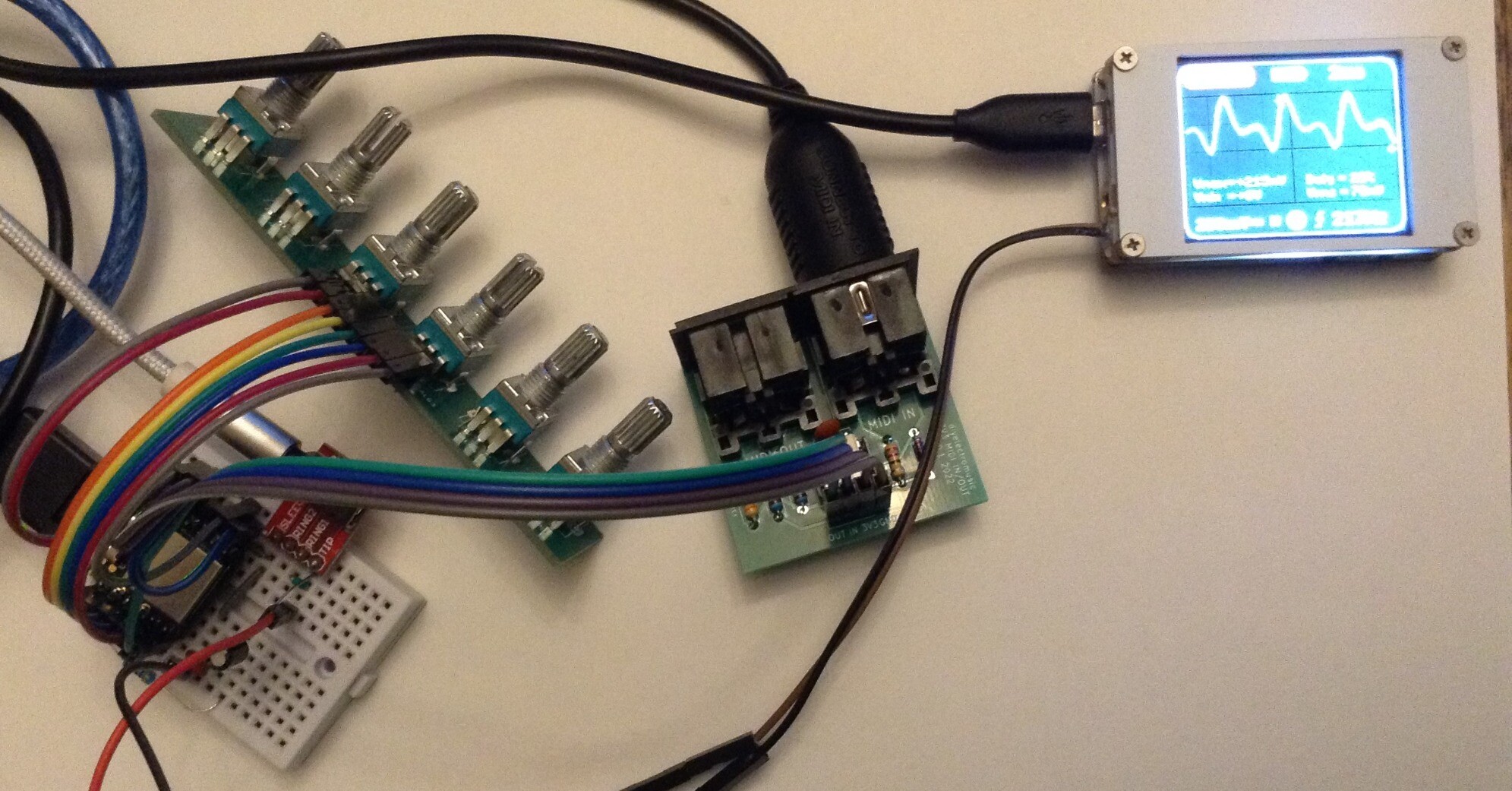
For completeness the same code can be used with the XIAO ESP32-C3 and serial MIDI, see the photo at the start of this blog.

To turn off all USB handling in the code, the following must be commented out:

//#define HAS_USB
//#define SER_TO_USB
//#define MIDI_USB_PCCC

For other parts of the code, the Arduino abstraction for A0 maps over to the ESP32-C3 fine. The only thing to watch out for is the increased analog resolution from 10 to 12 bits, but a call to analogReadResolution(10) drops that back to the expected 10 bits.

Oh and the Serial port to use is different:

  • XIAO SAMD21: Serial1
  • XIAO ESP32-C3: Serial0

Find it on GitHub here.

Closing Thoughts

If I can be bothered, it would be nice to actually display the General MIDI voice name on the display. The SAM2695 also has its MT-32 mode, so having some means of selecting that might be interesting too.

And so far I’ve largely only messed about with driving it on a single MIDI channel, so there is a lot more that could be done there.

Kevin

#controlChange #esp32c3 #midi #programChange #SAM2695 #samd21 #usbMidi #xiao
Simple DIY Electronic Music Projectsdiyelectromusic.com@diyelectromusic.com
2025-06-28

XIAO USB Device to Serial MIDI Converter

Having recently revisited the CircuitPython USB to Serial MIDI Router as part of XIAO ESP32-C3 MIDI Synthesizer – Part 2 it reminded me I didn’t really have a simple Arduino USB device to serial MIDI for the XIAO. So this is filling that gap.

Warning! I strongly recommend using old or second hand equipment for your experiments.  I am not responsible for any damage to expensive instruments!

These are the key Arduino tutorials for the main concepts used in this project:

If you are new to Arduino, see the Getting Started pages.

Parts list

  • XIAO SAMD21
  • Serial MIDI module
  • Breadboard and jumper wires

The Circuit

A 3V3 serial module can be hooked up to the TX/RX pins of the XIAO as shown above.

The Code

This is largely a simplification of the code used for XIAO SAMD21, Arduino and MIDI – Part 4 to use just the standard serial port and USB device MIDI.

There is one option at the top to determine how the serial port ought to be routed. There are two options:

  • Serial to USB. This allows a full bi-directional serial <-> USB.
  • Serial to Serial. This allows both USB and Serial RX to route to Serial TX.

In the other direction, USB always gets routed to the Serial port.

Find it on GitHub here.

Closing Thoughts

Often I find I’ve missed out a simpler use-case in pursuit of a more complex one. This was one of those times so hopefully that is now fixed.

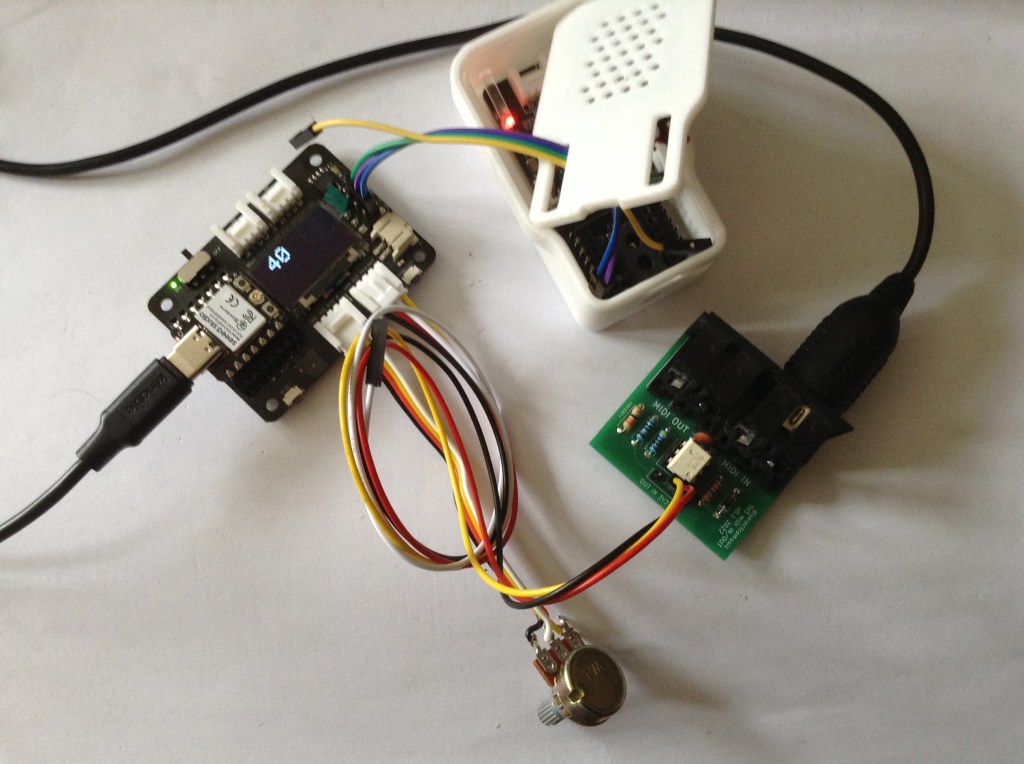
In the above photo I’m using it as a USB to serial router for my M5 Stack Synth module based on the SAM2695 that I’ve been playing with. The Synth is powered from the XIAO’s 5V and GND and connected to the TX/D6 pin. This allows me to use USB MIDI which gets routed to the M5 Synth hanging off the XIAO TX pin.

There is more on that particular synth chip here: XIAO ESP32-C3 MIDI Synthesizer – Part 3.

Kevin

#m5stsack #midi #SAM2695 #samd21 #usbDevice #usbMidi #xiao

Simple DIY Electronic Music Projectsdiyelectromusic.com@diyelectromusic.com
2025-06-27

XIAO ESP32-C3 MIDI Synthesizer – Part 4

In Part 2 I looked at how to add USB MIDI to the XIAO MIDI Synthesizer and in Part 3 I looked at some of the properties of the SAM2695 synth chip itself. This post combines the two into a relatively simple, but playable, synth.

  • Part 1 – Getting started and getting code running.
  • Part 2 – Swapping the ESP32-C3 for a SAMD21 to get USB MIDI.
  • Part 3 – Taking a deeper look at the SAM2695 itself.
  • Part 4 – A USB MIDI Synth Module using the SAMD21 again as a USB MIDI Host.
  • Part 5 – A Serial MIDI Synth Module using the original ESP32-C3.
  • Part 6 – Pairs the Synth with a XIAO Expansion board to add display and potentiometers.

https://makertube.net/w/kaZT6zPjKUmGQp17J15fMM

Warning! I strongly recommend using old or second hand equipment for your experiments.  I am not responsible for any damage to expensive instruments!

These are the key tutorials for the main concepts used in this project:

If you are new to microcontrollers, see the Getting Started pages.

The Circuit

I’m wanting to plug a USB MIDI keyboard into my XIAO Synth, so I’m going to swap the XIAO ESP32-C3 out once again for a XIAO SAMD21 as described in Part 2. A future post will go back and create a serial MIDI version using the unmodified XIAO Synth.

Recall that a source of 5V power is required, and below I’m just using the 5V USB passthrough from the original XIAO ESP32-C3.

There is one issue to watch out for in this kind of configuration. Depending on how the USB power is provided, there might not be a common ground point between the XIAO’s power and any audio amplification used.

Apparently GND is always passed through many USB charger blocks.

To prevent interference and noise, it may be necessary to ground the USB connection providing power.

The Code

I’m using a combination of the SAMD21 USB Host Library “USB MIDI Converter” example and some GPIO and MIDI handling.

The general thread of the code will be as follows:

loop():
Do any USB host processing (e.g. plug-and-play)
IF USB MIDI messages received THEN
Send to serial MIDI
IF any buttons pressed THEN
Handle button IO
Generate any additional MIDI messages as required
Send to serial MIDI

In particular it should be noted that the MIDI “listening” is one-way only USB to serial MIDI; and that any internal control events that generate MIDI are also only going one way – to serial MIDI.

The buttons will be used to do the following:

  • Button 0 and 1: Program Select Up/Down
  • Button 2 and 3: Channel Volume Up/Down

A much more sophisticated interface could be developed – e.g. using one of the buttons to change modes for the other buttons, to allow the selection of different things, but for now, this is plenty.

There are several layers to the code to allow this however, so I’ll cover them briefly here.

  • Main Loop button IO: Checks for the main H->L, L->H, L->L, H->H events and calls functions for all but the last (buttons are pulled high so H->H means “nothing happening).
  • Event functions for Pressed, Released, Hold which call program or volume handling functions as required.
  • Program/volume handling functions that update the values and then trigger the appropriate MIDI messages to be sent.
  • Functions to send a MIDI Program Change or Control Change message as required.

In the end I’ve only triggered events on button Pressed, so the Release and Hold functions don’t cause any further action to take place, but the model is there for use in the future if required.

Note: as I’m not using the Arduino MIDI Library, I just build PC or CC messages directly and call out to Serial1.Write as shown below.

void midiSendControl (uint8_t cmd, uint8_t d) {
uint8_t buf[3];
buf[0] = MIDI_CC | (MIDI_CHANNEL-1);
buf[1] = cmd;
buf[2] = d;
Serial1.write(buf, 3);
}

Simple, but it works. Note PC are only two bytes in size not three.

If performance seems to be an issue, then I have a few things to adjust in the scheduling:

  • I can split the digitalRead() of each button over several scans to allow MIDI processing to happen in between.
  • I can switch to the XIAO equivalent of direct PORT IO to try to read all IO pins at the same time. I don’t know what this looks like for the SAMD21 however and it would make it hardware specific, so I’d really rather not do that.
  • I can remove the waiting of 1mS. This was in the original USB converter, so I kept it in here too. I ought to measure the free running loop() time to see if it is needed.

Find it on GitHub here.

Closing Thoughts

In the video I cycle through a few of the programs whilst controlling the synth from a keyboard.

At one point I remove the external audio connection (yes, I should have turned it down first!) to contrast the sound with the internal speaker. Yes, it is a bit “tinny” but it isn’t too bad.

This really is just the very “tip of the iceberg” given the whole range of parameters available that were mentioned in Part 3.

Kevin

#controlChange #midi #programChange #SAM2695 #samd21 #usbHost #xiao

diyelectromusicdiyelectromusic
2025-03-16

Michael Bauer, maker of the DIY REMI electronic wind instrument, has just published all the design and build notes from a pretty neat Samd21 based synth, designed for an Adafruit Itsy-Bitsy M0.

There is a very comprehensive build guide and all code is for the Arduino environment and up on GitHub.

Read more here: mjbauer.biz/Sigma6_M0_synth_we

I always learn a lot from his writeups :)

2025-02-26

@scruss It's my own left-handed version of a #MicroWriter programmed using @microblocks on an #SAMD21 board. Been in the planning stage for 30 years :)

TinkerCAD project of the keyboardMicroBlocks script
Malte SteinerMalteSteiner
2025-02-24

Last weekends task force was about to get the firmware and documentation via done for my based LFO / AR / random voltage generator for my

Shown in the picture is the testing the modulation range of my new circuit.

DIY modular synthesizer electronics
2025-02-23

Just to help anyone else using one of these #AliExpress #SAMD21 #M0 boards, pin marked D2 is actually pin4 and pin marked D4 is pin2
vi.aliexpress.com/item/4000169

2024-05-07

I was browsing some of the newer ATtiny chips the other day and started to make a note of some of their properties and it made me realise I actually have quite a few different microcontrollers at my disposal and many more I could be having a look at.

But having committed to not attempting to get hold of every variant of every device to put a MIDI interface on it, I thought it would still be worth a post summarising some of the features to make selecting them in the future a little easier.

There are many comparison charts and tables online, but this is my own summary of the things that are important to me right now in terms of using them for musical purposes.

Note: I think the data is correct at the time of writing. Feel free to let me know of any mistakes. Also feel free to let me know what microcontrollers you use for music, and why, in the comments.

8-bit Microcontrollers

MCUFreqPWRGPIOADCPWMDACCommsRAMFlashATmega328P16MHz2.7-5.5V236/860UART, I2C, SPI2K32KATmega32U416MHz2.7-5.5V261280UART, I2C, SPI, USB2.5K32KATtiny858/20MHz2.7-5.5V6460USI5128KATtiny8812MHz2.7-5.5V28620I2C, SPI5128KATtiny21(2|4)
ATtiny41(2|4|6)20MHz1.8-5.5V6|12
6|12|186|10
6|10|1261UART, I2C, SPI128
2562K
4K

32-bit Microcontrollers

MCUFreqPWRFPUGPIOADCPWMDACCommsRAMFlashSAMD21 (M0+)48MHz1.6-3.6VN30/381430?1SERCOM, I2S, USB4-32K32-256KSAMD51 (M4)120MHz1.6-3.6VY513237?1SERCOM, I2S, USB128-256256-1024KRP2040 (2xM0+)133MHz3.3VN304110UART, I2C, SPI, USB, PIO264KexternalESP32 (LX6)160MHz3.0-3.6VY3418162UART, I2C, SPI, I2S, Wi-Fi, BT0-2M0-4MESP32-S2 (LX7)240MHz2.8-3.6VN?432080UART, I2C, SPI, I2S, Wi-Fi0-2M0-2-4MESP32-S3 (2xLX7)240MHz3.0-3.6VY452080UART, I2C, SPI, I2S, Wi-Fi, BT0-2-8-16M0-4-8MESP32-A1S (2xLX6)240MHx3.0-3.6VY?14??2UART, I2C, SPI, I2S520K+4M0?

Points of Note

  • The ATmega and ATtiny devices are all 8-bit AVR architecture and might be either 3V3 or 5V operation depending on the device. Whereas the others are all 32-bit, 3V3 operation, and either ARM or Tensilica Xtensa architectures.
  • The SAMD51, ESP32 and ESP32-S3 are all interesting as they include a floating point unit, which might be useful if I get into requiring mathematical synthesis.
  • ATtiny2xx, ATtiny4xx, SAMD21, SAMD51, ESP32 all include a DAC which would be really useful for generating control voltages.
  • ATmega32U4, SAMD21, SAMD51, RP2040 all support USB directly.
  • The last one is an interesting device. The ESP32-A1S is a single module that includes an ESP32 and a CODEC module. More recent versions use the ES8388 and support two audio in/out channels. There is an Espressif Audio Development Framework for use with all ESP32-based devices.

Other MCUs of possible interest might include some of the newer RISC-V devices (e.g. ESP32-C3), the STM32 device range (the higher performing devices include floating point support, for example), the Teensy boards (which have a strong following for audio applications), and even running with the broadcom devices used on the various Raspberry Pis in “bare metal” mode.

A key tradeoff already would be choosing between a more powerful, probably 32-bit, 3V3 logic devices or a less capable 5V device.

Development Boards

I’m unlikely to be working with a microcontroller directly though, given my own level of knowledge, so I’m probably going to be looking at some kind of development board.

The following could all be possibilities if I’m happy running at 3V3.

Note, many of the form-factors, e.g. Adafruit’s QT Py or Feather, support most of the architectures – but not all are listed – just those I have or might consider. I’ve also added in some other boards that I know are often used (or shout about being used) for audio applications.

Prices are approximate at time of writing (Feb 2024).

BoardMCUArchSpeedRAM/FlashFPUGPIOADCPWMI2SDACCostRPi PicoRP20402xM0+133MHz264K/2MN27316PIO0£4XIAOSAMD21M0+48MHz32K/256KN14111111£6XIAORP20402xM0+133MHz264K/2MN11411PIO0£6XIAOESP32-S32xLX7240MHz8M/8MY1191110£8XIAOESP32-C3RISC-V160MHz4K/4M?114110£6QT PySAMD21M0+48MHz32K/256KN119911£9QT PyRP20402xM0+125MHz264K/8MN13413PIO0£10QT PyESP32-S32xLX7240MHz512K+2M/4MY13101310£15TrinketSAMD21M0+48MHz32K/256KN55211£9ItsyBitsySAMD21M0+48MHz32K/256KN23111311£12ItsyBitsySAMD51M4120MHz192K/512K+2MN2371812£15FeatherSAMD21M0+48MHz32K/256KN2062011£19FeatherSAMD51M4120MHz192K/512K+2MY2161612£23FeatherRP20402xM0+125MHz264K/8MN21416PIO0£12FeatherESP32-S32xLX7240MHz2M/4MY2162110£17BananaPicoWESP32-S32xLX7240MHz512K/2M+8MY2718810£4WROOM32ESP322xLX6<240MHz500K/448K+4MY34152512£3Teensy 3.6MK66FX1M4F180MHz256K/1MY64252212N/ATeensy 4.0IMXRT1062M7600MHz1M/2MY40143120£26Teensy 4.1IMXRT1062M7600MHz1M/8MY55183520£30Arduino MKR ZeroSAMD21M0+48MHz32K/256KN2271311£30Arduino Giga R1STM32H747XM7
M4480MHz
240MHz1M/2M?761413?2£70

It is interesting to note which boards support a DAC and which support I2S, both very useful for audio applications and the number of ADCs is relevant too.

Boards specifically designed for audio processing, which I’ve no direct experience of, include:

  • Pico ADK – A RP2040 based “audio development kit” with 8 ADCs and SPI DAC.
  • Daisy Seed – an ARM Cortex-M7 with audio IO designed for DSP and audio applications (£35)
  • Bela and Bela Mini – designed for use with Beaglebone for real-time, low-latency audio processing (~£130-£160).

And it is worth noting that the Teensy has many features well suited to audio processing, including a dedicated software audio toolkit (see below).

Software Audio Frameworks

There are a number of software frameworks for use with some of the above for audio processing:

There is a bit of discussion about these here: Arduino Audio and MIDI Frameworks.

Closing Thoughts

I expect this page will evolve with new information, but it will be good to have a single post to refer back to.

Kevin

https://diyelectromusic.wordpress.com/2024/05/07/selecting-microcontrollers-for-music/

#adafruit #arduino #attiny #esp32 #raspberryPi #raspberryPiPico #samd21 #samd51 #teensy

2024-04-11

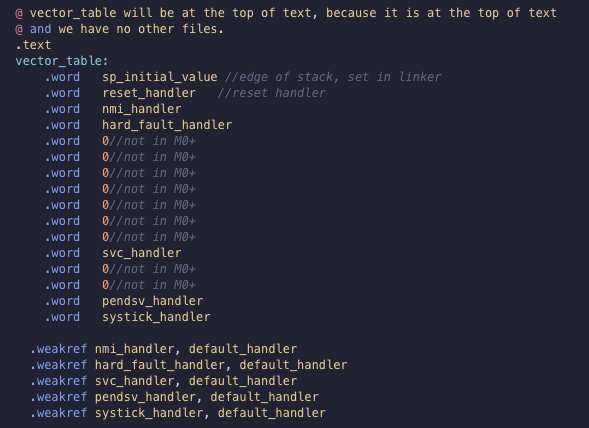
So, the tool chain works, but how to get the startup code a little sturdier? So I guess that means - how to write the interrupt vector table? How to zero the bss?

How to do it all with the thumb instruction set in assembly... okay! Sleeves up.

whynotestflight.com/excuses/ho

And finally a repo

github.com/carlynorama/Strippe

-gcc, , , , , ,,

Code screenshot of the minimum Coretext-M0+ compliant vector table written in gcc assembly. Lives in the repo linked to in post. It has gaps where the M0+ doesn't do everything the other Coretex-M's can do. Code screenshot of a vector table written for the SAMD21E18 with ALL the options written out. gcc assembly. Lives in the repo linked to in post.
2024-04-06

Now it's ARM's turn, Specifically the Core M0 SAMD21E18

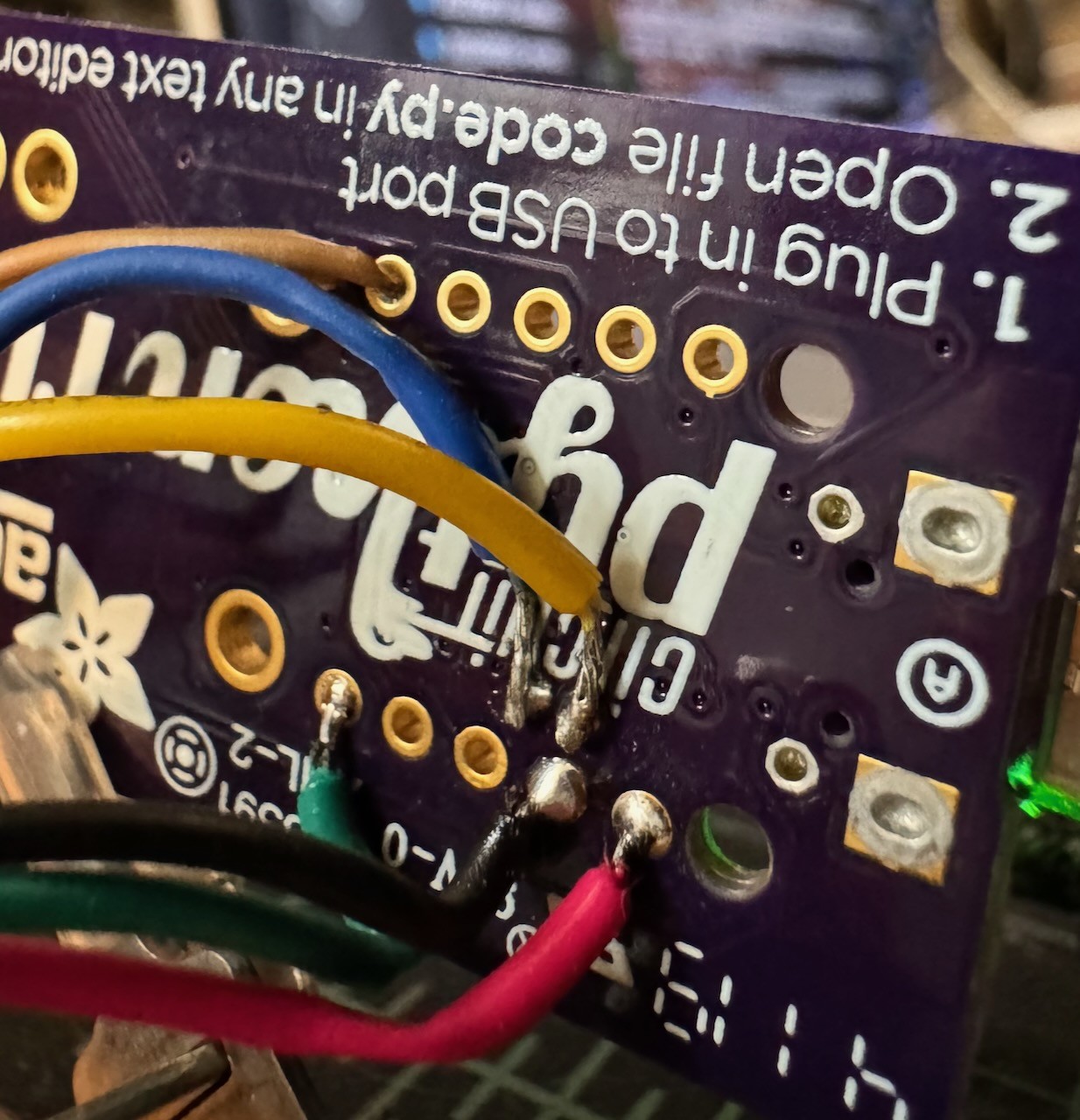
There isn't quite the same perfect playlist (although plenty of great resources!) for what I wanted so this will be multi part to get to a "good" place. This post is mostly about the tool chain (arm-gcc/OpenOCD/gdb)

Hardware is the the Adafruit PyRuler which is a fancy Trinket M0

whynotestflight.com/excuses/ho

Shout out to:
vivonomicon.com/2018/04/02/bar

, , , , , , ,

Terrible hack solder job to SWD interface pins on the back of the AdaFruit PyRuler
Les capsules du prof Lutzlutzray@mamot.fr
2024-01-18

One of my most proud of plot. Geeky, chuck-full of data, and _nice_ .

forums.adafruit.com/viewtopic.

The two small vertical lines at the base correspond to the clock jitter width I measured with a Feather M0 which uses XOSC32K since there's a crystal on the board (the jitter is then as small as ± 0.02 ms).

#matplotlib #SAMD21 #microcontrollers #electronic #atomicsynchronator

Mathematical plot showing two superposed distributions of precisely timed interval supposed to be 1 second in duration. One distribution has a long asymmetrical tail on the left, with some intervals having a length as long as 1.003 s (3 ms too long).

The title is

Jitter of RTC 1PPS events using internal crystals (Adafruit Trinket MO with SAMD21)
Chris Burtonburtyb@widget.uk
2023-11-26

I'm looking to upgrade my USB-C Plug Tester from #SAMD21 to #RP2040. The #USBC Plug #connector hasn't been that reliable so I'm looking at alternatives / asking for suggestions (preferably with a footprint I can create within JLCPCB capabilities). #Electronics

Two small PCB showing a USB-C plug which straddles the PCB edge.
Les capsules du prof Lutzlutzray@mamot.fr
2023-05-14

Quand tu démarres une enfilade sur un forum de support technique, que t'as aucune réponse et que tu te répliques à toi-même pour aider les autres qui trébucheraient sur le même problème.🤓 forums.adafruit.com/viewtopic. #Arduino #Adafruit #Neopixel #DMA #SAMD21

Malte SteinerMalteSteiner
2023-04-06

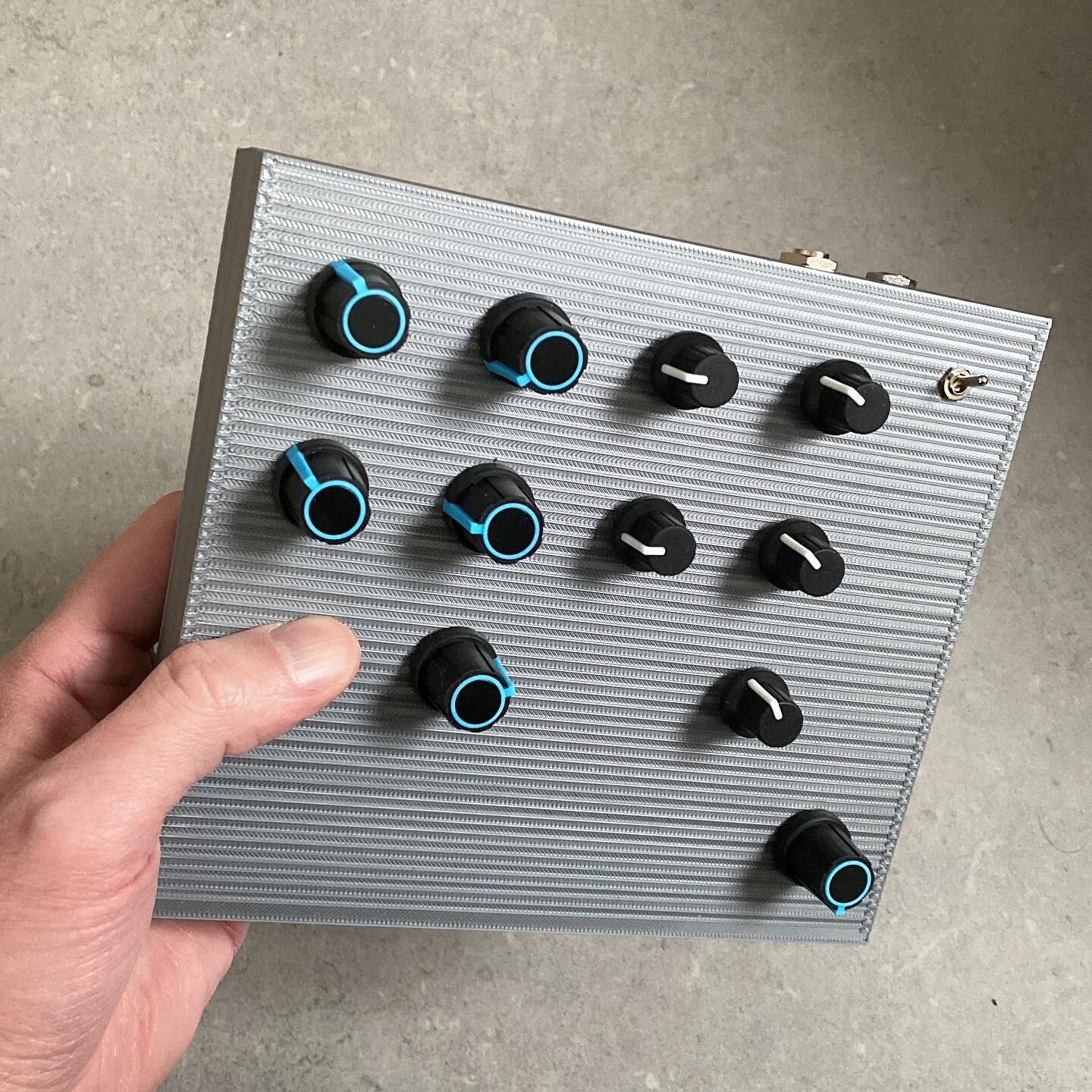
After the successful debut of the b4 digidrone (pictured below) on two concerts in Helsinki, I am now developing a bigger version for the studio, based on a more powerful as the brave used here.

b4 DigiDrone DIY synthesizer
Malte SteinerMalteSteiner
2023-02-05

My based diy noise/ drone ,in a temporary cardboard case as prototype. Two wavetable oscillators with Cross FM and analog feedback. Firmware is :
github.com/HerrSteiner/SAMD-Sy

Client Info

Server: https://mastodon.social
Version: 2025.07
Repository: https://github.com/cyevgeniy/lmst