
Mô hình Maya1 tts nhanh hơn, có thể tạo 50 giây âm thanh trong 1 giây
Maya1 recently released phiên bản mới, cải thiện tốc độ và chất lượng âm thanh. Ưu điểm:
- Tốc độ nhanh hơn, đặc biệt với các đoạn văn dài
- Hoạt động trực tiếp trên Windows
- Hỗ trợ đa GPU, tạo âm thanh 48khz chất lượng cao
- Tuyệt vời để tạo audiobooks hoặc nội dung nhiều câu
#Maya1 #ttsmodel #audiosynthesis #speechsynthesis #tts<REASONING>
Prostitutas
Colleagues
The following is a Vietnamese translation of a post about a r
#speechSynthesis
1,500 visits to my Thorsten-Voice website from Google in just 28 days — unbelievable 🤯😊
That’s over 50 visits per day!
TAKE THAT, AMAZON & NETFLIX 😆
#thorstenvoice #tts #ai #opensource #speechsynthesis #milestone

Read
🧵 A thread celebrating the incredible contributors who built #eSpeakNG, one of the most sophisticated open-source text-to-speech engines ever created:
Starting from Jonathan Duddington's original eSpeak in 1995 (!) on RISC OS, this project now supports 127+ languages through the dedication of hundreds of contributors worldwide. Let me tell you their story... 🌍
The original espeak era (2010-2014) saw foundational work by Jonathan Duddington and early POSIX improvements by Reece H. Dunn, making it buildable on modern systems. This set the stage for what became an incredible international collaboration.
🚀 The eSpeakNG transformation (2014-2016):
When Reece H. Dunn forked to espeak-ng, the project exploded with innovation:
Complete codebase modernization to C99
Windows/BSD platform support
SSML markup language support
Visual Studio build system
Modern APIs and error handling
📱 Mobile & Web Revolution (2016-2017):
The project went everywhere! Android integration, Emscripten web port for browsers, improved threading for Mac OSX. Plus the first wave of new languages: Arabic (Taha Zerrouki), Japanese (Reece Dunn), and major Unicode emoji support.
🌍 The Great Language Expansion (2017-2019):
This is where it gets amazing. So many people contributed entire language implementations:
Valdis Vitolins became a linguistic powerhouse, contributing to 20+ languages including Latvian, Lithuanian, Russian-Latvia, Bashkir, Kazakh, Ukrainian, Hebrew, and more.
boracasli98/tc-dl brought us Bashkir, Turkish, Nogai, Turkmen, Uyghur, and Uzbek support.
JRMeyer contributed Kyrgyz pronunciation rules.
Shadyar Khodayari devoted incredible effort to Persian/Farsi language support.
Christo de Klerk improved Afrikaans substantially.
🎭 Constructed Languages (2018-2019):
The community even embraced fictional languages!
Lucas Werkmeister: Quenya (Tolkien's Elvish)
Lucas Werkmeister: Sindarin
Da Def & Valdis Vitolins: Lang Belta (The Expanse)
Valdis Vitolins: Klingon (piqd)
Indigenous & Minority Languages:
Graham Oliver: Māori
Michael Conrad: Cherokee
Katri Hiovain & Sebastien Le Maguer: Lule Saami
Valdis Vitolins: Quechua
ronaldaug: Shan Tay Yai
🔧 Modern Era Engineering (2019-2025):
Recent years brought serious engineering improvements:
djphoenix: Complete CMake build system migration and core C code fixes
Juho Hiltunen: Massive codebase cleanup and testing improvements
Christopher Brannon: SSML security fixes and memory management
Ulrich Müller: IEEE80 free software compliance
🌟 Latest Heroes (2020-2025):
Andiv06: Maintaining 15+ languages including Bashkir, Belarusian, Guarani, Greenlandic, Kyrgyz, Nogai, Romanian, Turkmen, Uzbek
Valdis Vitolins: Still contributing to Latvian and Kyrgyz
Cameron Wong: Mandarin improvements
Bill Dengler: English pronunciation and Totontepec Mixe (with Elizabeth Resendiz)
Christian Leo Mameli: Italian refinements
New language pioneers:
Hanif Rahman: Pashto
Andy Vladescu: Aromanian & Crimean Tatar
Luna Rose: English Shavian script
Biniam Gebremichael: Tigrinya
atabekm: Karakalpak
Filomena Rocca: Xextan
🏗️ What makes this special:
This isn't just code - it's linguistic archaeology. Each language required analyzing pronunciation rules, stress patterns, phoneme mappings, and cultural nuances. The English rules file alone is 7,132 lines of linguistic analysis!
The technical architecture supports formant synthesis, MBROLA integration, SSML markup, multiple platforms (Linux/Windows/Android/Web), and maintains scientific rigor with IPA phoneme modeling.
💝 Why this matters:
In a world of proprietary AI, these contributors created a truly open, scientifically rigorous TTS system that speaks to billions of people in their native languages - including endangered and constructed languages that commercial systems ignore.
From 1995 RISC OS to 2025 web browsers, from English to 127 languages, from one developer to hundreds of contributors worldwide - this is open source at its finest.
To everyone who contributed pronunciation rules, phoneme mappings, bug fixes, and linguistic expertise: you've democratized voice technology for the world. 🙏
#OpenSource #TTS #Linguistics #Accessibility #SpeechSynthesis
Pluralistic: Daily links from Cory Doctorow – No trackers, no ads. Black type, white background. Privacy policy: we don't collect or retain any data at all ever period.pluralistic.net@web.brid.gy
2025-10-16Pluralistic: The AI that we'll have after AI (16 Oct 2025)
https://fed.brid.gy/r/https://pluralistic.net/2025/10/16/post-ai-ai/
Since my previous post asking about programmers, etc. received so many positive responses, I am going to use the same tags and explain what I wish to accomplish. That way, I can learn from real experts what is possible and what isn't. Note that I am not a programmer and am just writing as a user.
Hello, everyone. I am forty-one and totally blind, having never seen. I have loved DOS since I was a teenager and basically taught myself tto use it, since by the time I learned about it, people were already moving to Windows. I love XP and 7 but find 11 to be frustrating and annoying. Unlike many, I don't find Linux or Mac OS to be worthy replacements. But I strongly feel, given the general advances in technology, as well as those in modern versions of DOS, that it can be a viable alternative. It's quick, efficient, and text-based. This, then, is my ultimate vision. Some of these things may be easier to implement than others, and some may not even be possible. One of my favourite sites is this one, which debunks all sorts of fallacies related to DOS and gives me hope that my dream may someday be realised.
http://www.chebucto.ns.ca/~ak621/DOS/DOS-Fal.html
Summary
My ultimate vision is a 32-bit version of DOS with true multi-tasking, a talking installer, an updated screen reader, a software synthesizer, and usb support that could be used as a daily operating system on modern (or at least semi-modern) hardware.
Blind-Specific Goals
1. Talking installer: One of the main difficulties of installing DOS for a blind person is the lack of speech without a dedicated screen reader. This was true even in Windows XP, and to a lesser degree, 7, though Talking Windows PE (a version with the NVDA screen reader slipstreamed into it) changed that. I have also seen someone load config.sys, autoexec.bat, and command.com along with the ASAP screen reader onto a floppy and boot from it, so it may, indeed, be possible, though booting from a floppy is automatic, whereas booting from anything else would require changing the bootloader, which is not accessible to the blind. If it is not possible to create a talking installer, perhaps some sort of batch system, similar to XP Unattended, can be created, so that the user just has to hit a few keys and start an automatic installation.
2. Software speech synthesis or reasonable alternative: This might be one of the most difficult things to implement, but it is th emost important. As it stands, most DOS screen readers work with hardware synthesizers that connect either via a serial port or an internal card. They work well, but unless new ones are made, they may be difficult to find. Plus, many computers don't have a serial port, and I'm not sure usb to serial can even work in DOS, especially for this sort of thing. Ideally, there would be a synthesizer, similar to ESpeak in NVDA, that would work directly with the screen reader to voice text on the screen. However, it seems that these sorts of synthesizers require apis, etc. that DOS doesn't have. Whether it would be possible to simulate a hardware synthesizer in real DOS as is done in the Talking DOSBox, which also contains Windows 95, I don't know. It is possible to send speech directly to the pc speaker, but most pc speakers, when they exist, are designed for beeps and very low quality output. That said, there was a novelty synthesizer, called Tran, that did just this. Perhaps a more serious version could be created and connected to a screen reader. There were screen readers that worked with the SoundBlaster synthesizer which did use software, but even that required the real card to be installed. If drivers and synthesizers can be created for more modern soundcards, that might be a bridge between full software synthesis and requiring an external device. A final option is simply to create modern synthesizers with an RS-232 connection. At least the speech would be good and they would still be manufactured, unlike the older ones.
3. Updated screen reader support: I don't know how much screen readers would need to be updated in order to be able to take advantage of modern programs and versions of DOS, but having that option would be a good thing. The only fully open source screen reader I know of is Provox. While JAWS for DOS, Vocal-Eyes, Flipper, etc. were all made freely available, we don't have their code. I am going to attempt to contact Larry Skutchan, maker of ASAP, to ask if he is willing to let us work with the code, or rewrite and update it, as he may no longer have the program.
General Goals
1. 32-bit: Even in Windows, I don't see the need for a 64-bit system. But I do think that DOS can benefit dramatically from being upgraded to 32-bit. It would mean more memory could be used in ram, true multi-tasking without extra tools could be done, and maybe, some of the blind-specific ideas of mine could be accomplished. I really cannot stress the importance of multitasking enough, even for mainstream things such as browsing the Internet while keeping an e-mail client open to alert for notifications, or even listening to music while reading a website or downloading something. I am fully aware of tsr programs, and they are wonderful, but they don't allow for background processes. I have heard of FreeDOs-32, but it seems to be no longer maintained.
2. Full usb support: I know that there is very rudamentary support for usb storage, but if this could be expanded to other devices, it might be possible to use a sound card for speech, a usb keyboard, a camera or scanner for ocr, a wifi dongle, etc.
3. An accessible, modern browser and wifi support: I know that it is possible to connect to the Internet using certain wireless cards. I also know that there is at least one graphical browser called Arachne. But whether it is accessible or has been updated, and whether more exist, I don't know. And what about systems without these cards? Can they access the Internet using wifi or at least cable via an ethernet connection?
4. A text-based, menu-driven desktop: I love the commandline, but sometimes, it might be quicker and/or easier to use menus. The graphical desktops require use of the mouse. I want to retain the text-based nature of DOS. It seems that this may already exist, and that I need to research DOS Navigator, Volkov Commander, Midnight Commander, and Norton Commander.
Things to Avoid
Don't turn DOS into Linux or Windows. Keep program installation simple, don't start requiring permissions for things, don't make everything graphical with a terrible interface that keeps changing, ribbons, etc., and don't include artificial intelligence as mandatory.
#accessibility #AdaptiveTechnology #blind #DOS #FreeDOS #Internet #MSDOS #programmers #programming #ScreenReaders #software #SpeechSynthesis #technology
Would anyone be able to help me contact Larry Skutchan, or could someone please pass a question on to him? I don't wish to disturb him, especially now that he is retired. Several years ago, I recall asking him about ASAP and if I could obtain a full version of it. He told me that he no longer had it, but that the demonstration was fully functional, with only some reminders to buy the product. I must assume that, since he lost the program, he also lost the source code. But if I knew the language in which it was written, I could find a programmer to rewrite the code, updating it to add support for software synthesizers, various modern things, and even create new set files for updated and current programs. But naturally, I need his permission to do so, since it is not open source and I don't want to get in any sort of legal trouble. While Provox is, indeed, open source, ASAP is one of the most advanced and flexible DOS screen readers, and I would like to use it in my project to make FreeDOS and its programs more accessible.
#accessibility #APH #ASAP #blind #DOS #FreeDOS #programming #ScreenReader #ScreenReader #SpeechSynthesis #technology
I cannot figure out how to get real DOS (of any kind) working in VMWare with Com0com and NVDA (my hardware synthesizers are packed away at the moment), so right now, I have Talking DOSBox. Since it already speaks and has various synthesizers available, I would like to know if it would be possible to substitute MS-DOS with FreeDOS 1.4, since I want to try the advanced features, modern programs, etc.
The main problem I see is installing it with speech. Perplexity gave me instructions that seemed viable, but upon actually looking in the various directories, I discovered that the reason Talking DOSBox works with the SoundBlaster synthesizer is that it's not pure MS-DOS but the version that comes with Windows for Work Groups. There is another way to access speech, so that NVDA acts as a bns driver, but I'm not sure if this would work, either with MS-DOS or FreeDOS. Can anyone assist me?
#accessibility #blind #computing #DOS #DOSBox #FreeDOS #NVDA #OperatingSystems #ScreenReaders #SpeechSynthesis #technology #VirtualMachines #VMWare #Windows

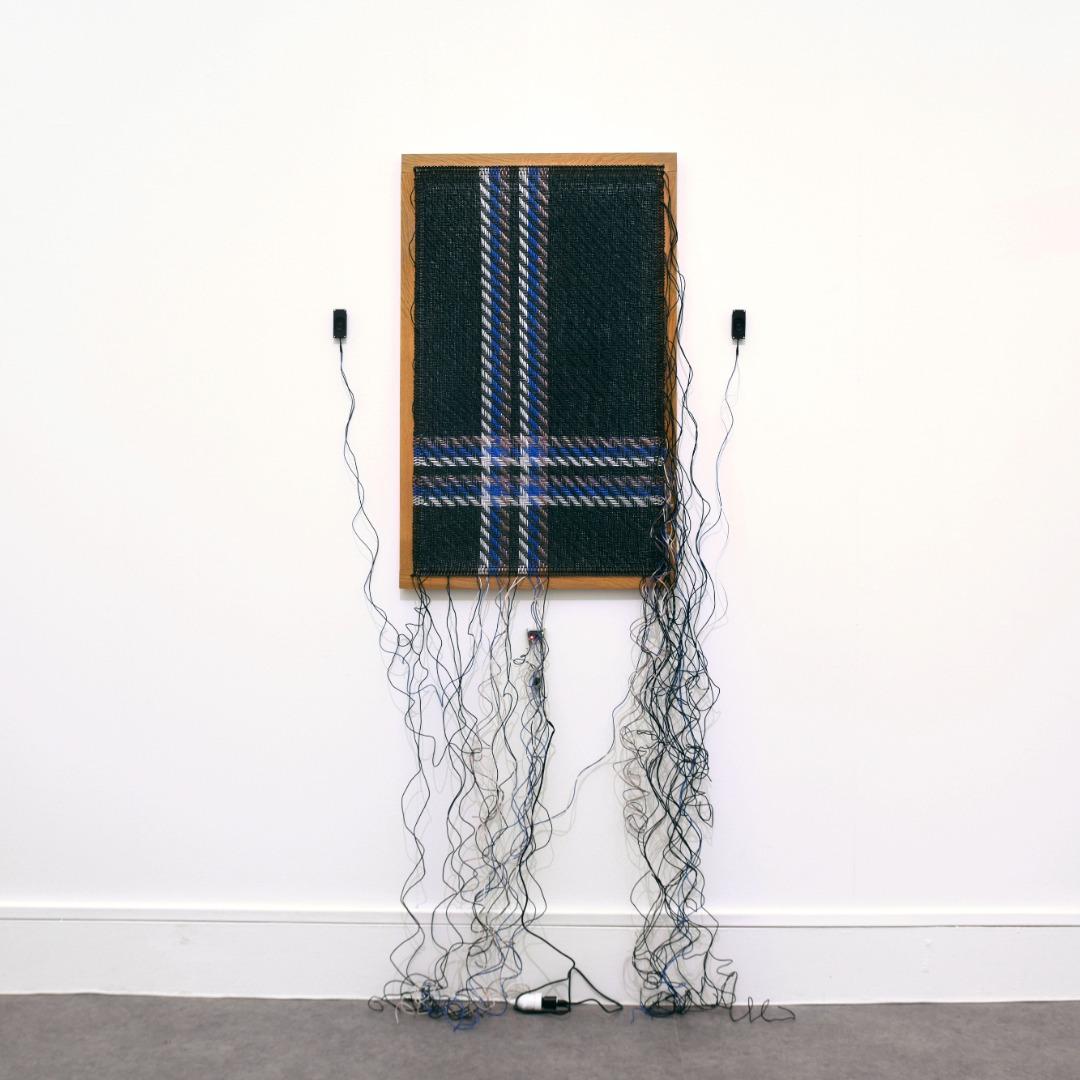
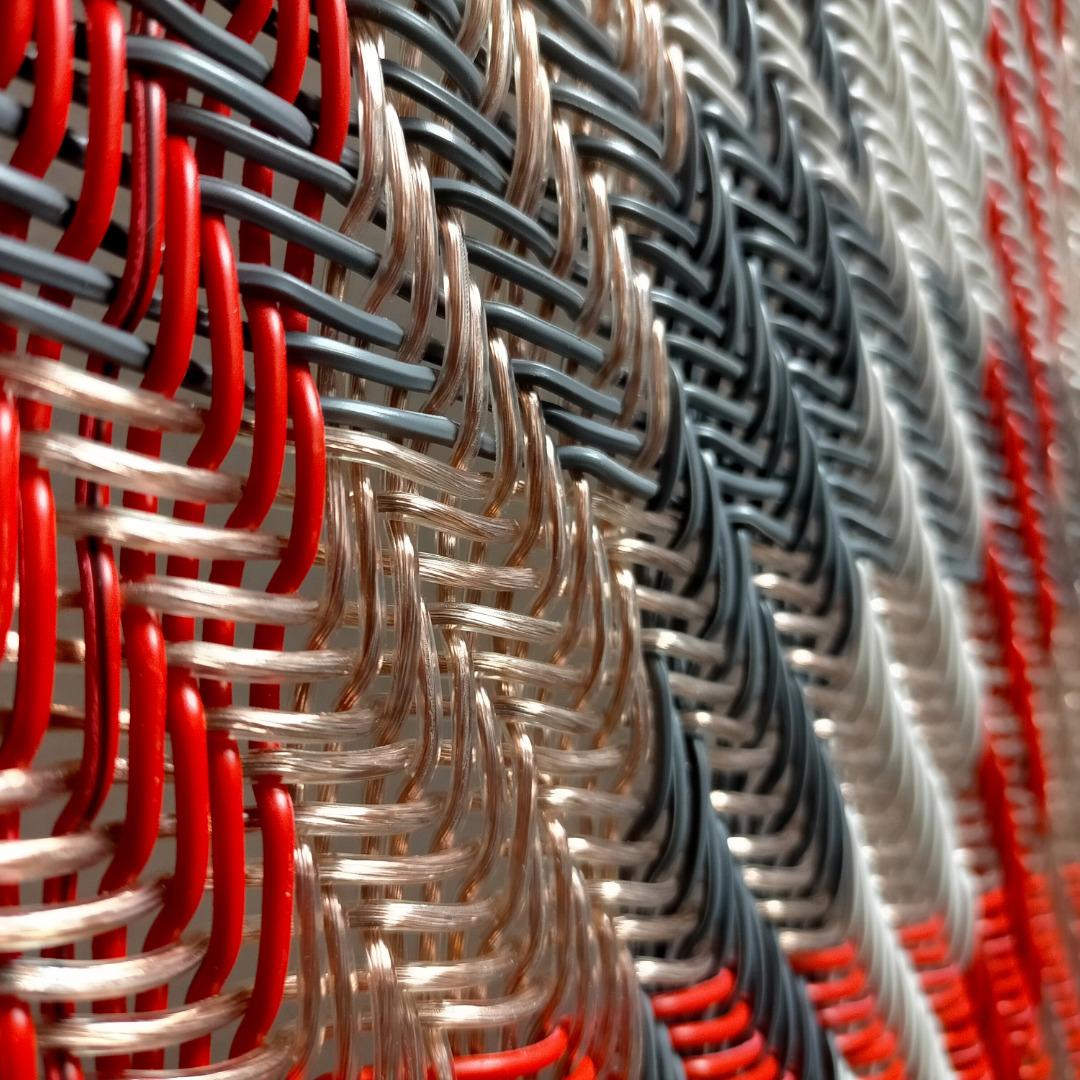
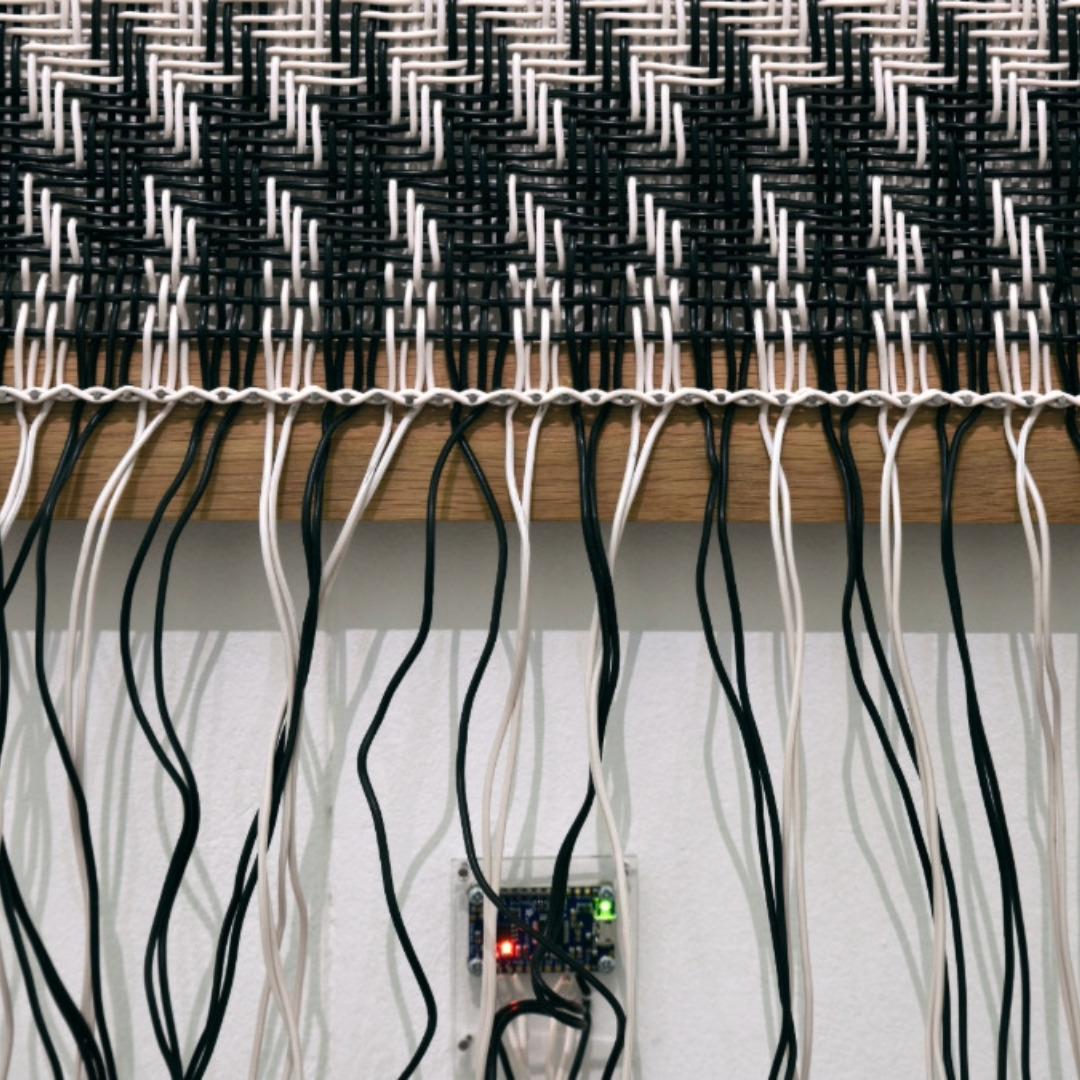
Loops of the loom, spoken weaving by Cecile Babiole
https://neural.it/2025/09/loops-of-the-loom-spoken-weaving/
#audioart #microphones #sampling #audiorecording #transmissionart #sound #soundart #soundartist #klangkunst #soundinstallation #soundartinstallation #soundsculpture #soundcomposition #computermusic #scores #sounddesign #soundpoetry #womenintechnology #voicetechnology #digitalvoice #speechsynthesis #texttospeech #artandtechnology #arttech #newmediaart #newmediaartist #mediaart #artreview #neuralmag #neuralmagazine
One of my college jobs was working with a patient, later a dear friend, suffering from quadriplegia. Over the decades I've followed work on computer brain interfaces as they progressed and found this article on privacy concerns around a new speech synthesis approach. I'm glad scientists are working on both sides of this.
https://arstechnica.com/science/2025/08/an-inner-speech-decoder-reveals-some-mental-privacy-issues/
Hi y’all!
v0.1.0 of my portable text to speech device software was released!
Information about it can be found at https://git.ka-so.me/kasanwa-solane/portable-tts
Why did I make this?
I made it as a tool for my personal accessibility toolbox. There’s times that, for various reasons, I struggle with speech, but am expected to speak aloud or that speech is the modality for communication most useful in said context. This allows me to produce speech in a recognizable facsimile of my voice by typing it on a dedicated device.
Why a dedicated device?
Sometimes, I’m in situations where smartphones are disallowed, as well as any device with an integrated camera or microphone. A dedicated accessibility device that deliberately does not have those input modalities is much more acceptable in those spaces.
Everyone is encouraged to boost this post and/or share the link elsewhere. I want the people who might have a use case for this device to be able to find it.
#accessability #augmentativeAdaptiveCommunication #textToSpeech #speechSynthesis #DIY

Here’s how deepfake vishing attacks work, and why they can be hard to detect https://arstechni.ca/etz6 #speechsynthesis #deepfakes #Security #Biz&IT #fraud #AI

SP0256A-AL2 Speech Synthesis
I had one of those moments recently when reading an article online sent me into a bit of a major tangent. The article in question was talking about the SP0256-AL2 speech synthesizer chip. And if you heard a computer talking in the 1980s, then chances are it was probably this chip doing all the hard work.
These aren’t very easy to come by these days, but you might get lucky with the usual places and find a legit, used, working one, but apparently an awful lot of those that can be found online are likely to be fake (see: https://www.smbaker.com/counterfeitfakejustplainbad-sp0256a-al2-chips).
But a number of peripherals for home computers in the 1980s included it and as luck would have it, the wonderful “MR GELÉE’S TECH” has a PCB, supplied with the chip included, for the RC2014 here: https://www.tindie.com/products/mrgelee/mg005-speech-synthesiser-designed-for-rc2014/
Update: I’ve also spotted that there is SP0256-AL2 emulation in the RC2040 project too.
So whilst on particularly a musical project (at least, not at the moment), this details how I got it up and running.
For my series of projects driving this from an Arduino, see Arduino and SP0256A-AL2.
https://makertube.net/w/gmqV2pM5UMqTPt31ThwseY
Warning! I strongly recommend using old or second hand equipment for your experiments. I am not responsible for any damage to expensive instruments!
If you are new to microcontollers, see the Getting Started pages.
The SP0256A-AL2
This is a pretty amazing device. It was present in the Currah uSpeech peripheral (that unfortunately I never had myself) back “in the day” and a whole load of other cheap(ish) add-ons for 1980s computers.
It works by having a set of samples encoded in ROM for the basic phonetic sounds of the English language (called “allophones”). Then it is told which to sound by a controlling CPU, or these days MCU probably.
Of course, text to speech has come on enormously since then, and there are all sorts of nuance now possible. It will be interesting to see if the recent rounds of AI use become a pinnacle of text to speech or a curse, but we shall see.
But there is something pretty nostalgic about hearing an allophone-based, lo-fi (by today’s standards) chip in action. And this style of voice is iconic for the sounds of computer voices used in films such as War Games, 2001, and The Forbin Project, among many others.
There is a complete run-down of the family of these devices here: https://en.wikipedia.org/wiki/General_Instrument_SP0256
“The SP0256-AL2 is perhaps the most commonly encountered variant. It contains 59 allophones primarily intended for use with English language phrases and five pauses in its internal 16 Kb (2 KB) ROM.”
There are full technical details in a datasheet and application manual available online, for example, from here: https://www.cpcwiki.eu/index.php/SP0256
Here is the full allophone table from the datasheet:
The datasheet also includes some words that show how the allophones can be used, for example:
I sort of imagined that somewhere there might be a library that has the data structures that represent the details provided in the datasheet, but I’ve not found it yet if it exists.
But thankfully there are means of getting allophones from English Text, which I’ll get to shortly.
The Basic Code
The code to drive the chip from BASIC is pretty straight forward. This is my code based on the example provided in the manual:
10 DATA 18,12,55,12,43,18,51,35,5,55,0
15 DATA 24,35,46,52,45,21,41,51,11,13,14,53,45,0
20 LET LE=11+14
30 DIM XX(LE)
40 FOR Y = 1 TO LE
50 READ XX (Y)
60 NEXT Y
70 FOR Z=1 TO LE
80 IF (INP(31) AND 2) = 2 THEN GOTO 100
90 GOTO 80
100 OUT 31,XX(Z)
105 NEXT Z
There is a list of the phonemes required and they are sent to the chip in turn.
As already mentioned of course, the real trick is how to get that list of allophones. Whilst it is possible to walk through the datasheet for the SP0256A-AL2 and pick out the correct ones in turn, that is a lot more difficult that it might initially seem, as it perhaps highlighted above.
Text to Allophone Data Workflow
As with may of these things we are fortunately that there are tools out there that can do all this for us. In this case, two tools are required:
- lexconvert: https://github.com/ssb22/lexconvert
- espeak or espeak-ng: https://github.com/espeak-ng/espeak-ng
I used espeak-ng which has a MSI installer for Windows, and lexconverter which is a python script.
Install steps:
- Install espeak-ng as required. This is a command line utility for Linux or Windows and instructions for installation can be found in “Documentation” -> “User Guide”.
- Grab the lexconvert.py script.
I had to ensure that the location of espeak-ng was present in my system PATH, but also had to edit lexconvert.py to change several instances of espeak to espeak-ng. There were three places that looked like they would need changing, all associated with “os.system”, “os.popen” or “subprocess.Popen” calls or similar.
I suspect copying the original executable to a more handy location and renaming it to “espeak” would probably work too.
To get allophones suitable for use with the SP0256A-AL2 requires the “cheetah” option to lexconvert, as detailed below:
cheetah : Allophone codes for the 1983 "Cheetah Sweet Talker" SP0256-based hardware add-on for ZX Spectrum and BBC Micro home computers. The conversion from phonemes to allophones might need tweaking. Set the CHEETAH_SYM environment variable to see the mnemonic symbols from the instruction sheet (not actually used by the system).
The command I used was as follows, which then waits for keyboard input and creates a data structure of allophones which can be used almost directly in the BASIC program.
C:\Users\Kevin\Stuff>python lexconvert.py --phones cheetah
Enter text (EOF when done)
Hello World
DATA 27,51,45,53,46,52,45,21,0
Greetings Professor Falcon
DATA 36,14,19,13,12,44,43,9,14,51,40,7,55,52,40,26,45,41,51,11,0
Would you like to play a game?
DATA 46,30,21,25,22,45,6,41,13,51,9,45,20,51,36,20,16,0
This is the Voice of World Control
DATA 18,12,55,12,43,18,51,35,5,55,24,35,46,52,45,21,41,51,11,13,14,53,45,0

C:\Users\Kevin\Stuff>
One issue I had in using these DATA statements directly is that they get capped when pasted into the RC2014 terminal, hence using two DATA statements in my final code.
But in general terms, this works surprisingly well.
RC2040 Support
After getting this far, I happened to spot that there is also SP0256-AL2 support in the RC2040 emulator too – more here: https://github.com/ExtremeElectronics/RC2040
In particular there is a script that will create the entire BASIC code for you here: https://extkits.co.uk/sp0256-al2/
Full details of the emulation can be found here: https://github.com/ExtremeElectronics/SP0256-AL2-Pico-Emulation-Detail
This is a really easy way to start messing around with it.
A Note on Chips
As mentioned at the start, getting hold of a true SP0256A-AL2 might be a bit of a lottery, so it maybe that playing with the Pico emulation is good enough.
But a good source, if you are already an RC2014 user, is the MG005 as previously mentioned. It is a great addition to your RC2014 system.
In my case I have managed to end up with three devices, one from the MG005 and two off ebay. They weren’t particularly cheap but look like they come from sellers who have a range of vintage devices for sale (one in the UK and one from Netherlands).
All three devices do seem to work and seem to be actual SP0256A-AL2 devices rather than a re-badged simpler device in the range. Here are some photos of the tops and bottoms of my three devices.
The bottom one is the trusted source from MG005 (hence the coloured in GI logo), the others are the two ebay purchases.
They all have similar markings. The text appears pretty distinct in all three devices, and although it’s quite hard to see in the photo, all three have a faint “C 236 20” type marking, viewable in the right light, that is just visible on the centre device in the photo.
All three also have a very distinct, recessed, spot marking pin 1 and none of them seemed to have overly shiny pins that would imply they’ve been “re-dipped” in solder to make them look new.
So far, I think I have three good chips I can use for experimenting.
Closing Thoughts
I now feel like I should build up DATA statements of allophones for well-known quotes from computers in films.
I also now want to work out how to drive the SP0256A-AL2 directly from a microcontroller myself, so that will probably be next.
Then I would like to tie this up to MIDI somehow, but my initial thought, of linking allophones to MIDI notes, seems to have been done already: https://rarewaves.net/products/midi-narrator/
But I still might have to overdub it saying “Concerto for a Rainy Day”. Getting it in time with the music might be an interesting challenge, but maybe there might be a computer-voice-vocoder-like thing possible now.
And of course, this now presents all sorts of interesting possibilities for some more Philip Glass…
Kevin


This post was inspired by the accessibility, or lack there of, of various operating systems, annoyances that people have with Windows, and the current state of Linux, which many sighted people tout as a great Windows alternative. While there are obviously some blind people who use it, overall, the experience is neither streamlined nor easy. and it can be downright frustrating. There is Mac OS, but then, there is the expense of a Mac, plus the fact that many normal periferals can't be used with it. There are Android and IOS, but these are touch-based, not built for computers, though both can be used with real keyboards. Still, such operating systems come with their own headaches.
My solution is one that cuts through all of the hurdles to a system that is fast, efficient, light on resources, and very accessible. This is DOS. I am not referring to MS-DOS, but to modern varients such as FreeDOS (just updated this year), Enhanced DR-DOS (updated a few years ago), VDOS (a version that runs directly in modern Windows systems), etc. For instance, this is FreeDOS.
https://www.freedos.org/download/
This is a wonderful (and long) list of general fallacies that people may hold about the operating system, as well as statements debunking them and proving why it is still a viable choice in 2025.
http://www.chebucto.ns.ca/~ak621/DOS/DOS-Fal.html
For us in the blind community, there are really only two issues standing in our way. The first is a good screen reader, and the second is software synthesis. Yet even these can be overcome. While many DOS screen readers were made in the past, only one is now completely open source. That is Provox. The entire code is available for us to update to our hearts' content. (Look down the page and you will find the download link under the screen reader section.)
Of course, we could create an entirely new one, but this gives us a good place to start if we don't want to reinvent the wheel. As for hardware synthesis, it was done in the past, with Flipper. It's not the best, but it shows that it is possible. Now, with all of these updates to DOS itself, as well as faster machines with better memory, soundcards, and drivers, it should be easier to create a software synthesizer.
There are still people programming for DOS, both for everyday use and versions of the operating system itself. Why not collaborate with them? Why can't we have a text-based, keyboard-driven operating system that works for us, that isn't bloated, and that we can even help to create? Imagine a version of DOS designed with accessibility in mind. What if it came with a built-in screen reader that talked during installation, braille support, a magnifier, ocr software, various other accessibility options, and menus that were easy to navigate for those who didn't wish to use the commandline, as well as access to it for those who did? What if it were free, or at the very least, extremely cheap, and could run on almost anything, so that anyone in the world could use it, provided he had some sort of computer? This is all within reach.
How many of you would be interested in at least trying out these modern versions of DOS to see what they offer and how far we could take them into the realm of accessibility and daily use?
#accessibility #blind #commandline #computing #DOS #FreeDOS #OperatingSystem #programming #ScreenReader #SoftwareSynthesizer #SpeechSynthesis #text-based #tui #WindowsAlternative
SpeechSSM: Hour-Long AI Narratives Redefine Voice Technology https://aiorbit.app/speechssm-hour-long-ai-narratives-redefine-voice-technology/ #AIVoice
#SpeechSynthesis
#SpeechSSM
#FutureOfAI

@thelinuxEXP I really like Speech Note! It's a fantastic tool for quick and local voice transcription in multiple languages, created by @mkiol
It's incredibly handy for capturing thoughts on the go, conducting interviews, or making voice memos without worrying about language barriers. The app uses strictly locally running LLMs, and its ease of use makes it a standout choice for anyone needing offline transcription services.
I primarily use #WhisperAI for transcription and Piper for voice, but many other models are available as well.
It is available as flatpak and https://github.com/mkiol/dsnote
#TTS #transcription #TextToSpeech #translator translation #offline #machinetranslation #sailfishos #SpeechSynthesis #SpeechRecognition #speechtotext #nmt #linux-desktop #stt #asr #flatpak-applications #SpeechNote

🌟 Excited to share Thorsten-Voice's YouTube channel! 🎥 🗣️🔊 ♿ 💬
Thorsten presents innovative TTS solutions and a variety of voice technologies, making it an excellent starting point for anyone interested in open-source text-to-speech. Whether you're a developer, accessibility advocate, or tech enthusiast, his channel offers valuable insights and resources. Don't miss out on this fantastic content! 🎬
follow hem here: @thorstenvoice
or on YouTube: https://www.youtube.com/@ThorstenMueller YouTube channel!
#Accessibility #FLOSS #TTS #ParlerTTS #OpenSource #VoiceTech #TextToSpeech #AI #CoquiAI #VoiceAssistant #Sprachassistent #MachineLearning #AccessibilityMatters #FLOSS #TTS #OpenSource #Inclusivity #FOSS #Coqui #AI #CoquiAI #VoiceAssistant #Sprachassistent #VoiceTechnology #KünstlicheStimme #MachineLearning #Python #Rhasspy #TextToSpeech #VoiceTech #STT #SpeechSynthesis #SpeechRecognition #Sprachsynthese #ArtificialVoice #VoiceCloning #Spracherkennung #CoquiTTS #voice #a11y #ScreenReader
Goode @thorstenvoice, just found your channel and I'm impressed! Your work on TTS is fantastic and so important for accessibility in the FLOSS community. Keep it up! #AccessibilityMatters #FLOSS #TTS #OpenSource #Inclusivity #FOSS #Coqui #AI #CoquiAI #VoiceAssistant #Sprachassistent #VoiceTechnology #KünstlicheStimme #MachineLearning #Python #Rhasspy #TextToSpeech #VoiceTech #STT #SpeechSynthesis #SpeechRecognition #Sprachsynthese #ArtificialVoice #VoiceCloning #Spracherkennung #CoquiTTS #voice #a11y #ScreenReader


🚀🎤 Behold the future of speech synthesis: LLama-powered nonsense! In a world where tech jargon reigns supreme, why not strap a llama to your neural network and call it innovation? 🤔💡 Perfect for those who think "simple" means adding #complexity to complexity. 🦙💬
https://llasatts.github.io/llasatts/ #speechsynthesis #innovation #techjargon #neuralnetworks #llamapower #HackerNews #ngated
After my #wake_word_detection #research has delievered fruits, I have plans to continue works in the voice domain. I would love if I could train a #TTS model which has #British accent so I would use it to practice.
I was wondering if I could do the inference on #A311D #NPU. However, as I am skimming papers of different models, having inference on A311D with reasonable performance seems unlikely. Even training of these models on my entry level #IntelArc #GPU would be painful.
Maybe I could just finetune an already existing models. I am also thinking about using #GeneticProgramming for some components of these TTS models to see if there will be better inference performance.
There are #FastSpeech2 and #SpeedySpeech which look promising. I wonder how much natural their accents will be. But they would be good starting points.
BTW, if anyone needs opensource models, I would love to work as a freelancer and have an #opensource job. Even if someone can just provide access to computation resources, that would be good.
#forhire #opensourcejob #job #hiring
#AI #VoiceAI #opensourceai #ml #speechrecognition #speechsynthesis #texttospeech #machinelearning #artificialintelligence #getfedihired #FediHire #hireme #wakeworddetection
Client Info
Server: https://mastodon.social
Version: 2025.07
Repository: https://github.com/cyevgeniy/lmst