#OpenSCAD

2026-03-04

I need a dip belt for my training.
They cost like 300 SEK, for basically a strap with two D-rings, so I decided I'm making my own with an old belt and a 3d-printed buckle.

I think 3d printing really shines making "things-to-attach-things-to-other-things": connectors, buckles, fasteners and so on, which are simple but need to have very specific measures.

I'm not even particularly good at CAD, but simple things are easy to put together.

#3dprint
#openscad

2026-03-03

Looks like the old brain is coming back online again - managed to do a mini project with minimal brain fog interference. I'm now "officially" in #AutisticBurnout, and I've been told I need to do things I enjoy, but I haven't been able to do this kind of thing since late November.

It's a height-adjustable phone mount for 13YO to record his abstract art videos without his mum having to hold the phone for him. Upcycled cupboard door for the base and old wardrobe clothes rail for the pole. 3D printed base and sliding bracket in hot pink (the colour filament I had loaded in the 3D printer), designed in OpenSCAD. Laser cut MDF holder designed in Inkscape.

#Lasercutting #3DPrinting #OpenSCAD #Inkscape #DIY #SpecialInterest #Maker

Side view of the phone holder with phone in place. The base is a white piece of MDF wood with 13YO's latest abstract art masterpiece still in place. The vertical pole is mounted on the left in a socketed pink 3d printed bracket.  About half way up the pole, a pink 3d printed sliding bracket supports a flat laser cut phone holder which suspends the phone at a variable height over the base. The holder is roughly the profile of a straight-sided bottle. The top and sides are separate layers held together by MDF wood sides, joined together with a "knuckle joint". The phone fits in a recess in the wide part, with the full display accessible, and there's a window in the bottom layer for the camera to peer through.Detail of the pole showing the bottom bracket and sliding bracket. The bottom bracket is a flat plate with a deep socket offset to one side for the pole, and three screw-holes to allow it to be firmly attached to the base board. The sliding bracket is an oval cylindrical section with a bracket at right-angles and a tightening nut to stop it sliding when you don't want it to.Top view of holder without a phone in place, facing left-to-right, showing the recess for the phone and the camera window. The most recent art piece can be seen through the window and below the holder.
2026-03-03

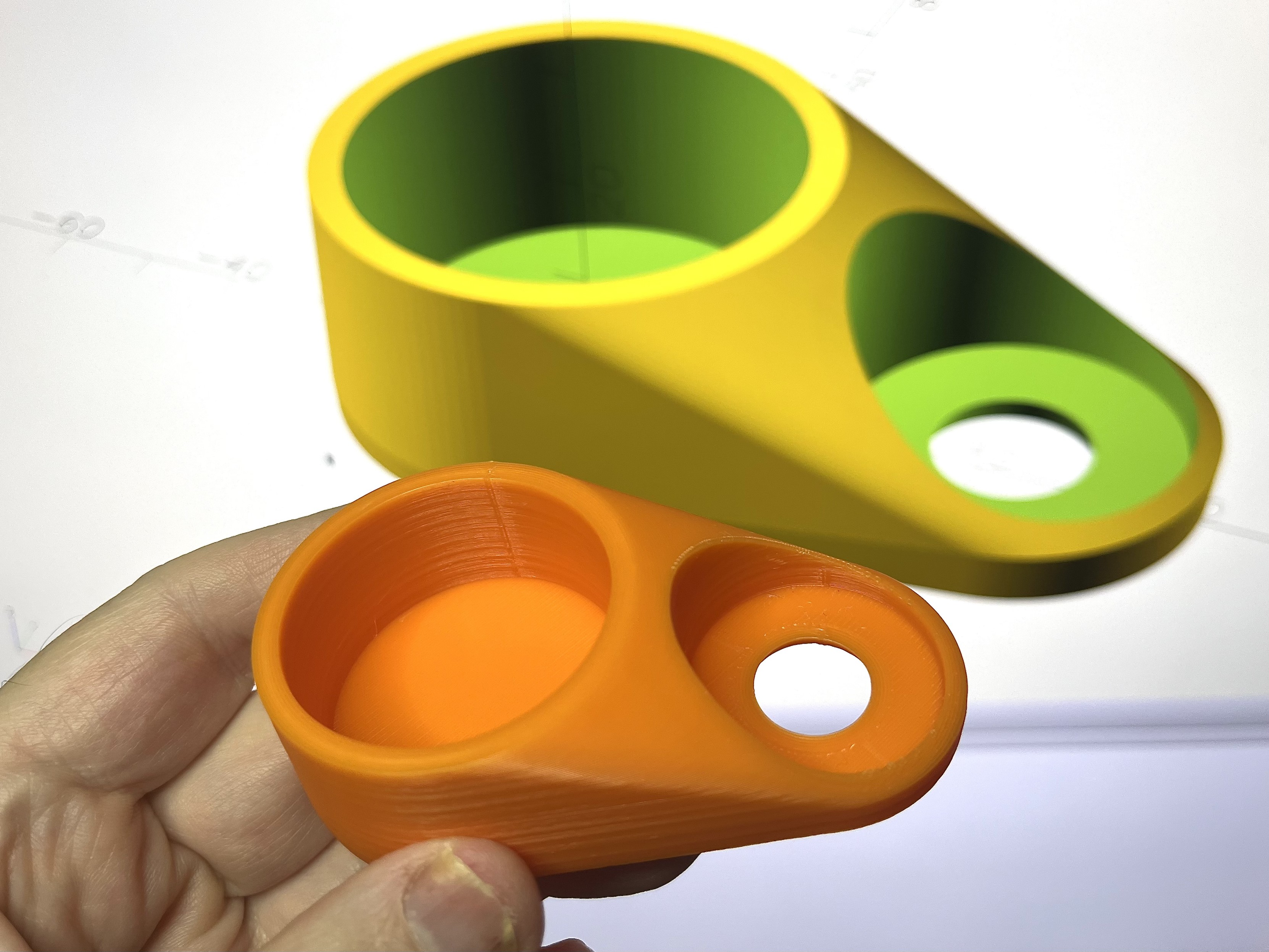
I love making beautiful, functional things with just a few lines of code. #OpenSCAD

Curvy, 3D-printed mystery object held up in front of its model on screen.
2026-03-02

Also, we're working on a 3D model of a replacement "1" key for an ADM 3+ terminal.

This key has a weird kind of angled box stem, but also the "1" key is of weird dimensions (estimated 18x32.6mm) and the stem location is slightly off center (maybe 2mm to the left?)

I think we're going to go to the local hackspace and try printing it today.

This is based on github.com/rsheldiii/KeyV2/ with a new hacked in stem type.

#retroComputing #openScad #3dprinting

openscad: isometric view of the key cap. It has a nice rounded profile and dished top. A rectangular stem sticks out the bottom. The key legend says "1" and "!" in "routed gothic", a modern clone of a classic font called "Gorton".The keycap from the bottom, with the stem pointing directly at the user. It is off center a bit.The keycap from the side. The stem appears to be at a 15 degree angle.
2026-03-01

Habe eine Weile das Projekt liegen lassen. Aber (nicht nur) @a32 hat vorgeschlagen anstelle von Holz lieber was am 3D-Drucker zu drucken.
Stehe nur leider auch wieder am gleichen Problem wie vorher, ich muss irgendwie jemanden mit 3D Drucker fragen, oder mich mal in einen Makerspace begeben.
Tatsächlich habe ich mit @a32 einige Varianten durchgespielt und schon mal etwas losmodelliert. Dank ihm kenn ich jetzt #OpenSCAD und habe mir schnell ein paar primitive Formen zusammengebastelt und die Kugeln zusammengestellt.
Aber ich habe ja immer noch keinen Drucker.

Bis, dann ein guter Freund zufällig einen Drucker übrig hatte und ich ihm den abkaufen konnte. (Aber dabei wollte ich doch vorher noch die #MöphDiss abschließen.)

9/19

Ein großer Karton noch halb in Folie eingewickelt.

This is the first project, where the set of metal radius gauges, I've got recently, was really heavily used. And also it probably is the most rigorously recreated replacement part in my life. I couldn't just stop at the core mechanical functionality, I had to go for aesthetics, so the shape of the knee looks at least as organic as the original.
Of course I did it in #OpenSCAD with #BOSL2 just because I can :D

A light-colored doll with a charcoal black 3d-printed knee standing in front of a laptop holding a radius gauge. Laptop on the background shows OpenSCAD with a 3d model of one half of said knee
stgiga (they/them) :polygender_verify:stgiga@blahaj.zone
2026-02-28

@evermorian@xoxo.zone

Seeing as you're making dice that are fighting the current situation in the USA right now, I think
this would be up your alley. https://stgiga.github.io/gigaware/TarouijaD120files.zip would be up your alley. It is a 3D model with OpenSCAD for tweaks, of a d120 but instead of the numbers 1-120, it has extended Tarot and extended Ouija as its symbols, via Unicode shenanigans, following this mapping https://www.reddit.com/r/d120Lists/comments/17mr2uv/d120_tarot_and_spirit_board/

Roll: Result
1: Ace of Spades

2: Two of Spades

3: Three of Spades

4: Four of Spades

5: Five of Spades

6: Six of Spades

7: Seven of Spades

8: Eight of Spades

9: Nine of Spades

10: Ten of Spades

11: Jack of Spades

12: Knight of Spades

13: Queen of Spades

14: King of Spades

15: Ace of Hearts

16: Two of Hearts

17: Three of Hearts

18: Four of Hearts

19: Five of Hearts

20: Six of Hearts

21: Seven of Hearts

22: Eight of Hearts

23: Nine of Hearts

24: Ten of Hearts

25: Jack of Hearts

26: Knight of Hearts

27: Queen of Hearts

28: King of Hearts

29: Ace of Diamonds

30: Two of Diamonds

31: Three of Diamonds

32: Four of Diamonds

33: Five of Diamonds

34: Six of Diamonds

35: Seven of Diamonds

36: Eight of Diamonds

37: Nine of Diamonds

38: Ten of Diamonds

39: Jack of Diamonds

40: Knight of Diamonds

41: Queen of Diamonds

42: King of Diamonds

43: Black Joker

44: Ace of Clubs

45: Two of Clubs

46: Three of Clubs

47: Four of Clubs

48: Five of Clubs

49: Six of Clubs

50: Seven of Clubs

51: Eight of Clubs

52: Nine of Clubs

53: Ten of Clubs

54: Jack of Clubs

55: Knight of Clubs

56: Queen of Clubs

57: King of Clubs

58: White Joker

59: Fool

60: Individual

61: Childhood

62: Youth

63: Maturity

64: Old Age

65: Morning

66: Afternoon

67: Evening

68: Night

69: Earth and Air

70: Water and Fire

71: Dance

72: Shopping

73: Open Air

74: Visual Arts

75: Spring

76: Summer

77: Autumn

78: Winter

79: The Game

80: Collective

81: 0

82: 1

83: 2

84: 3

85: 4

86: 5

87: 6

88: 7

89: 8

90: 9

91: A

92: B

93: C

94: D

95: E

96: F

97: G

98: H

99: I

100: J

101: K

102: L

103: M

104: N

105: O

106: P

107: Q

108: R

109: S

110: T

111: U

112: V

113: W

114: X

115: Y

116: Z

117: Yes

118: No

119: Hello

120: Goodbye

And in Unicode

🂡🂢🂣🂤🂥🂦🂧🂨🂩🂪🂫🂬🂭🂮🂱🂲🂳🂴🂵🂶🂷🂸🂹🂺🂻🂼🂽🂾🃁🃂🃃🃄🃅🃆🃇🃈🃉🃊🃋🃌🃍🃎
🃏🃑🃒🃓🃔🃕🃖🃗🃘🃙🃚🃛🃜🃝🃞🃟🃠🃡🃢🃣🃤🃥🃦🃧🃨🃩🃪🃫🃬🃭🃮🃯🃰🃱🃲🃳🃴🃵𝟶𝟷𝟸𝟹𝟺𝟻𝟼𝟽𝟾𝟿𝙰𝙱𝙲𝙳𝙴𝙵𝙶𝙷𝙸𝙹𝙺𝙻𝙼𝙽𝙾𝙿𝚀𝚁𝚂𝚃𝚄𝚅𝚆𝚇𝚈𝚉👍👎⎆⎋

The first section of characters is the contents of the Playing Cards block in Unicode, minus Red Joker (white is kept) and Playing Card Back. So that means the 52 cards (jokers included) in an English/American deck of playing cards, plus Tarot's Knight cards, so 56 cards (and these are basically a graphical suit with the value above it, in a 12pt cell), plus the 22 cards in the Major Arcana, with "Fool" as XXII as is done on some decks. That section is rendered as a 12pt card with Roman numerals I through XXII with IX and XI having disambiguation dots. The naming I used for the cards is the
alias names Unicode gives the cards. So none of the "The Hanged Man" or the generic numbered-only names that Unicode gives as their official codepoint names. After that is Ouija's 0-9 and uppercase A-Z, using Unicode's Mathematical Monospaced characters (Courier) from Mathematical Alphanumeric Symbols block, in order to fit the 1800s playbill font commonly seen on Ouija boards, also 12pt. Now the next ones are the interesting ones. To represent Yes and No, I used the Thumbs-Up and Thumbs-Down emoji respectively, and the real interesting part is what I did for Hello and Goodbye. For those, I used two characters from the Miscellaneous Technical block, namely the Enter Symbol and the Escape Symbol, both seen on old Mac keyboards. The first one is a diamond with an arrow pointing inwards, and the second one is a circle with an arrow pointing outwards. The metaphor here is that "Hello" is entering a conversation, and "Goodbye" is leaving one, obviously with a spirit. And all this fills ALL 120 slots on a d120, with no empty or duplicate entries. A unique glyph for each side. The only fonts usable for this by the way are Unifont Smooth (bundled) or UnifontEX. No other font, even Unifont itself, has all the characters together, due to the fact that Hello and Goodbye symbols are in Plane 0, meanwhile the rest of the characters are in Plane 1 AND even include emoji, never mind that some fonts do not support the Major Arcana part of the Playing Cards block. So basically, you're stuck with these two forks of GNU Unifont, but UnifontEX is pixel and so is not exactly a fitting theme unless you're a hacker like I am. Plus, by a bout of sheer chance, ALL the characters after vectorization turned out fine (though White Joker's J is too skeletal in the loop), something that related characters (some of the other stuff in the same block as the thumbs up and thumbs down emoji didn't vectorize well) have trouble with. I was very pleasantly surprised that the emoji and the Roman numerals turned out fine. But ultimately this was a feat of engineering I did when I was bored from 2023 to nowadays.

Anyways, what makes this a compelling protest product is that it combines several things that fundamentalist Christians are very prone to hating. It takes Tarot cards and Ouija boards and shoves them onto dice that are literally divisible into an entire set of common and rare TTRPG dice, on top of the shape being a D&D d20 but divided into 6 triangles (putting a d4 on each face and then dividing by 2), a D&D d12 but divided into 10 triangles for each pentagon, as well as being a derivative shape of the d30 and d60. So basically, this "Tarouija" d120 combines multiple things that fundamentalist Christians consider "demonic" into one divination ritual item and thus is a great form of protest against the religious right. For the record I live in California. Hopefully this is interesting. Oh the OpenSCAD file needs the nightly build of OpenSCAD.
#dicemaking #dicemaker #dice #d120 #unicode #unifontex #tarotcard #tarotdecks #tarotcards #tarotcardsreading #ouijaboard #ouija #3d #3dp #3dprinting #3dprinter #spiritboard #majorarcana #fuckice #protest #unifont #openscad #scad #3dart #art #tech #technology #code #font #fontdev #fonts #3dmodel #3dmodeling #3dmodels #3dmodeled #computerscience #compsci #boredom #activism #ice
Yann Büchau :nixos:nobodyinperson@fosstodon.org
2026-02-27

And here is my published dissertation @umphy, about quantifying the natural CO2 exhaust at the Starzach site in Southwest Germany (my result: ~10t/d):

hdl.handle.net/10900/176213

I used a lot of #FOSS software and hardware for all of it and it was amazing. Honorable mentions: #gitAnnex, #dataLad, #KiCAD, #OpenSCAD, #PlatformIO, #Arduino, #TexLaTeX. I just wish I'd used #nix / #nixOS sooner.

licensed #OpenAccess under #CreativeCommons CC-BY-4.0

#PhDLife

Figure 2: Examples of CO2 degassing at the Starzach site. Figure reproduced from Büchau et al. (2022, Appendix A,
page 62, kindly provided by the publisher under a CC-BY-4.0 license). (a) diffuse degassing, small ascending gas
bubbles (during spring 2020 flooding), (b) mofette with largest diameter, examined in 2015 by Lübben and Leven
(2022), (c) picture by Martin Schon in 2019, groundwater monitor well, turned into the site’s most active mofette shortly after its deployment in 2014.Table 2: Tabular comparison of four low-cost NDIR CO2 sensors evaluated for application at the Starzach site,
reproduced from Büchau et al. (2022, Appendix A, page 65, kindly provided by the publisher under a CC-BY-4.0
license)Figure 5: Gas flow funnel system mounted over the groundwater monitoring well (Figure 1, installed in 2014, which
turned into a mofette shortly after deployment) at the Starzach site in 2022. Figure reproduced from (Büchau et al.,
2024a, Appendix B, page 80, licensed under CC-BY-4.0).Figure 9: Flux-gradient setup close to the ground, next to the Starzach site’s mofette with the largest diameter (30 cm,
Figure 2b, examined in 2015 by Lübben and Leven, 2022). Four Sensirion SCD30 low-cost CO2 sensors each
are mounted 40 cm above and below a Campbell Scientific IRGASON eddy covariance station at 60 cm height.
Measurements of this setup are shown in Figure 10 and Figure 11.
Stewart Russellscruss@xoxo.zone
2026-02-27
RevK :verified_r:revk@toot.me.uk
2026-02-25

OK, that works... Quite impressed with @jlc3dp

The PCB with LEDs to go inside is expected tomorrow.

Update: Someone asked me if this image was real, not AI, or proof of concept: FFS, it is a real photograph I took of a real 3D print!

And yes, I am mastodon only now, so bloody well boost 🙂 thanks. Yes, thank you.

P.S. never expected "bloody well boost" to work. Extra cool. Thanks all.

#stargate #openscad #stl

A group of four action figures in military-style outfits interact near a large, circular stone gate with intricate carvings. The background is a vibrant green.

“This gate, …, is plastic”
Stewart Russellscruss@xoxo.zone
2026-02-25
Quixoticgeekquixoticgeek@v.st
2026-02-24

Uploaded another design to printables. This time a simple stackable 1x1 gridfinity holder for 1/4" hexdrive bits.

I could find plenty of gridfinity bit holders, but none that were stackable and 1x1. So I designed my own in openscad

printables.com/model/1615225-g

#3DPrinting #Gridfinity #OpenSCAD.

Prototype of a small pump I designed and CNC millied for the purposes of teaching.
The parts were designed using math and SCAD (where you program your part). The code is on the last image.

#photography #macro #macrophotography #industriteknik #darktable #danmark #cnc #machining #machinist #teaching #openscad #milling #metalwork
Part of the small pump, designed to be made with only a single endmill.When the middle part rotates, it forces the ring surrounding it to turn, which forces gasses/fluids through the channels below.The code that I wrote to design the parts.
Stop calling me a nerd!
2026-02-22

@Matthias Je nach Anwendungsfall und insbesondere für einfachere Modelle halte ich #OpenSCAD schon auch für eine Option.

FoxyLad :tinoflag:foxylad@mastodon.nz
2026-02-21

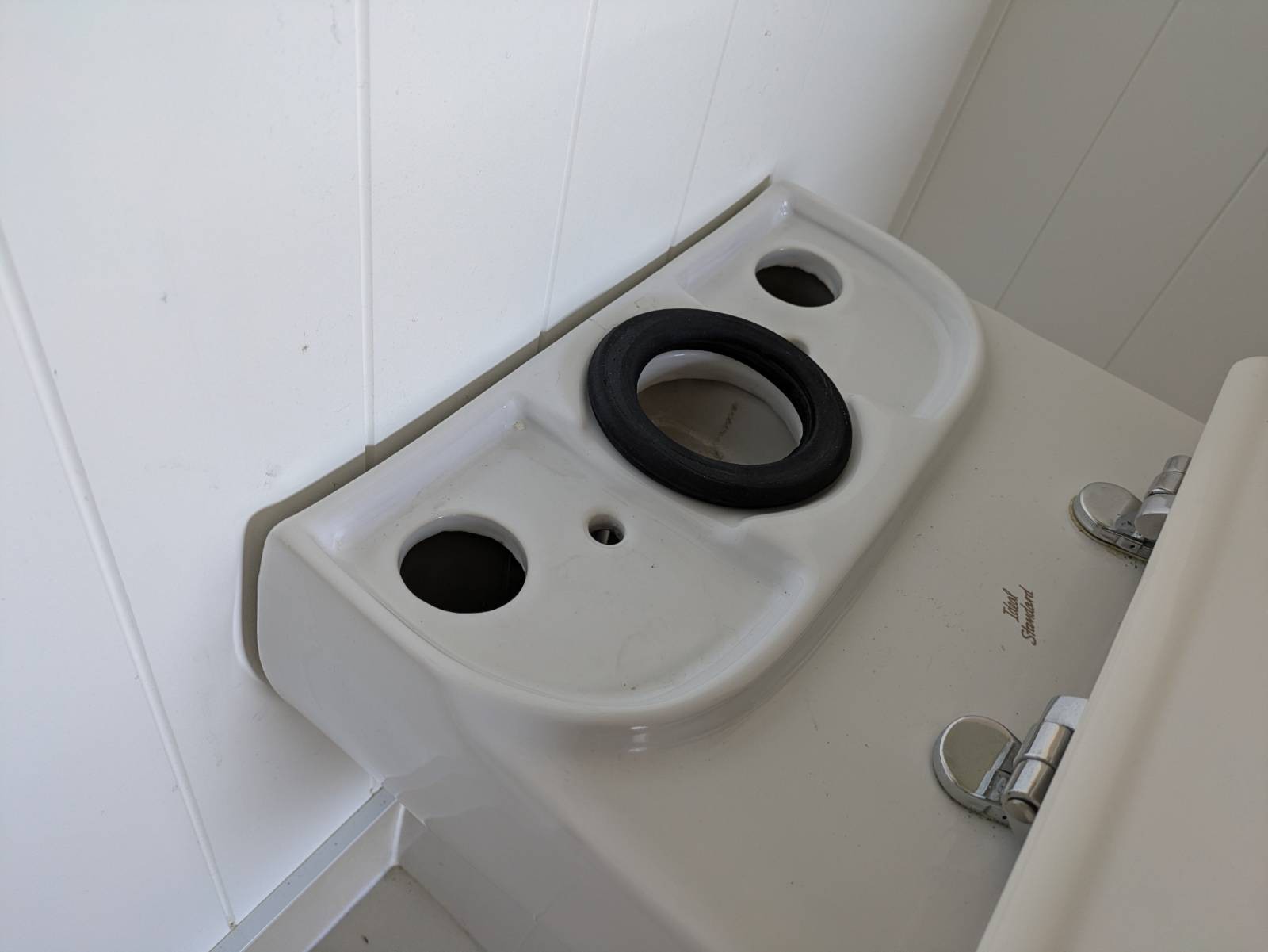
Problem: the toilet cistern is attached with two bolts through the bottom into a nuts under the small holes. And the cistern covers the big holes, so how to hold the nut while you screw the bolt into it?

#3DPrinting to the rescue! A quick model in #OpenSCAD, print on my #Prussa Mini, and some number 8 fencing wire (of course!) and voila! Two captive nut holders. The loo was back together in five minutes.

The base of a toilet showing two small and two large holes into the cavity inside the base, with no access to hold nuts under the small holes while screwing the bolt into them.A screenshot of the OpenSCAD 3D modelling package, showing a shape with a nut-shaped depression and two arms with a hole through them.The bed of a Prussa Mini 3D printer with two real copies of the OpenSCAD design.A picture showing the a nut holder before installation and one installed, holding the nut snugly under a small hole..
Jiëljiel
2026-02-21

Big up to the @OpenSCAD team for the amazing work you’re doing!

Just tested the nightly build and loved the changes since the last stable release are fantastic. Such a game-changer for my 3D prints!
Quick question: any ETA on the next stable release? Can’t wait to use it in production ! 😊

Pete Prodoehl 🍕rasterweb
2026-02-17

How many times will I screw up the size of a hexagon in @OpenSCAD I'm pretty sure it's every time... I probably need to add a calculator to my code.

For now this one seemed to work:

omnicalculator.com/math/hexagon

Client Info

Server: https://mastodon.social
Version: 2025.07
Repository: https://github.com/cyevgeniy/lmst