#VirtIO

2025-11-25

#TCP Offloading! Eigentlich hatten wir die Lösung gestern schon.
Szenario:
#LXC -> veth nic -> Host/Hypervisor -> virtio nic -> firewall -> #virtio nic -> e1000 nic -> DB-Server

Der LXC setzt eine "dummy" cksum in den TCP Header in der Annahme, der Host würde die korrekte cksum auf dem NIC berechnen. Dadurch ist bereits ab dem lxc selbst "chsum incorrect". Interessanterweise erreicht das Paket dennoch den DB-Server, wird dort aber entgültig verworfen und es gibt auf das SYN keinen SYN-ACK.

nickbeardednickbearded
2025-11-23

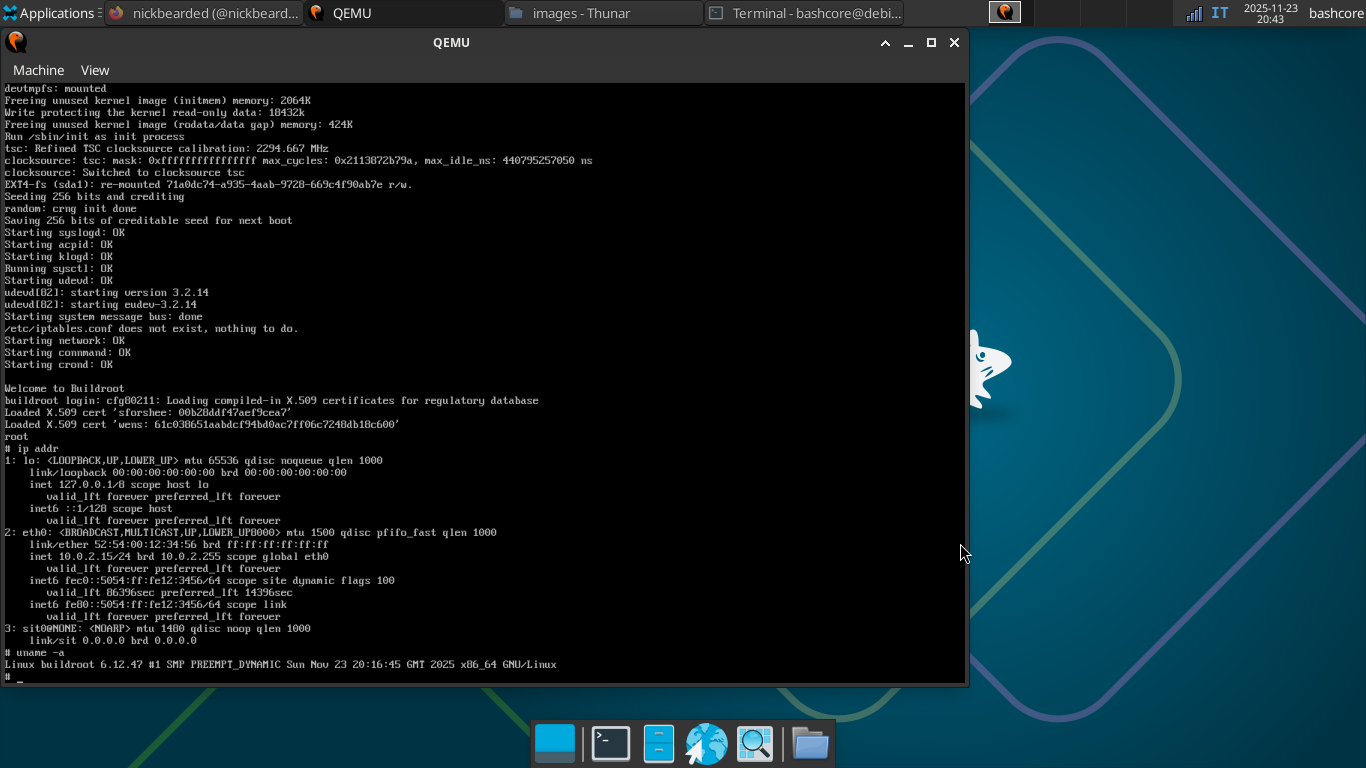
Getting started with a cool new project: building my own minimalist Linux OS for x86_64 using Buildroot! 🛠️

Just finished the full cross-compilation with the pc_x86_64_bios_defconfig. The resulting tiny system is up and running in QEMU.

Excited to spend the next few days exploring Buildroot's potential, from custom kernels to package management. Time to dig into the embedded world! 🚀

buildroot
2025-11-20

I figured I'd dump this into the void, but has anyone out there successfully done 3d accelerated virtio graphics with a NixOS host?

#nixos #virgl #virtio #KVM #linux #stumped

Linaro LimitedLinaroLtd
2025-11-12

At EdgeTech 2025, Linaro will present how VirtIO innovation is transforming connectivity across automotive and mobile systems.

Lina Iyer will share how Linaro drives standardization in the Arm ecosystem, contributes to open-source projects like Linux, QEMU, and Android, and advances Virtio-msg to enable faster, more reliable communication for next-generation vehicles.

Join the conversation on the 19/11 at 📍 L1-05

@joeress another one where it was useful was generating a cut down test case for #latex. I was diagnosing a problem with the #virtio specs caused by a regression in htlatex and #gemini was able to generate a nice concise reproducer much faster than I could have.

We got a bunch of security reports for #qemu recently: gitlab.com/sculizhenghao. Fortunately these were not slop reports and having test cases with the reports was very useful.

2025-11-04

So I was curious about VirtioFS today and decided to satisfy that curiosity with the Help of Gemini DeepResearch. The Resulting document was an interesting read. It looks like the Tool manages not to Hallucinate as it has direct sources. The Part that VirtioFS is basically FUSE was new to me. When I finished reading it I thought, maybe some people might like this read aswell.

wegmueller.it/blog/Implementin

#rustlang #drivers #illumos #virtio

2025-10-29

So … while this is obviously nice for virtualized gaming, what about video decode/encode acceleration?

Is there a way to give a #Linux guest access to the host #GPU's video codec acceleration without GPU passthrough?

Just like it's possible to pass /dev/dri into a container, can I do a similar thing with a #QEMU / #KVM virtual machine?

#libvirt #virtualization #HWAccel #VideoEncoding #VirtIO #VirtIOGPU #VirGL

2025-10-18

#nixos #qemu #virtualization
okay my home-manager and sshd both services worked
well hm's only log error is that it cailed to create to some hm prorgam's files
I am not disabling #dconf for that
I can use emacs from serial port #virtio , even vterm
and ssh to host machine
2 questions
- why is it so slow, even the #direnv and how can I speed it up
( obv it's built without a bootloader, as that's way faster)
- sharing data from host also means if I mod something in that from vm , it also gets modded on host , my point of making this vm was to test new configs for system
What re some quick and dirty ways out of it?
yes I can do with #podman maybe, but it can't share my nixos modules which enable all the display in 1st place
is there a #rust way ?
Notes
1. it doesn't include/shares nix-channels from host
2. neovim is way cooler , it can display colors, even on serial port
#linux
@ramin_hal9001

@tulilirockz I'm sure it all it would really take is someone putting together a DirectX pass-through driver over #VirtIO in the same way Mesa can encapsulate OpenGL or Vulkan. #wine/#proton should understand enough to be able to render DirectX on the host side. I don't know how many #FLOSS folks there are that want to hack on Windows drivers.

Patrick :neocat_flag_bi:patrick@hatoya.cafe
2025-09-04

One Open-source Project Daily

Quickly create and run optimised Windows, macOS and Linux virtual machines

https://github.com/quickemu-project/quickemu

#1ospd #opensource #efi #hackintosh #hacktoberfest #kvm #linux #macos #qemu #spice #tpm #virgl #virglrenderer #virtio #virtualization #windows

2025-08-26

#promox my #debian12 upgrade VM to #debian13 suffured a network interface renaming (#bookworm: enp6s18 got renamed to #trixie: ens18.)
I missed debian.org/releases/trixie/rel for my qemu q35 type, #virtio VM.

Really Lazy Bearreallylazybear
2025-08-18

So, to allow a linux vm to access a directory from Fedora host with virtio-9p, I'll need to run:

# semanage fcontext -a -t svirt_home_t "/some/dir"
# restorecon -vR /some/dir

Idk why sealert offers this non-working solution instead. It's really weird.:

# semanage fcontext -a -t virt_image_t 'dir'
# restorecon -v 'dir'

Thorsten Leemhuis (acct. 1/4)kernellogger@hachyderm.io
2025-08-14

Introduction to VirtIO, Part 2: Vhost

blogs.oracle.com/linux/post/in

Jonah Palmer writes: ""[…] #Vhost is a key optimization to #VirtIO that was created to offload data-plane processing from #Qemu into more efficient components.

We’ll start off by taking a more in-depth look into the causes of overhead in the data plane of a pure VirtIO configuration. We’ll talk about the costly operations that are involved, such as VM exits, VM entries, context switches, and userspace processing by Qemu. Then we’ll introduce vhost and elaborate on how it addresses these issues by moving data-plane operations either into the kernel (kernel-based vhost) or into a specialized userspace process (via vhost-user).

We’ll then dive into both #kernel-based vhost and vhost-user architectures, examining each in detail—including their advantages, drawbacks, typical use cases, and how they affect performance. […]"

#Linux #LinuxKernel

first image from the linked page
2025-06-16

Decided to switch back to QXL+Spice, but with Spice Listen Type = None, and with CPU pinning, and directly sending audio to pipewire. Seems to have fixed the slow 2d graphics, while maintaining smooth video playback, and eliminated any random intermittent freezes that would crash the viewer.

#libvirt #virtio #qxl

2025-06-16

I enabled OpenGL acceleration under VirtIO and video playback is smooth, but now other 2d things have suddenly become very slow, such as switching between windows and closing large windows. Is this a known problem? Or do I need a faster GPU or CPU?

#libvirt #virtio #virgl #virglrenderer

2025-06-11

Also wtf, why are Virtio Graphics so much slower than QXL Graphics? I was under the impression that Virtio was supposed to have lower overhead.

#qemu #virtio #libvirt #qxl

2025-06-11

Has anyone had luck running labwc under QEMU? Getting screen tearing running under Virtio Graphics, but better under QXL. Setting the resolution to the native resolution using wlr-randr seems to slow things down. Also having random freezes when moving my mouse around. Seeing lots of "Failed to commit output to Virtual-1" error messages when I check the stdout/stderr of labwc.

#labwc #qemu #qxl #virtio #wayland

GNU/Matt :fedora: :kde:gnuplusmatt@fosstodon.org
2025-04-24

some legend put the virtio guest tools in winget!

winget install RedHat.VirtIO

#linux #qemu #virtio #legend #windows #winget

hobbsc has movedhobbsc@social.sdf.org
2025-04-21

just wrapped up unfucking a #proxmox #windows server guest that had imported disks from #vmware. it was an arduous process that involved a ton of time with bcdedit/bcdboot. i also had to use dism to manually inject the #virtio drivers. ugh.

i really should document this and make it a blog post or something but i am so very exhausted. i need to do this again with another guest so maybe i'll write it all down then.

Zeroday Podcast (stefan)zeroday@podcasts.social
2025-04-05

#Linux is so cool...

with just a simple command on the #shell you can create a Image of a HDD to use with you #qemu #virtio #vm

"sudo qemu-img convert -f raw -O qcow2 /PATH/TO/DEVICE /PATH/TO/VM-IMAGE-FILE.qcow2"

It is that simple. If you wanna use it, just import it into your VM and go =P

Client Info

Server: https://mastodon.social
Version: 2025.07
Repository: https://github.com/cyevgeniy/lmst