#userinterface

2026-03-01
Hacker Newsh4ckernews
2026-02-28
mmalcmmalc
2026-02-28

@hyperjeff

A more general example might be, which window you should be looking at in the first place.

For me, one of the features most sorely lost in the transformation of the NeXT UI to MacOS was the clear distinction between main, key, and “other” windows/panels…


Screenshot of a page from the NEXTSTEP User Guide describing and illustrating the difference between main, key, and other windows.

By default, standard windows have a light gray title bar.

"To work in a window, you make it the key window — the window where you type, or that accepts your keystrokes. There's only one key window at a time.
A standard window with a black title bar is both the key window and the main window.”

If a panel (such as a Find panel) is key (and so has a black title bar) the main window (the window on which actions in the panel act) has a dark gray title bar.
2026-02-25

@rl_dane Unfortunately you are correct. #UserInterface Design, of course, isn't limited to #computers. There aren't too many new #vehicles these days that do *not* have a #touchscreen #infotainment #center. They are a distraction.

<tangent>
Same goes for #synthesizers. Many #digital #synths have gorgeous touchscreens but few #tactile #controls. Menu diving has always been an issue on these devices but it's definitely worsened. A lot of my time architecting new sounds is spend navigating an OS with my fingertips.

On the flip side, these instruments are ridiculously powerful. Multiple SoCs and running #Linux!
</tangent>

R.L. Dane :Debian: :OpenBSD: :FreeBSD: 🍵 :MiraLovesYou:rl_dane@polymaths.social
2026-02-24

#UserInterface Design was *completed* (as a "techné") circa 2009, and has devolved ever since. It's true, just accept it. #UIDesign #UI#microblogging #MicroToot: 138 characters

Firesledge 🔥🛷Firesledge@piaille.fr
2026-02-23

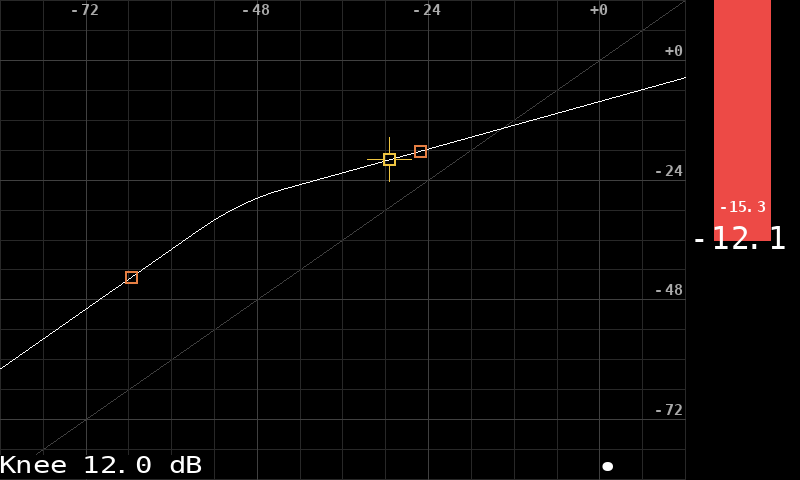
News from #PédaleVite: I made some changes internally and I have now the ability to show signal-related information on the GUI.

So I added or improved the GUI of a few effects. Below, on the screenshots: the compressor, the adaptive noise gate and the multi-band noise gate. The latter has now an automatic calibration system, so by pressing a single button the noise is optimally eliminated. Much simpler to use!

Everything still works with Pédale Vite v1 and its 128×64 1-bit display. A bit messy at such a low resolution and slow to refresh (forget Pédale Vite v3 @ 60 fps) but perfectly usable.

#audio #dsp #GuitarEffects #GuitarPedal #UserInterface #diy #pi5

Screenshot of the Pédale Vite GUI, showing the gain curve of a dynamics compressor on the left, and a meter indicating the current gain reduction on the right.Screenshot of the Pédale Vite GUI, showing the gain curve of a noise gateScreenshot of the Pédale Vite GUI, showing a multi-band noise gate. Each frequency range has a dedicated vertical bar indicating the levels before and after the gate.Same as the previous picture, but in a low resolution 128x64 screen. Picture elements are shrunk and simplified but still readable and usable.
Alien 👽 Max | 🇺🇦 gamedevmaxim@mastodon.gamedev.place
2026-02-23

It's been 5 days since I experimenting with Unreal Engine font materials. During this time I've made 21 materials and here's what they look like. These are very simple examples, I've shown some of the materials and their code in other videos

youtube.com/watch?v=C_-aIT3V3v4

#gamedev #UnrealEngine #UE5 #indiedev #userinterface #UI #education

2026-02-18

Too short; had to read too much

The incident management system has a nice feature where when changes happen on a ticket, it puts something in a notification pull down where I can easily go to see what’s new. My only problem is the listing basically says “Follow Update – CMP-INC1…” for everything. There’s no way to tell what it’s an update about unless I click on it. So, I have to click on all of them, which is usually a dozen at a time just to see what they are. And, the way the vendor coded it, there’s no way to open them in tabs. So, I have to click on the first one, review, open the list, click on the next one, repeat, until I’ve reviewed them all. Thankfully, as I click on them they color changes, so I can tell which I’ve already seen.

It feels like a lot to go through them. It feels inefficient to not be able to tell which incident I am checking before I click. And, the design makes me have to check them the most inefficient way possible.

#clicking #ticket #tsHtrtm #userInterface


Today i added paging to the help in my game, because I filled the old one.

With some feedback i ended up with tabs. I'm preatty happy i got the feedback, because i think it made the menu much better 🙂

Any improvment ideas?

#gamedev #userinterface #UI #UIdesign

2026-02-08

The inconsistency of Tahoe’s design

I even collected them all together, so the absurdity of the situation is more obvious.


It’s hard to justify Tahoe icons @ tonsky.me

Oh how the mighty have fallen.

I recommend reading the whole post. It’s an opus to how Tahoe UX design is an utter denunciation of the Macintosh Human Interface Guidelines – once considered to be the gospel of how interface design must be done.

I know it’s beating a dead horse at this point

I know it’s beating a dead horse at this point. Tahoe is a complete disgrace when it comes to user interface design. I don’t want to conflate this as denouncing Liquid Glass – although I still have issues with it. It’s how Tahoe is the worst implementation of it to the point where Mac OS isn’t what it is supposed to be.

Anyway, here’s to hoping all the changes with the leadership is all going to bear fruit sometime soon.

I’ve also realized that I might skip a mac OS version for the first time ever, esp now that I’ve successfully reverted my Mac back to Sequoia.

#apple #hig #humanInterfaceGuidelines #macOs #userInterface #ux
2026-02-06
Victor Forbergervforberger@fosstodon.org
2026-02-04

" #LibreOffice's focus on dependability, interoperability and its unflinching advocacy for the use and adoption of #OpenSource source and open standards is, to me, more of an appealing ‘feature’ than any #userinterface trend or having AI agents hallucinating in the margins."

omgubuntu.co.uk/2026/02/libreo

My default LibreOffice writer window, showing a menu bar and one toolbar (with formatting and view commands). Because a menu presents the commands in the context for which you use them, rather than the context changing the user-interface. What is not seen here are all the keyboard commands and a few macros (including a customized menu command macro for creating new sections in a document) I use when writing.
2026-02-02

Make buttons grow and shrink when the mouse moves over them with tkinter in Python

rodstephensbooks.com/pop_butto

#Python #UserInterface #Tkinter

These buttons grow and shrink as the mouse moves over them
2026-02-01

Add buttons to a row container made with tkinter in Python

rodstephensbooks.com/row_conta

#Python #Tkinter #UserInterface

This example lets you add and remove buttons from rows with tkinter in Python
Abdul Hadi Iliasabdulhadiilias
2026-01-31

UI UX Design Company in Dubai.

UI/UX design that creates intuitive, user-centered digital experiences.


khaledhossainitsolutions.com/u

Client Info

Server: https://mastodon.social
Version: 2025.07
Repository: https://github.com/cyevgeniy/lmst