#windoz10

2025-04-06

Talking with the folks in the local #vintage / #retrocomputing community, they clued me in that the #ThinkPad #RAID is a steaming pile of 💩 and not worth the trouble.

🤷 Oh well. Thanks for cluing me in

So I swapped out the two testing #NVMe drives I was using and reinstalled the original sticks - to have #windoz10 demanding for the #bitlocker recovery key. 🤦‍♂️

Well, time to wipe & install #windoz11 then.

Install went fine, only 4 rando #drivers to find for all #devices to be recognized and working.

Using my #CTT scripts to install the majority of applications, then to remove the #spyware #bloatware and other garbage #micro$oft added to #windows11

Then migrate my #data from my other ThinkPad. Welcome to my #sunday #funday

#siliconValley #SillyValley #sanfrancisco #sanfran #sanfranciscocomputers #sanfrancomputers #sanfranciscovintagecomputers #sanfranvintagecomputers #sanfranciscovintagehardware #sanfranvin-tagehardware
#vintagecomputing #vintagecomputint #vintagecomputer #vintagecomputers #vintagecomputalk
#vintagehardware #computerHistory #retro #VCF #vintageComputerFestival
#retrocomputing #retroComputers #WallOfRetro #retroTech #retroTechnology
#nerdsOfVintage #happyNerding
#computer #tech #computerHardware #laptop #laptops
#IBM #thinkpad #thinkpads #VintageThinkPad #X86 #WindowsVista #IBMhardware #lenovoHard-ware #Thinkpadnium
#upcycle #restore #TechnologyRepair #ThinkPadRepair #WasteNotWantNot #Thinkpadnium
#makeShitMonday #showmewhatyougot
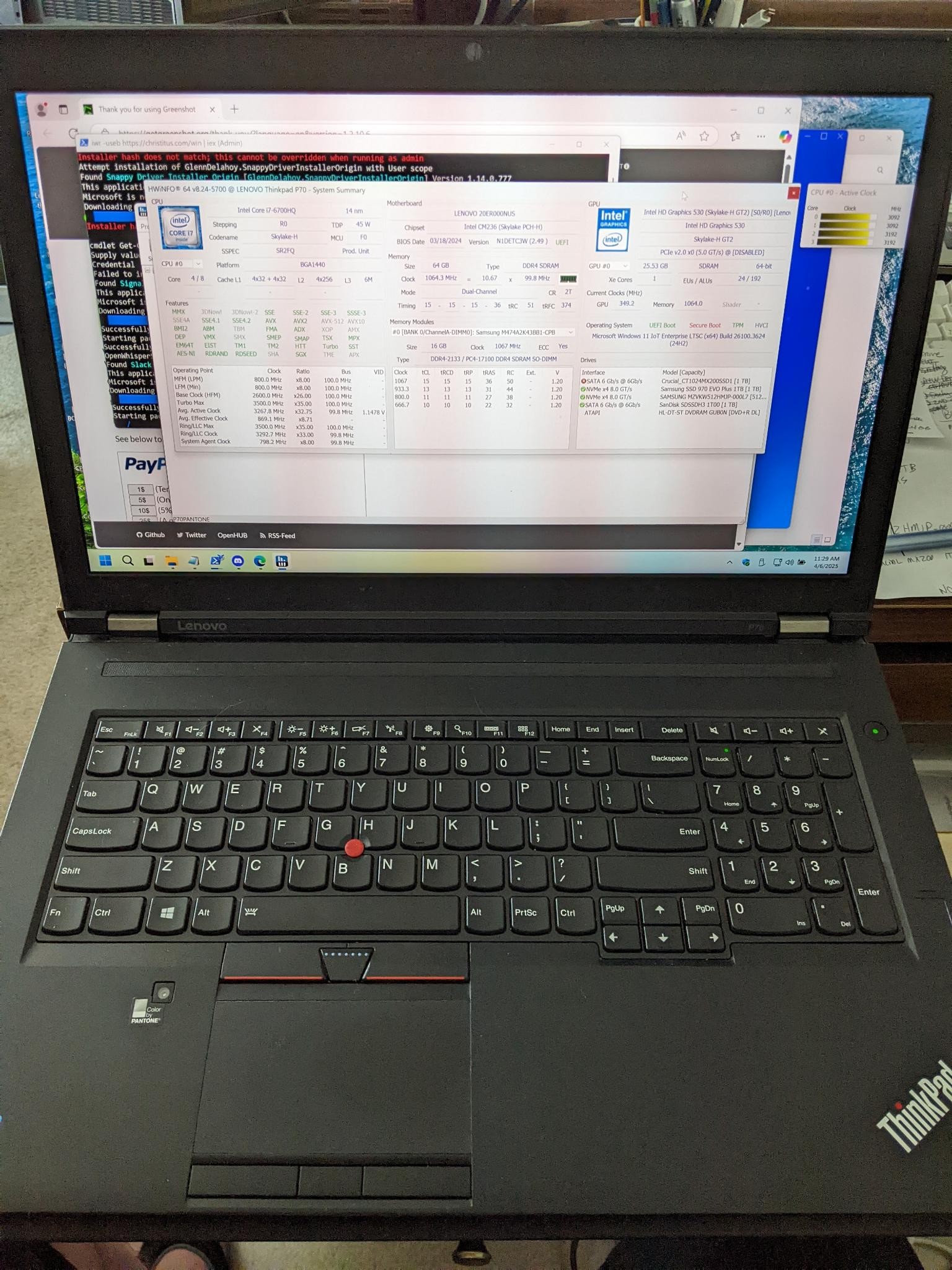
A ThinkPad P70 workstation laptop, in the process of being rebuilt: Windows 11 having bin installed, now installing all the applications. The HWiNFO application is displayed on the screen, showing the specifications of the laptop.
2024-11-29

1/2
Challenges with #windoz10 #windoz11 on a #thinkpad #T430s

Good old #intel #intel_corp never bothered to update & release #drivers for the HD #graphics #4000 #graphics4000
The driver is for #windows8 only

I figured this out by having the #windowsSecurity alerting that #coreIsolation - specifically #memoryIntegrity could not be enabled. With #idgkmd64.sys being released of July 2015.

If you remove the driver, the laptop defaults to the base Microsoft video driver with the horrid resolution, but you can enable memory integrity at this point. Reboot, and windows will alert that the driver cannot load because a security setting is blocking the loading of the driver.

I have dug around at length, there is no updated driver for Windows 10 or 11 (abandoned by Intel). I have tried windows update, Intel's own driver update tool, and the usual ThinkPad forums with no success. Ive found multiple posts of less experienced folks trying to decipher this issue and situation, all threads become dead ends.

So either you use the default Windows #VGA driver with memory integrity enabled and horrible resolution, or the #windows8 driver release with memory integrity disabled. Looks as I need to have a hardened configuration with #AV #EDR on this #T430s to manage the risks - more on that approach later.

#siliconValley #SillyValley
#vintagecomputing
#vintagecomputing #vintagecomputint #vintagecomputer #vintagecomputers #vintagecomputalk
#vintagehardware
#computerHistory
#retro
#retrocomputing #retroComputers
#WallOfRetro
#retroTech #retroTechnology
#nerdsOfVintage #happyNerding
#computer #tech
#nerds #nerd

Windows 11 alert on the incompatible driver for the Intel HD Graphics 4000 - igdkmd64.sysWindows 11 alerting that core isolation / memory integrity is off due to a driver incompatibilityAfter removing the driver and enabling the memory protection, the video driver is unable to load - this is the screenshot from windows 11 with this alertA screenshot with the specifications of the ThinkPad T430s that was upgraded to Windows 10 and then 11 that does not have an updated video driver
2024-08-13

Well some further testing confirmed the #usb port on the #dell #lattitude #e4200 is #DOA

Dam weird how it died in the middle of running a hard drive test with a USB drive dock connected 🙄

Thankfully the combination #esata & USB port works fine, but limits capabilities in drive testing/connecting drive docks.

As well as I remembered I have a Dell #dockingstation - port replicator

So... I think the plan is upgrade the #RAM to the max 5 GB and see how well #windoz10 runs on it, and then #linuxmint using the USB & esata in the port replicator

#vintagecomputing #computerhardware #hacker

2024-07-01

This "ez-dock" is not so easy - in fact I think it is #DOA. Been #troubleshooting this issue all weekend where the doc and the drive were not accessible.

The Unknown, new to me #PCMCIA/ pc card that has no #windoz10 drivers - Silicon Image SiI #3512 serial ATA controller providing two #eSATA ports that I was hoping to use for hard drive testing.

Took it as an opportunity to throw #Linux on this #t43 #ibm #thinkpad - decided on #MX running #fluxbox which seems to run rather well on this #vintagehardware and limited #RAM

Initially the eSATA card would light up, then would go dark with no visibility onto the drive media. Figured out how to configure #automount and tested with a different drive dock - and we have success! Confirmed the #pcmcia card works, and this other #unitek drive dock works! 😸

Tried the ez-dock via #USB and still no joy. Such a finicky #pos

#vintagetech #vintagecomputing #geek #hacker #makeshitmonday #modshitmonday #opensource

Client Info

Server: https://mastodon.social
Version: 2025.07
Repository: https://github.com/cyevgeniy/lmst