#ubuntuStudio

2026-01-24

#Dual_boot worked fine on an old Macbook Air, but on my Intel Mac Pro #Ubuntustudio will not install. The USB drive with the Ubuntu iso does show up, but when selected there's a popup saying: 'The version of macOS on the selected disk needs to be reinstalled. Use Recovery to reinstall macOS or select another startup disk.' Whatever I do, I can't install it. Is the hardware preventing the install, or macOS Tahoe maybe? Any ideas anyone?

- INTEL Mac Pro
- macOS Tahoe 26.2
2026-01-23

#Blender 5 is not running on #Intel Macs anymore. So here is my plan:
A dual boot #MacOS#Ubuntustudio! That way I can can make Blender 5 run on my Intel Mac (under Linux). I won't be able to run #Davinci on Linux though, because you need an Nvidia GPU for that, but I can always hop over to MacOS for editing. Or I stay in Linux and use the Blender video sequence editor. Or #KDenLive. I am new to KDenLive, but it seems pretty capable. So there's my plan for extending the life of my Mac.

I usually use the #BricastM7 reverbs. I mean, not the original unit, but impulse responses via #LinuxDSP IR plugins.

Today I spontaneously needed something "not as good". Like a more prominent, less pleasant, less natural… thinking in a positive way. Like the old #Alesis reverbs, they actually suck when it comes to sounding natural, but they are just so great for some use cases.

I found out I have the #Dragonfly plugins installed. I didn't even know. Apparently they come with #UbuntuStudio #Linux?

Great stuff.

michaelwillis.github.io/dragon

#recording #LinuxAudio #LinuxProAudio #reverb #impulseReverb

2026-01-18

#howTo
#linux #debian #ubuntu #ubuntu​Studio #KDE #Keybind #shortcuts #keyMapping #Umlaute

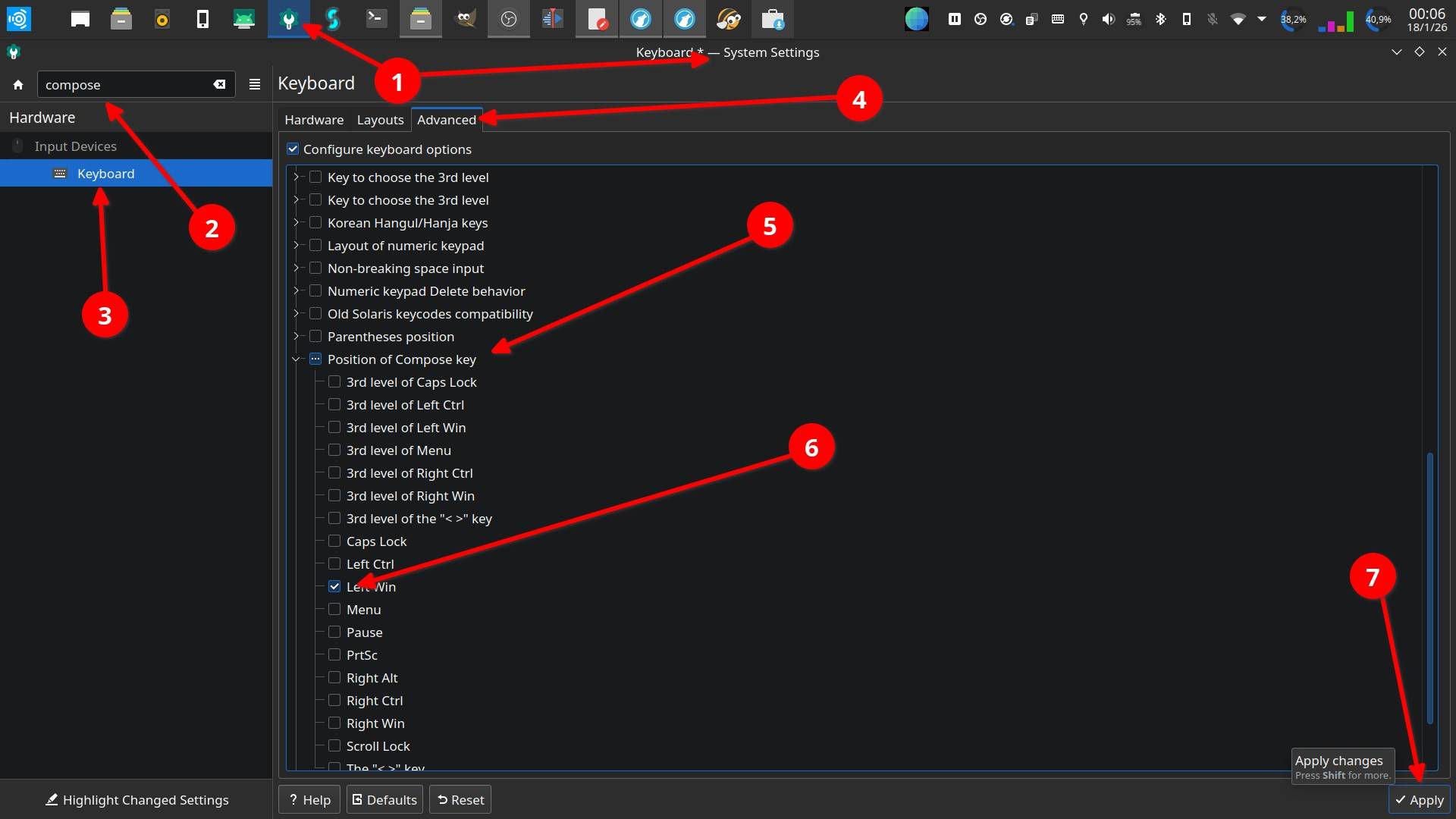
To be able to use the option to compose letters for example the german Umlaute "ä, ö, ü" or the spanisch "ñ" you have to activate the compose key option in the system settings menu. Once you have defined and activated a key on the keyboard for that specific purpose, you can compose the letters by combining respective or similar symbols with it while pressing the compose key.

Example:
["]+[composeKey] and than [u] => ü
[~]+[composeKey] and than [n] => ñ
[']+ [composeKey] and than [e] => é

Image that shows the settings manager of KDE in ubuntuStudio 2022.04. The different steps to activate the compose key option and to define a specific key for that purpose is indicated in detail with arrows and numbers. 1 - Settings Manager . 2 - The word "compose" in the search box makes appear the keyboard settings options. 3- The "Keyboard" option is selected. 4 - The "Advanced" tab is selected . 5 - The "Position of compose key" option is open. 6 - In this case the left Win key is selected as compose key. 7 - Selecting the "Apply" tab the changes take effect and the compose key option is available to create specific letters by composing them with the keyboard.
2026-01-18

#howTo
#linux #debian #ubuntu #ubuntu​Studio #KDE #Keybind #shortcuts #keyMapping

How to (re)map keys.
In the case of a #keyboard at hand there are two keys (down arrow and right arrow) that don't work anymore.
Solved this with (re)assigning the arrow up and arrow left keys in combination with the ALT key:
[ArrowUp]+[ALT] = arrow down
[ArrowLeft]+[ALT] = arrow right
The commands in the [Action] box are respectively Down and Right.

superuser.com wrote:

System settings:
  • => "Custom Shortcuts"
  • => "Edit" menu button at the bottom
  • => "New"
  • => "Global Shortcut"
  • => "Send Keyboard Input"

https:// superuser.com/questions/1826459/how-to-remap-key-combination-on-linux-wayland-kde-meta-arrow

Image that shows the settings manager of KDE in ubuntuStudio 2022.04. The different steps to create a shortcut for mapping a key are marked with arrows and numbers. 1 - Settings Manager . 2 - Entering the word "key" in the search box makes appear the keyboard settings options. 3 - The "Custom Shortcuts" options is selected. 4 - The Edit tab is selected, from there over the "New" option the Options "Global Shortcut" and "Send Keyboard Input" are at hand. 5 - A line for to name the new short cut shows up. 6 - In the trigger tab the key or key combination can be defined. 7 - The command "Right" is entered in the Action tab window.

Just wanted to drop a note: The #Soundcraft Si Impact digital mixing board works great for multitrack live recordings using #UbuntuStudio #Linux and #Pipewire (with a recent version via PPA – as always, flick the "pro audio" switch.)

So far, class-compliant USB audio has worked out great for me with Pipewire.

Other audio not so, unfortunately, in that case I had to go back to #Jack.

#LinuxAudio #LinuxProAudio

🧵 So for weirdness' sake, here is the #vcvRack patch that takes #MIDI data via #rtpMidi, running on #UbuntuStudio #Linux, fed from #MacOS / #OSX over the network…

… doing some weird things with MIDI notes, and then outputting MIDI CV to #MidiMonster which creates #ArtNet networking messages from it…

… which then are converted to a #DMX signal in an #XLR cable usind a #ShowTec #Net23 ArtNet-Node.

#EventTech / #Veranstaltungstechnik

Things I learned today on #UbuntuStudio 24.4 with #Pipewire 1.4.9:

1) I cannot run #OBS screen capture / audio capture from #Jack interface and #Hydrogen #DrumMachine at the same time. (One doesn't start until I exit the other one.)

2) It is impossible to screen-record #PianoTeq 7 properly, probably due to different frame rates of PianoTeq vs. OBS, or whatnot. (You can't see the keys moving as they should.)

3) My old PianoTeq 7 is actually still working and its electric piano sounds are still fun.

(Current release of PianoTeq is version 9.)

#Linux #LinuxAudio #LinuxProAudio

Erika Autumnerikaautumn
2026-01-04

" has gotten pretty good" I tell myself as I'm surrounded with an entire environment of desktops, laptops, and servers all running Linux, but still can't reliably keep my routing working every time I open on (not asking for help/solutions, just annoyed)

When it worked, I liked the tones I was getting out of and wanted to record something, but a big point of digital is reproducibility and I can't even depend on my projects to reopen intact.

2025-12-25

No progress with the wireguard issue. Still i get a connection with the "server" peer but receive no data. This is on both Ubuntu Studio 24.04 systems after an update/dist-upgrade.

I even did a remove and install of wireguard wireguard-tools but issue stays the same.

I wonder that there is not more posts about this when it seems to be a Ubuntu Studio issue.

#wireguard #linux #ubuntu #ubuntustudio

2025-12-22

#KDEexpress de la mano de @DavidMarzalC y @raivenra os desean felices fiestas con una nueva dosis de noticias #FLOSS y #KDE.

kdeexpress.gitlab.io/posts/kde

Recordar que si os gusta el podcast, el episodio o KDE en general una forma de colaborar es comentárselo a amistades o compartir por redes sociales (Mastodon no usa algoritmos)

Temas tratados:
#KDEGear 25.12 #Kdenlive 25.12 #KioT #Parrot 7 #UbuntuStudio 26.04 #FedoraGamesLab #Peertube 8 #Firefox 146 y 147 #Thunderbird 146 #Fairphone #podcastFLOSS

Adam Kaliszewski :mastodon: 🌱kalisz79@mastodon.com.pl
2025-12-18

Wieczorne miksowanko.
#ubuntustudio #bitwig @sonda_kosmos

laptop z programem muzycznym widoczna mała kolumna głośnikowa i różne kable.
fosstopia 🇩🇪MichlFranken
2025-12-16
Lorenzo's Musiclorenzosmusic
2025-12-15

Our Ubuntu Studio + Ardour + OBS Setup for our band's live streams. All open source. Love that we don't need proprietary software to play shows from our studio. 😀

Lorenzo's Musiclorenzosmusic
2025-12-09

Check out how I remixed "Friction Called Quest" for "Lorenzo's Remixes, Volume 2"!

The entire process used only free and open source tools.

I break down the session in the Ardour DAW running on Ubuntu Studio.

From creating the drum loop to editing Bryan’s sax line, watch the full walkthrough!

lorenzosmusic.com/videos/remix

la tierra de nuestros nietostierranietos@mastodon.uy
2025-12-03

🧵

#bugReport for #Epiphany v48.5+ #webBrowser as is on mastodon v4.5.1 in #ubuntuStudio 2022.04lts

Client Info

Server: https://mastodon.social
Version: 2025.07
Repository: https://github.com/cyevgeniy/lmst