
Dann versuchen wir (wieder) mal, Windows den Rücken zu kehren...
#UbuntuStudio

Like https://opengamingcollective.org/ but for #openSource #music related stuff. Go!
#OSHW #MODdevices #UbuntuStudio #FedoraJam #AVLinux #TwistedElectrons #musicEquipment
Another thing that I couldn't figure out is if I can have a separate full screen monitor in #DavinciResolve.
Without buying Decklink gear, I mean…
Also there is no GUI scaling between 100% (too small for me) and 150% (doesn't work because too large).
Also grey fonts on grey background, same shit like in #Darktable.
It's the simple things.
The fact that the free version of #Resolve #NLE 19 does not decode any footage that is not ProRes on my #UbuntuStudio #Linux system however… is not promising. (Including 8bit libx264 output not working)
So, after installing a package called mesa-opencl-icd on my #UbuntuStudio #Linux system, I can now… TADAAAAH
Run #DavinciResolve on Linux.
Sorry, #Lightworks and your pile of showstopper bugs you didn't manage to solve in the course of over a year, you are in danger.
Other things needed for #Davinci #Resolve to operate are the proprietary AMD graphics driver, if you are on AMD, here's a blog post that knows how to do it: https://interfacinglinux.com/2024/01/08/davinci-resolve-on-linux-with-amd-gpu/
I don't know if current Resolve releases still have library issues, I fixed those for my installation a long time ago and then gave up when it didn't work due to GPU issues.
However – using a new #NLE is a journey. For example, Resolve 19 cannot deal with the footage of my Panasonic GH6, and I do not know why. Is it because it's the free version? Is it a bug? Is it my OS…
The pig in the screenshot is ProRes 10bit from a Z Cam, the GH6 delovers h264 10bit…

Having installed the latest #AMDgpu drivers, #OBS screen recording now fails after a while on #UbuntuStudio 24.04 Linux. Giving up.
So, after a three hour fight with the #Lightworks #NLE on #UbuntuStudio 24.04 #Linux, mainly working around bugs and doing around 50 restarts, installing the latets proprietary #AMDgpu drivers…
… I can finally edit that 20 minutes of footage I recorded in the morning, of which 6m30s are to become a video.
Except I can't, because things like this make my brain go from creative mode to berserk mode.
Is #Linux to blame? No, not at all. It's the folks creating Lightworks. They did not fix bugs I have been repeatedly reporting since over a year over the course of 4 or 5 betas. And now, this is not some open source dude doing this in this spare time, I pay for their licensing product.
Reliable software in the creative context can be produced for Linux – #Harrison demonstrate it with their #Mixbus #DAW.
I just installed #Lightworks-2025.2-56356.deb on my #UbuntuStudio 24.04 #Linux and basically all the bugs I had reported in the past are still there.
Furthermore, I found multicam bins not to work anymore. Or perhaps they do, with some workaround.
I have to restart #LWKS constantly because of the bug preventing video from being displayed properly. And it crashes often.
What used to by my #NLE workhorse has become a sick old donkey.
I really don't know what to do. I don't really want to use #DavinciResolve, but it also doesn't work on my machine, because I'm using open source #AMDgpu drivers, and actually I just want to edit a little video, and that's all…
#Kdenlive never did it for me, even though it's nice. Lightworks wants to be a pro user tool, and it would be, if the *works* part in it was true.
I'm tired now.

How we route our band stream into an 18-channel soundcard through Ardour into OBS for studio-quality live streams :pensive_party_blob:
Sign up for our email list, and you can get our Free setup guide for how we do this https://mailchi.mp/lorenzosmusic/band-streaming-starter-kit
#music #opensource #LiveStreaming #Ardour #LinuxAudio #ubuntustudio
#Dual_boot worked fine on an old Macbook Air, but on my Intel Mac Pro #Ubuntustudio will not install. The USB drive with the Ubuntu iso does show up, but when selected there's a popup saying: 'The version of macOS on the selected disk needs to be reinstalled. Use Recovery to reinstall macOS or select another startup disk.' Whatever I do, I can't install it. Is the hardware preventing the install, or macOS Tahoe maybe? Any ideas anyone?
- INTEL Mac Pro
- macOS Tahoe 26.2
#Blender 5 is not running on #Intel Macs anymore. So here is my plan:
A dual boot #MacOS — #Ubuntustudio! That way I can can make Blender 5 run on my Intel Mac (under Linux). I won't be able to run #Davinci on Linux though, because you need an Nvidia GPU for that, but I can always hop over to MacOS for editing. Or I stay in Linux and use the Blender video sequence editor. Or #KDenLive. I am new to KDenLive, but it seems pretty capable. So there's my plan for extending the life of my Mac.
I usually use the #BricastM7 reverbs. I mean, not the original unit, but impulse responses via #LinuxDSP IR plugins.
Today I spontaneously needed something "not as good". Like a more prominent, less pleasant, less natural… thinking in a positive way. Like the old #Alesis reverbs, they actually suck when it comes to sounding natural, but they are just so great for some use cases.
I found out I have the #Dragonfly plugins installed. I didn't even know. Apparently they come with #UbuntuStudio #Linux?
Great stuff.
https://michaelwillis.github.io/dragonfly-reverb/
#recording #LinuxAudio #LinuxProAudio #reverb #impulseReverb

#howTo
#linux #debian #ubuntu #ubuntuStudio #KDE #Keybind #shortcuts #keyMapping #Umlaute
To be able to use the option to compose letters for example the german Umlaute "ä, ö, ü" or the spanisch "ñ" you have to activate the compose key option in the system settings menu. Once you have defined and activated a key on the keyboard for that specific purpose, you can compose the letters by combining respective or similar symbols with it while pressing the compose key.
Example:
["]+[composeKey] and than [u] => ü
[~]+[composeKey] and than [n] => ñ
[']+ [composeKey] and than [e] => é
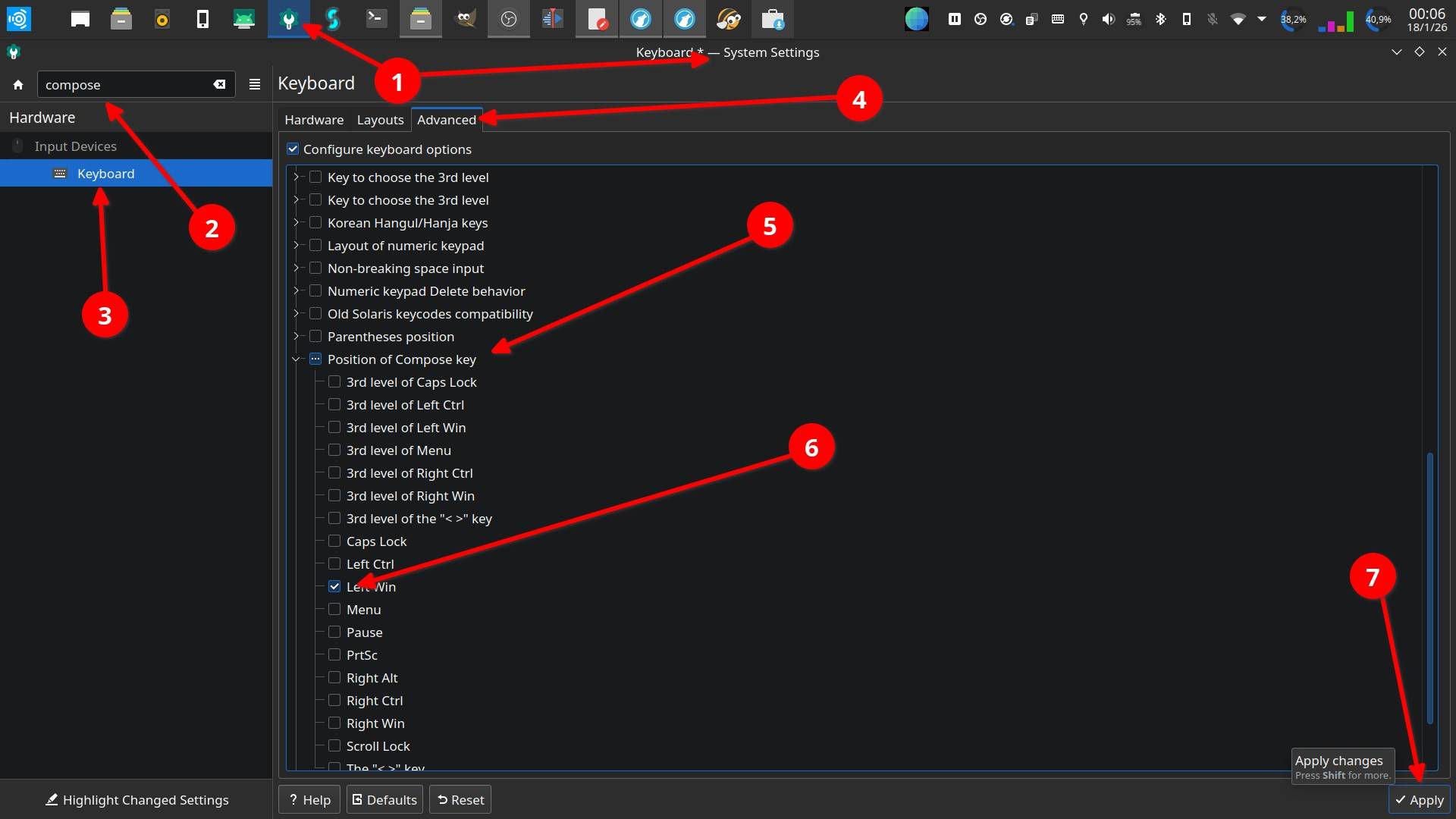
#howTo
#linux #debian #ubuntu #ubuntuStudio #KDE #Keybind #shortcuts #keyMapping
How to (re)map keys.
In the case of a #keyboard at hand there are two keys (down arrow and right arrow) that don't work anymore.
Solved this with (re)assigning the arrow up and arrow left keys in combination with the ALT key:
[ArrowUp]+[ALT] = arrow down
[ArrowLeft]+[ALT] = arrow right
The commands in the [Action] box are respectively Down and Right.
superuser.com wrote:
System settings:
- => "Custom Shortcuts"
- => "Edit" menu button at the bottom
- => "New"
- => "Global Shortcut"
- => "Send Keyboard Input"
https:// superuser.com/questions/1826459/how-to-remap-key-combination-on-linux-wayland-kde-meta-arrow

Just wanted to drop a note: The #Soundcraft Si Impact digital mixing board works great for multitrack live recordings using #UbuntuStudio #Linux and #Pipewire (with a recent version via PPA – as always, flick the "pro audio" switch.)
So far, class-compliant USB audio has worked out great for me with Pipewire.
Other audio not so, unfortunately, in that case I had to go back to #Jack.

Yesterday: #FOH with #vcvRack on #UbuntuStudio #Linux 24.04 as a #DMX / #ArtNet controller (via #MidiMonster).

🧵 So for weirdness' sake, here is the #vcvRack patch that takes #MIDI data via #rtpMidi, running on #UbuntuStudio #Linux, fed from #MacOS / #OSX over the network…
… doing some weird things with MIDI notes, and then outputting MIDI CV to #MidiMonster which creates #ArtNet networking messages from it…
… which then are converted to a #DMX signal in an #XLR cable usind a #ShowTec #Net23 ArtNet-Node.

Things I learned today on #UbuntuStudio 24.4 with #Pipewire 1.4.9:
1) I cannot run #OBS screen capture / audio capture from #Jack interface and #Hydrogen #DrumMachine at the same time. (One doesn't start until I exit the other one.)
2) It is impossible to screen-record #PianoTeq 7 properly, probably due to different frame rates of PianoTeq vs. OBS, or whatnot. (You can't see the keys moving as they should.)
3) My old PianoTeq 7 is actually still working and its electric piano sounds are still fun.
(Current release of PianoTeq is version 9.)

"#Linux has gotten pretty good" I tell myself as I'm surrounded with an entire environment of desktops, laptops, and servers all running Linux, but still can't reliably keep my #audio routing working every time I open #Ardour on #UbuntuStudio (not asking for help/solutions, just annoyed)
When it worked, I liked the tones I was getting out of #Guitarix and wanted to record something, but a big point of digital #recording is reproducibility and I can't even depend on my projects to reopen intact.
Client Info
Server: https://mastodon.social
Version: 2025.07
Repository: https://github.com/cyevgeniy/lmst