I just found a new tool to analyze my network connections called "stitch"
https://github.com/karol-broda/snitch
There is a AUR package on Arch, give it a try.
I just found a new tool to analyze my network connections called "stitch"
https://github.com/karol-broda/snitch
There is a AUR package on Arch, give it a try.
Open Notebook è la nuova alternativa open source e privacy‑first a Google Notebook LM. Supporta oltre 16 provider AI, funziona al 100% in locale e organizza contenuti multimodali #OpenSource #AI #LinuxTools #Docker


🗣️🎤📝 :linux: Speech to Text and Text to Speech on GNU/Linux :disability_flag: 📝🔊💻
Why This Matters to Me (and Maybe You Too)
If you’re anything like me—a Linux user who counts on voice typing and TTS because of visual impairment—you know that accessibility is not a luxury, it’s a necessity. Speaking from experience as someone who depends on voice typing (and TTS) , the quest for a seamless, local, FLOSS speech-to-text (STT) setup on Linux can be frustrating.
Here’s how you can succeed with modern tools using Linux. FLOSS means freedom and privacy; working locally means real control.
Let’s dive in! I’ll tell you what I’ve learned and what I use—and hope you’ll share your favorite tools or tips!
System-Wide Voice Keyboard: Speak Directly in Any App
Want to speak and have your words typed wherever your cursor is—be it a terminal, browser, chat, or IDE? Here’s what actually works and how it feels day-to-day:
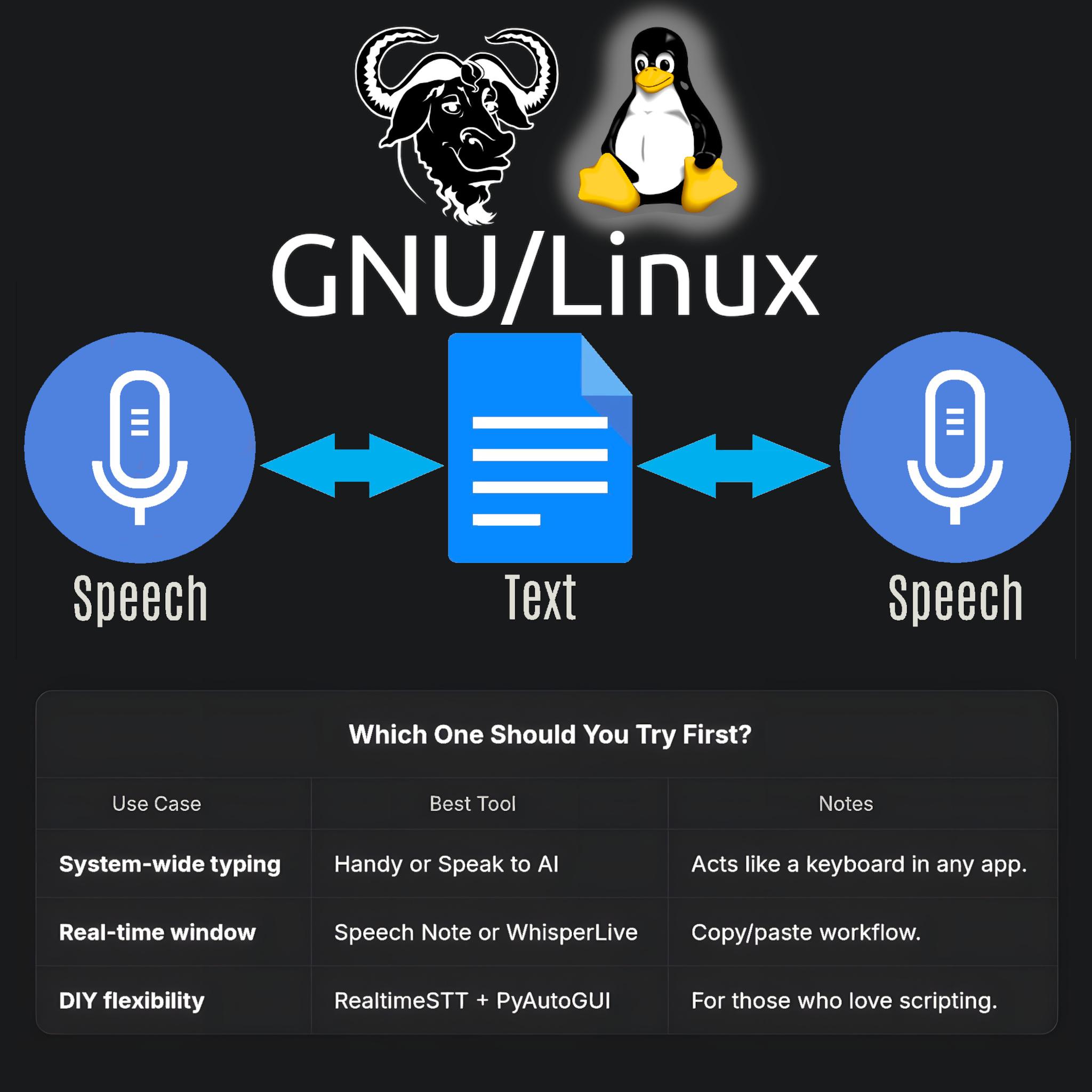
- Speak to AI (Offline, Whisper-based, global hotkeys)
This tool is my current go-to. It uses Whisper locally, lets you use global hotkeys (configurable) to type into any focused window, and doesn’t need internet. Runs smoothly on X11 and Wayland; just takes a bit of setup (AppImage available!).
GitHub Repo https://github.com/AshBuk/speak-to-ai) | Dev.to Post https://dev.to/ashbuk/i-built-an-offline-voice-typing-app-for-linux-speak-to-ai-3ab5)
- DIY: RealtimeSTT + PyAutoGUI
For the true tinkerers, RealtimeSTT plus a Python script lets you simulate keystrokes. You control every step, can lower latency with your tweaks, but you’ll need to be comfortable with scripting.
RealtimeSTT Guide https://github.com/KoljaB/RealtimeSTT#readme)
- Handy (Free/Libre, offline, Whisper-based, acts as a keyboard)
I’ve read lots of positive feedback on Handy—even though I haven’t tried it myself. The workflow is simple: press a hotkey, speak, and Handy pastes your text in the active app. It’s fully offline, works on X11 and Wayland, and gets strong accuracy thanks to Whisper.
Heads up: Handy lets you pick your own shortcut key, but it actually overrides the keyboard shortcut for start/stop recording. That means it can clash with other tools that depend on major shortcut combos—including Orca’s custom keybindings if you use a screen reader. If your workflow relies on certain shortcuts, this might need adjustment or careful planning before you commit.
GitHub Repo https://github.com/cjpais/Handy) | Demo https://handy.computer)
Real-Time Transcription in a Window (Copy/Paste Workflow)
If you’re okay with speaking into a dedicated app, then copying, these options offer great GUIs and power features:
- Speech Note by @mkiol https://mastodon.social/@mkiol
FLOSS, offline, multi-language GUI app—perfect for quick notes and batch transcription. Not a system-wide keyboard, but super easy to use and works on both desktops and Linux phones.
Flathub https://flathub.org/apps/net.mkiol.SpeechNote | LinuxPhoneApps https://linuxphoneapps.org/apps/net.mkiol.speechnote/)
- WhisperLive (by Collabora)
Real-time transcription in a terminal or window—great for meetings, lectures, and captions. Manual copy/paste required to get the text to other apps.
GitHub Repo https://github.com/collabora/WhisperLive)
More Tools for Tinkerers
If you like building your own or want extra control, check out:
- Vosk: Lightweight, lots of language support. GitHub https://alphacephei.com/vosk/)
- Kaldi: Powerful, best for custom setups. Website https://kaldi-asr.org/)
- Simon: Voice control automation. Website https://simon-listens.org/)
- voice2json: Phrase-level and command recognition. GitHub https://github.com/synesthesiam/voice2json)
Pro Tips
- Desktop Environment: X11 vs. Wayland affects how keyboard hooks and app focus actually operate.
- Ready-Made vs. DIY: If you want plug-and-play, try Speech Note or Handy first. Into automation or customization? RealtimeSTT is perfect.
- Follow the Community: @thorstenvoice offers tons of open-source voice tech insights.
Screen Reader Integration
Looking for robust screen reader support? Linux has you covered:
- Orca (GNOME/MATE): The most customizable GUI screen reader out there. The default voice (eSpeak) is robotic, but you can swap it for something better and fine-tune verbosity so it reads only what matters.
- Speakup: Console-based, ideal for terminal.
- Emacspeak: The solution for Emacs fans.
💡 Orca is part of my daily toolkit. It took time to get the settings just right (especially verbosity!) but it’s absolutely worth it. If you use a screen reader—what setup makes it bearable or even enjoyable for you?
Final Thoughts
If you’re starting from scratch, try Handy for direct typing (just watch those shortcuts if you use a screen reader!) or Speech Note for GUI-based transcription. Both are privacy-friendly, local, and accessible—ideal for everyday Linux use.
Is there a FLOSS gem missing here?
Sharing what works (and what doesn’t!) helps the entire community.
Resources:
Speech Note on Flathub https://flathub.org/apps/net.mkiol.SpeechNote
Handy GitHub https://github.com/cjpais/Handy
Speak to AI Guide https://dev.to/ashbuk/i-built-an-offline-voice-typing-app-for-linux-speak-to-ai-3ab5
RealtimeSTT https://github.com/KoljaB/RealtimeSTT
#Linux #SpeechToText #FLOSS #Accessibility #VoiceKeyboard #ScreenReader #Whisper #Handy #SpeechNote #OpenSource #Community #voicetyping #LocalSTT #TTStools #SpeechRecognition #A11y #Linuxtools #Voicekeyboard #Whisper #Handy #speech-to-text #SpeechNote #review #ScreenReaders #ORCA #FOSS
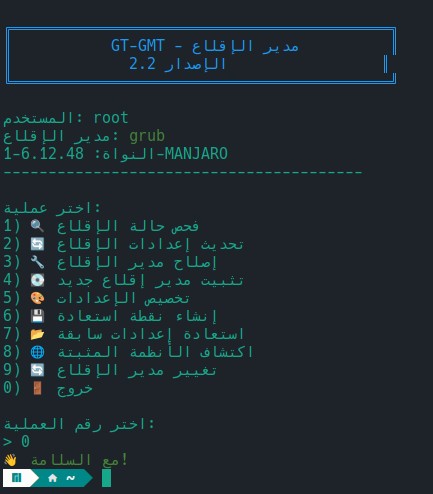
🚀 اكتشف GT-GMT – مدير الإقلاع الشامل على GNU/Linux!
إدارة GRUB وsystemd-boot وrEFInd أصبحت سهلة، آمنة وتفاعلية، مباشرة من الطرفية أو عبر AppImage.
🔹 تثبيت عن بعد:
bash <(curl -fsSL https://raw.githubusercontent.com/SalehGNUTUX/GT-GMT/main/install_online.sh)🔹 نسخة AppImage مستقلة: تحميل GT-GMT AppImage
🔹 المستودع على GitHub: زيارة مستودع GT-GMT
💡 واجهة سهلة، دعم عربي، نسخ احتياطية، واستكشاف الأنظمة المثبتة. جربه الآن وامنح جهازك القوة الكاملة لإدارة الإقلاع! 💻✨
#مدير_الإقلاع #لينكس #أدوات_لينكس #نظام_تشغيل #GRUB #systemd_boot #rEFInd #برمجيات_حرة #مجتمع_لينكس #تكنولوجيا #برمجيات_مفتوحة #أدوات_نظام #تقنية #مطورين
#GTGMT #BootManager #Linux #GNU_Linux #GRUB #systemd_boot #rEFInd #OpenSource #AppImage #LinuxTools #LinuxUtilities #LinuxAdmin #SysAdmin #TechTools #Software #FreeSoftware #ArabicTech #LinuxCommunity #LinuxArabic #OpenSourceTools #gnutux
@lunte161 @c_merriweather @itsfoss
What my head are these?
Anyway, someone might help…
https://todon.eu/@lunte161/115368325687273863
#Linux #Ubuntu #LinuxNewbies #LinuxTools #LinuxTool #LinuxHelp #newbie #newbies #saveMe #PCs #LinuxNewbie #help #LinuxForum #UbuntuHelp #LinuxMint #ZorinOS #WindowsEOL #MSWindows #Windows10EOL #windows10alternative #Windows10 #Windows11 #Windows10vsWindows11 #tracking #dataCollection #AI #ArtificialIntelligence #privacy #privacyMatters #MicroShit #Windoze #windoze11 #software #WindowsAlternative #WindowsAlternatives #migrate2Linux #MigrateToLinux #seekHelp #dev #devs #Development #developer #developers #develop #edit #extract #inject #files #tool #tools #image #images #trd #ZXSpectrum #BetaDisk #start #Interface1 #ZXSpectrums #emulator #emulators #Pentagon #Scorpion #Evolution #Sprinter #Clone #Variant #Variants #MAME #build #Windows #util #utils #vintage #vintageComputing #substitute #substitutes
Vuoi automatizzare i tuoi flussi di lavoro su Linux con controllo totale e flessibilità? n8n è la piattaforma open source che unisce low-code, AI e self-hosting. Scopri come funziona! #n8n #Automation #LinuxTools #OpenSource
Shotcut 25.10 è qui! Nuovi filtri video, Text-to-Speech, supporto HTML, FFmpeg 8 e miglioramenti audio. L’editor open source si evolve con funzioni potenti e compatibilità Linux. #Shotcut #VideoEditing #LinuxTools #OpenSource
Vuoi misurare la velocità della tua rete senza dipendere da servizi esterni? LibreSpeed è la soluzione open source che puoi ospitare direttamente sul tuo server. Scopri come funziona e perché è perfetta per utenti Linux! #LibreSpeed #SpeedTest #FOSS #LinuxTools
Do you use a terminal multiplexer? Do you use a terminal on a regular basis? Have you ever been frustrated by shell history being lackluster?
Atuin is a great solution. It simply works. No more attempts to trick bash_history into playing nicely between tmux panes or shell sessions.
Search works well and the UX is quick and doesn’t get in your way.
No i don’t work on the project, i just really love this tool https://atuin.sh
Top vs. htop: Choose top for universal availability; opt for htop for a feature-rich, intuitive monitoring tool. #ServerManagement #LinuxTools https://xt.om/YsSN
I'm attempting to figure out how to to properly #export #Apple #iCloud #messages from my #iPhone. I got my data from apple. I have my #Encryption #key but I can't figure out how to format the exported messages and what #foss #linuxtools I can use to view them. Any #help would be greatly #appreciated.
"Keegees" ra mắt: Công cụ dòng lệnh (CLI) để quản lý keybindings trên GNOME một cách dễ dàng và đẹp mắt! 🚀
Với Keegees, bạn có thể:
- Sao lưu và khôi phục keybindings
- Xuất/nhập cấu hình
- Thêm, xóa, reset keybindings một cách tương tác.
Giao diện CLI thân thiện, giúp trải nghiệm quản lý keybindings trở nên thú vị hơn! ✨
#GNOME #Keybindings #CLI #CôngCụ #OpenSource #PhanMemTuDo #LinuxTools #GNOMEshortcuts #keegees
https://www.reddit.com/r/SideProject/comments/1n1i7x3/introducing_keegees_qu
Master AWS CLI Multi-Profiles in 2025
Learn to streamline multi-account AWS access using .bashrc, direnv, AssumeRole, and MFA.
Boost security, reduce errors, and automate like a real DevOps engineer.
🔗 Full guide:
https://medium.com/@ismailkovvuru/master-aws-cli-multi-profiles-bashrc-direnv-assumerole-mfa-2025-guide-1cc165eff351
Unlock Podman in 5 Minutes: Container Commands for Busy Professionals!
https://www.youtube.com/watch?v=5NIz8MjcaU0
#opensuse #opensuseleap #opensusetumbleweed #leap #tumbleweed #microos #slowroll #aeon #leapmicro #suse #sysadmin #linux #redhat #redhatlinux #fedora #openshift #python #Podman #ContainerManagement #DockerAlternative #LinuxTools #SysAdmin #PodmanTutorial #Containers #LinuxContainers #TechForBusyPeople #EfficiencyInTech
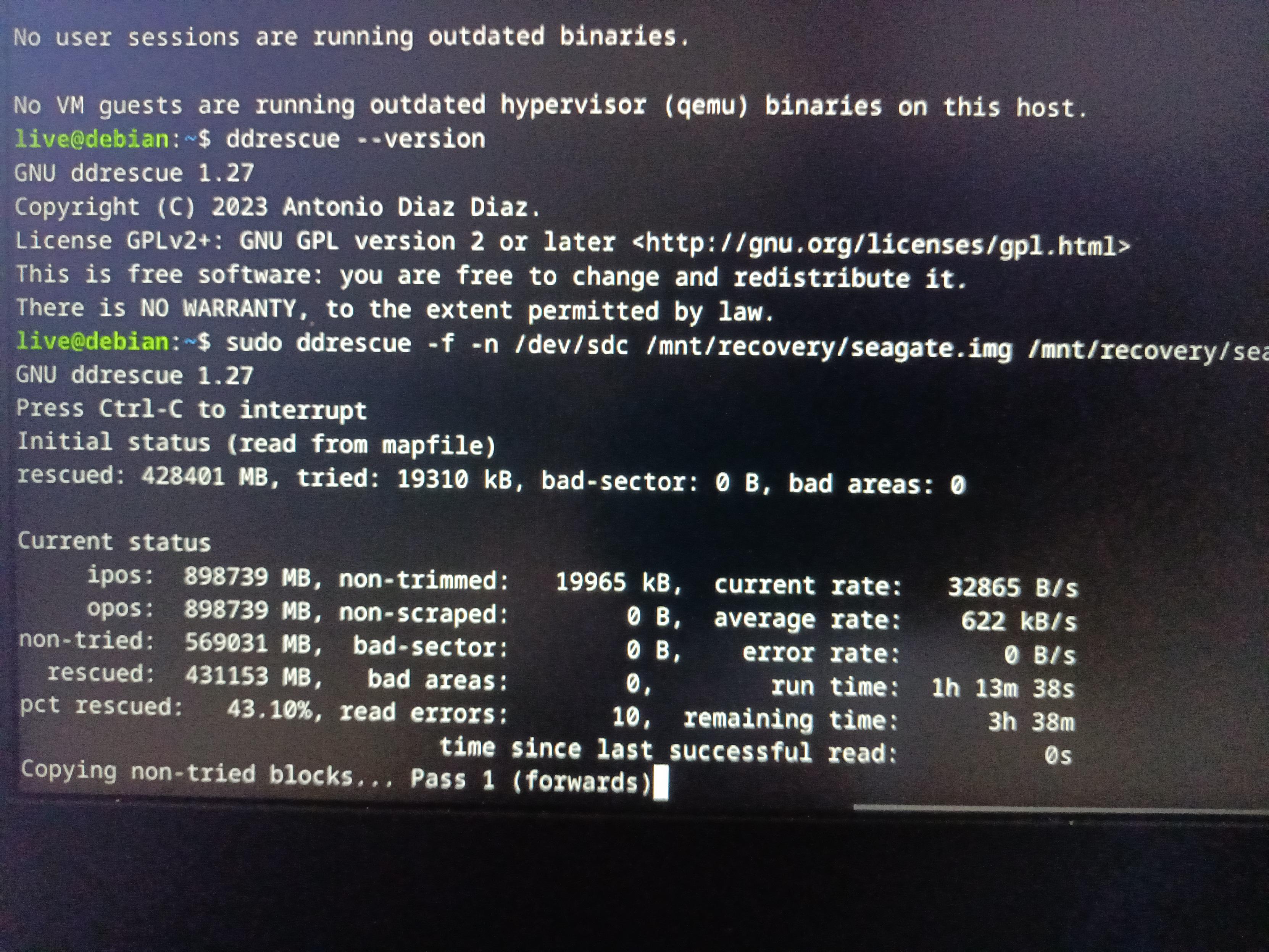
After a safe Ctrl+C on Saturday, I resumed the ddrescue recovery this Monday using the saved log and image. It's picking up exactly where it left off. 43% rescued so far, zero read errors on this pass. Hope lives. 🤞